Key Takeaways
- A melody generator comes in two families: compositional (this step sequencer — you place every note) and generative (AI tools that compose for you). Compositional tools keep authorship clear.
- Constraint beats freedom for beginners: the grid always shows 12 rows — in the four scale modes, 12 consecutive notes of one scale — and that narrow window produces better melodies than 88 piano keys.
- The 3-note hook recipe works: 6 rhythmic hits on scale degrees 1–3–5, repeated with one varied ending.
- Compose rhythm first, pitches second: tap the groove on one row, then move notes to new rows.
- Scale lock applies to 4 of the 5 modes — Chromatic mode offers all 12 semitones with no lock.
- Transfer patterns to your DAW by ear: 16 steps at 120 BPM = one 4/4 bar of 16ths. Harmonize with the chord progression generator.
What Is a Melody Generator?
A melody generator is an interactive tool that helps you create a tune. This one is a compositional step sequencer: a 16-step by 12-row grid where columns are time steps and rows are pitches from your chosen scale. Click cells to place notes, set a tempo and instrument, and press play. Unlike AI generators that compose for you, every note here is your decision.
The grid removes the fear of wrong notes without removing authorship. Scale lock constrains which pitches are available; rhythm, repetition, and contour — the real ingredients of a hook — are entirely yours.
How This Melody Generator Works
This melody generator is a browser-based step sequencer running on the Web Audio API. It schedules each filled cell as an oscillator note and loops the pattern. The exact mechanics:
- Choose a scale and root: the 12 rows remap to 12 consecutive notes of that scale in a bright, high register. In C major the rows run from E at the bottom up to B at the top — the root C sits six rows up, not on the bottom row. Major and minor windows span 12 scale notes (an octave plus a fifth); pentatonic and blues windows span two octaves of their notes; Chromatic mode skips the lock and offers all 12 semitones in one octave.
- Click cells: each filled cell plays one note at its step; empty cells are rests. Multiple filled cells in one column play together as a chord.
- Set tempo and instrument: the slider sets 60–200 BPM; the selector switches oscillator timbre (sine, square, triangle, sawtooth, pluck).
- Press play: a scheduler walks the columns left to right, triggering each step's notes — looping until you stop it.
In the four locked modes, every click is diatonic — pitch is constrained so you can focus entirely on rhythm and contour. In Chromatic mode, the training wheels come off.
Melody Math: Step Timing and Worked Example
The grid runs on simple division.
step duration (seconds) = 60 ÷ BPM ÷ 4 (4 steps per beat = 16th notes)
Worked example: 16-step grid at 120 BPM.
- One beat: 60 ÷ 120 = 0.5 seconds.
- One step: 0.5 ÷ 4 = 0.125 seconds (125 ms).
- One full 16-step loop: 16 × 0.125 = 2.0 seconds = one 4/4 bar of 16ths.
- Frequencies follow equal temperament: A4 = 440 Hz, each semitone multiplies by 21/12.
This math is your DAW transfer key: 16 grid steps at 120 BPM always equals one bar, so a pattern you sketch here drops straight into a piano roll at the same tempo.
| Tempo | One step | Full 16-step loop |
|---|---|---|
| 60 BPM | 250 ms | 4.00 s |
| 90 BPM | 166.7 ms | 2.67 s |
| 120 BPM | 125 ms | 2.00 s |
| 200 BPM | 75 ms | 1.20 s |
How to Use the Melody Generator
- Pick a scale and root: start with Major Pentatonic for foolproof hooks or Natural Minor for darker melodies.
- Set the tempo: match your project's BPM first — find it with BPM tap tempo.
- Tap a rhythm: fill 4–8 cells in a single row until the groove loops well — rhythm before pitch. Click cells one by one, or drag across them to paint a run.
- Assign pitches: move notes to 2–3 different rows, keeping the rhythm. Neighboring scale degrees sound most natural.
- Loop and refine: press play, listen on repeat, and change one note at a time until the pattern sticks in your head.
Reading Your Grid: 5 Checks for a Working Pattern
| Check | What to look at | Target |
|---|---|---|
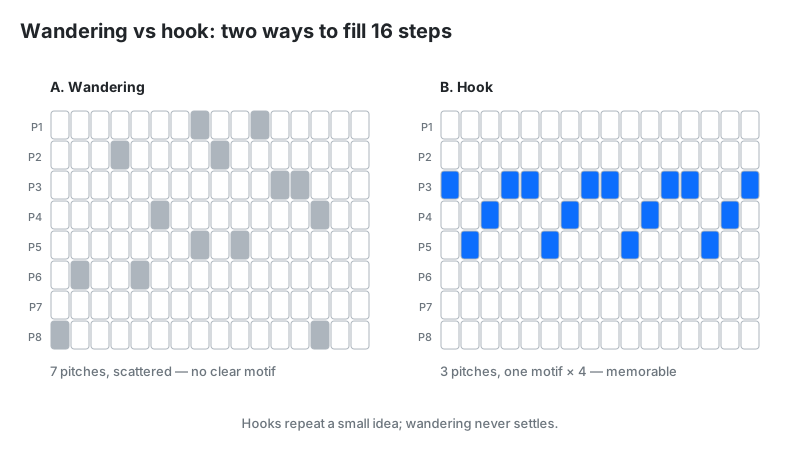
| Pitch count | How many different rows are used | 3–4 pitches = memorable; 7+ = wandering |
| Contour | The shape: up, down, arch, or flat | Arches (up then down) feel most songlike |
| Rest density | Empty cells between notes | ≥25% empty = breathing room and groove |
| Repetition | Does a 2–4 step motif repeat? | A repeated motif is what makes hooks hook |
| Range | Highest vs lowest row you actually used | About an octave or less keeps the line singable |
Why Constraint Creates Better Melodies
Beginners write better melodies inside a 12-row window of one scale than across 88 piano keys. Unlimited choice produces random wandering; a scale constraint forces you to build from rhythm, repetition, and contour — the actual ingredients of memorable melody. Jazz improvisers practice the same way, restricting themselves to one scale until it sings.
Run the experiment: compose one 16-step pattern using all rows, then one using only 3 rows. The 3-row version almost always sounds more like a real hook. Limitation is a compositional technique, not a training wheel.
The 3-Note Hook Recipe
Fill this exact recipe into the grid and you get a working hook in under a minute.
- Set the scale to Major Pentatonic, root C, tempo 120.
- Place notes on steps 1, 4, 7, 10, 13, and 16, using only rows that play scale degrees 1–3–5 (C–E–G, the tonic triad — in C pentatonic each of those notes appears on two rows; either set works).
- Leave steps 8 and 15 empty — rests are part of the groove.
- Press play and loop it twice.
- On the second loop, change one note to a different scale degree — the small surprise the brain remembers.
The brain latches onto small pitch sets because it can predict them, and prediction fulfilled feels like catchiness. Three stable notes plus one surprise is the whole craft of hook writing in miniature.
Rhythm First, Pitches Second
Professional songwriters compose rhythm before pitch. Where notes fall against the beat determines a melody's feel far more than which notes they are. A great rhythm on one repeated pitch already sounds like music; great pitches with dead rhythm sound like an exercise.
Grid workflow: click 6–8 cells all in the same row until the rhythm grooves on loop. Only then move individual notes to new rows. The melody nearly writes itself — because the hard part (rhythm) is already solved.
You Wrote It: The Authorship Line
This melody generator is compositional — you made every decision. You chose the scale, placed each note, set the rhythm, and shaped the contour. The tool constrained the pitch menu; nothing else. That makes the result unambiguously your original work.
AI melody generators differ: the model makes the compositional decisions from your text prompt, and authorship of that output is legally murky (review any AI output before commercial use, as Musely's own page advises). With a grid, there is no ambiguity — the clicks are yours, so the melody is yours.
From Grid to DAW: Finishing Your Melody
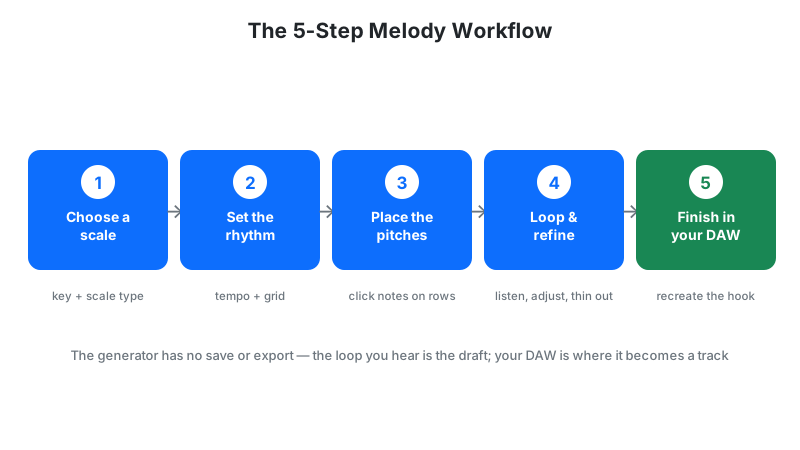
The grid is a sketchpad; your DAW is the canvas. Once a pattern loops well, recreate it in your DAW's piano roll by ear: same tempo, same scale, notes at matching steps. Then develop it: add a second phrase that answers the first, vary the ending, and harmonize it with chords from the chord progression generator.
Check your melody's note set against the scale finder if you plan key changes, and verify any sung version sits in a comfortable range with the vocal range finder.
Limitations
- Scale lock is not universal: Chromatic mode offers all 12 semitones — including clashing ones. In the other four modes, chromatic passing tones aren't on the grid (the Blues scale's ♭5 is, in Blues mode); add passing tones in your DAW.
- No save and no export: the grid holds your pattern only while this page stays open — reloading loses it, and there is no MIDI or audio download. Recreate the pattern in your DAW with the step math above before you close the tab.
- High register: the rows sit in a bright, lead-synth register, well above a typical singing range. Treat the loop as a sketch and transpose it down in your DAW for vocals.
- Fixed grid resolution: triplets and swung rhythms can't be represented on an even step grid.
- Synth preview, not production audio: the Web Audio timbres sketch the idea; final sound design happens in your DAW.
- No dynamics: every step plays at equal velocity — accents and phrasing are up to you.
Melody Generator vs Alternatives
| Method | How it works | Best for | Watch out for |
|---|---|---|---|
| This step sequencer | You click notes on a scale-locked grid | Beginners, quick hooks, clear authorship | Diatonic only (except chromatic); fixed grid |
| AI melody generators | A model composes from your text prompt | Instant ideas, no theory needed | Generic output; you didn't write it; murky authorship |
| Random MIDI tools | Algorithms generate note sequences | Starting points, block-breaking | Often needs heavy editing to sound musical |
| Piano roll (DAW) | Full manual composition | Complete control, production-ready | Blank-page paralysis for beginners |
| Humming into a mic | Voice memo + transcription | Capturing inspiration anywhere | Needs transcription to become usable |
Melodies you compose with this tool are your own original work. The grid constrains pitches to your chosen scale but every rhythmic and melodic decision is yours.