Last updated: October 12, 2026 · Written by the Pitch Detectors Editorial Team
Pitch Detectors is a free suite of 60+ online audio tools — BPM calculators, tuners, decibel meters, audio trimmers, and speaker calculators. Every tool runs entirely in your browser: no downloads, no sign-up, and your audio files never leave your device.
No software downloads, bulky installers, or waiting. Everything runs locally in your
browser with zero latency.
Privacy-First Audio Engine
Your microphone feeds, audio recordings, and calculation parameters stay entirely on
your device and are never uploaded.
Optimized for Every Device
Engineered for fluid performance across smartphones, tablets, laptops, and ultra-wide
studio monitors.
Completely Free Forever
All 60+ tools are open and free to use with zero subscriptions, paywalls, or gated
limitations.
Guide
What Is Pitch Detectors?
Definition: Pitch Detectors is a free, browser-based collection of audio tools and calculators for musicians, producers, podcasters, and engineers. It covers tempo and rhythm, pitch and tuning, music theory, sound analysis, audio editing, speaker design, and audiobooks — every tool computing instantly on your device with no installation or account.
The idea is simple: the calculations and edits musicians look up every day — song tempo, string tuning, speaker wattage, decibel levels — should not require a download, a subscription, or an engineering degree. Each tool does one job, explains the concept behind it, and shows its work, so you learn while you use it.
Key Takeaways
60+ free tools across 7 categories, from tap-tempo BPM to speaker enclosure design.
100% client-side processing: files and microphone audio never leave your device.
No accounts, paywalls, or watermarks; everything works on phones, tablets, and desktops.
Honest accuracy: browser decibel readings are estimates, not calibrated lab measurements.
Hearing-safety guidance follows the NIOSH 85 dB(A) recommended exposure limit.
Categories
The 7 Tool Categories
Every tool on the site lives in one of seven categories. Pick the category that matches your task — each hub page lists its tools and explains when to use which.
DJ & Music Production
18 tools: BPM calculator, tap tempo, song key finder, pitch shifter, and transition timing calculators. They are built around beats per minute, milliseconds per beat, and key detection for harmonic mixing — the timing questions DJs face mid-set.
Speaker & Acoustic Tools
31 tools: amplifier wattage matching, impedance wiring, SPL prediction, ported and sealed enclosure tuning, crossover filters, and room resonance. The math rests on Thiele-Small parameters, Helmholtz resonance, and the inverse-square law for sound over distance.
Music Theory
10 tools: online metronome, scale finder, chord identifier, and chord progression generator. They cover time signatures, intervals, and the circle of fifths for practice, songwriting, and study.
Pitch & Tuning
10 tools: microphone guitar tuner, real-time pitch detector, vocal range finder, and frequency-to-note converters. Built on the A440 tuning standard and equal temperament, with cent-level pitch measurement (100 cents per semitone).
Sound Analysis
6 tools: live decibel meter, LUFS/RMS loudness meter, waveform visualizer, and microphone testers. They measure dB SPL and A-weighted levels for rooms, venues, and recordings.
Audio Editing
7 tools: audio trimmer, merger, volume booster, speed changer, normalizer, reverser, and loop generator. They edit MP3, WAV, OGG, M4A, FLAC, and WebM files with millisecond precision.
Audiobook Tools
5 tools: listening-speed, book-length, progress and finish-date, and cost-per-hour calculators. They turn playback speed and chapter counts into realistic listening schedules.
How to Choose the Right Audio Tool
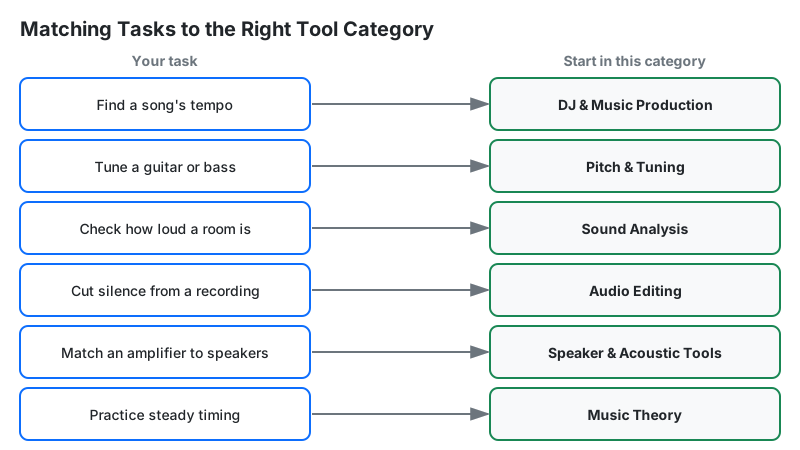
Start from the job, not the tool name. Find your task below and open the suggested starting point — every page links to its related tools.
Musicians and students use the tuners, metronome, and theory tools for daily practice, and the pitch detector to check intonation on vocals and instruments.
DJs and producers use the BPM, key, and transition calculators to plan sets and harmonic mixes without breaking flow.
Podcasters and creators use the trimmer, normalizer, and loudness meter to ship consistent-sounding episodes without opening a DAW.
Audiobook listeners use the speed and progress calculators to plan listening around commutes, workouts, and deadlines.
Speaker builders and engineers use the wattage, impedance, SPL, and enclosure calculators to design systems on paper before buying parts.
Teachers use the no-signup tools on smartboards to demonstrate tempo, pitch, and loudness concepts live in class.
How the Tools Work: Accuracy and Privacy
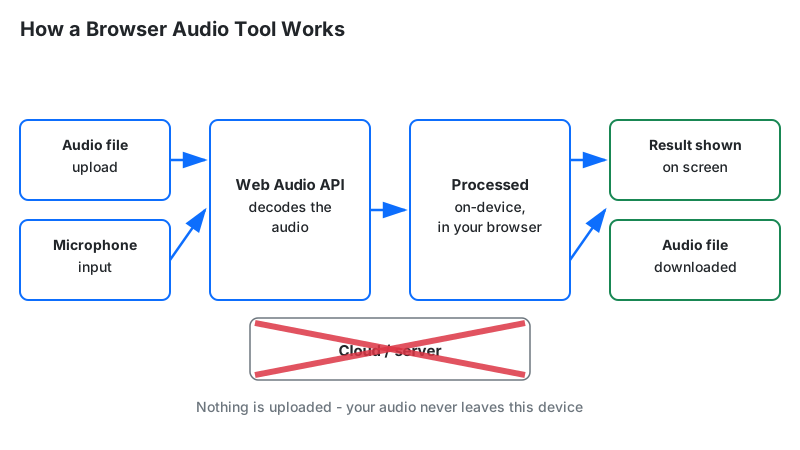
Every tool is built on the Web Audio API, the W3C standard for sound in the browser. Your browser decodes the audio, runs the analysis or edit, and encodes the result — all on your device. Microphone tools use the browser's getUserMedia permission; the audio stream never leaves your machine.
This architecture is the privacy story: because nothing is uploaded, there is nothing to store, leak, or hand over. It is also the business model — with no server compute or storage cost per user, the tools stay free without accounts or paywalls.
On accuracy: tuners use autocorrelation pitch detection and are typically precise within a couple of cents on a clear signal. The decibel meter is the honest exception — phone microphones are not calibrated to a reference level, so readings can differ by several decibels between devices. Treat it as a useful estimate for spotting loud environments, not as a compliance instrument.
Each tool page documents its exact formula or standard, and calculation tools are verified against hand calculations and published reference tables before release.
Diagram: the client-side pipeline behind every tool on this site
Limitations
Single-purpose tools, not a DAW. There is no multitrack mixing, EQ, or effects chain here.
Memory-bounded editing. Audio files are decoded into RAM, so very long high-resolution recordings may strain phones.
Estimates, not instruments. The decibel meter cannot replace a calibrated meter for occupational noise compliance.
Planning-grade results. Calculators give solid answers for learning and everyday decisions, not certified engineering measurements.
Online Tools vs. Desktop Software
Browser tools and desktop programs solve different problems. Use this site for instant answers; reach for a full program when the job outgrows one screen.
Pitch Detectors
Audacity
GarageBand
Adobe Audition
Cost
Free
Free, open-source
Free on Apple devices
Paid subscription
Installation
None — runs in the browser
Download required
Preinstalled / App Store
Download required
Multitrack editing
No
Yes
Yes
Yes
Learning curve
Minutes
Moderate
Easy
Steep
Best for
Quick calculations and one-click edits
Full audio editing at no cost
Music creation on Mac and iPhone
Professional post-production
Diagram: matching common tasks to the right tool category
Frequently Asked Questions
Yes. All 60+ tools are free with no paywall, no account, and no watermark. Processing happens in your browser, so there are no server compute costs to pass on — that is what makes the free model sustainable. Ads support the site, but no tool is ever locked behind payment.
No. Every tool runs in a modern browser on Windows, Mac, Linux, Android, and iOS. Microphone-based tools such as the tuner and decibel meter ask for microphone permission once; that permission stays between your browser and your device, and no audio is transmitted anywhere.
No. Files you open in the editing tools are decoded and processed locally with the Web Audio API. Nothing is uploaded, stored, or transmitted, so there is nothing that can leak or be used to train a model. Closing the tab discards everything.
It is a useful estimate, not a calibrated measurement. Phone and laptop microphones are not calibrated to a reference level, so readings can differ by several decibels between devices. It works well for spotting loud environments, but workplace noise compliance requires a calibrated meter meeting standards such as ANSI S1.4.
Yes. All tools run in Chrome, Safari, Firefox, and Edge on phones and tablets, with layouts designed for small screens. Tools that need the microphone will prompt for permission. Very large audio files may process slowly on older phones because the entire file is held in memory.
The guitar tuner is built for the six standard guitar strings: it detects which string you are near and whether to tune up or down. The pitch detector is general-purpose — it identifies any sung or played pitch as a note name plus cents of deviation, which suits vocals, wind instruments, and intonation checks.
Start with the Speaker Wattage Calculator to estimate the amplifier power your speakers need for a target loudness, then use the Impedance Calculator to plan safe cabinet wiring. The SPL Calculator predicts the resulting decibel level. Together, the three answer power, wiring, and loudness.
Trimming, merging, or reversing re-encodes the file, and re-encoding a lossy format such as MP3 discards a little more data each time. For best quality, edit from a WAV or FLAC original and export MP3 only once at the end. Edits that stay in WAV are lossless.
There is no fixed limit because nothing is uploaded — the practical limit is your device's memory, since the whole file is decoded into RAM. Songs and short clips work everywhere; hour-long high-resolution recordings may strain phones. If a file will not load, try a desktop browser or a shorter section.
Yes. There are no accounts or sign-ups and no student data is collected, which keeps classroom use simple. The metronome, tuner, scale finder, and decibel meter project well on a smartboard, and each tool page explains the concept it demonstrates, so the tools double as teaching aids.