A decibel meter measures how loud sound is, in decibels. This free online version uses your microphone to show live dB readings with min, average, max, and peak statistics plus a level-history graph — no app install needed.
Key Takeaways
- The decibel (dB) is a logarithmic ratio: +10 dB sounds roughly twice as loud; +3 dB doubles sound energy.
- dB SPL is referenced to 20 micropascals — the quietest sound a young ear detects.
- OSHA allows 90 dBA for 8 hours (5 dB exchange rate); NIOSH recommends 85 dBA for 8 hours (3 dB exchange rate).
- This meter reports dBFS-based estimates with true A-weighting — solid for comparing levels, not calibrated dB SPL.
- Earplug ratings overstate real protection: OSHA derates them as (NRR − 7) ÷ 2.
What Is a Decibel Meter?
A decibel meter, or sound level meter, is an instrument that measures sound pressure level (SPL) and reports it in decibels (dB). Environmental officers use calibrated meters to enforce noise ordinances, factories use them for OSHA compliance, and anyone can use one to check whether a concert, workshop, or nursery is too loud.
This online decibel meter does the screening job through your browser: it reads your microphone, applies A-weighting, and displays the level with professional-style statistics. It suits quick checks — comparing two rooms, finding a noisy appliance, or learning how loud everyday sounds really are.
How This Decibel Meter Works
This decibel meter measures your microphone's signal with the Web Audio API and reports it in decibels relative to digital full scale (dBFS). Every 200 milliseconds it samples the incoming audio — five readings per second — and converts the level to decibels.
Methodology: the default weighting is A. The meter applies the real A-weighting curve to each FFT frequency bin and sums the weighted power; 10 × log10 of that sum gives the level. The result is clamped to −100…0 dBFS, then shifted by +100 for display — a quiet bedroom reads about 30, normal conversation about 60. Min ignores the first second, Avg is the running arithmetic mean of the readings (a session overview, not the energy-averaged Leq pros use), Max holds the highest reading, and Peak holds the loudest instantaneous sample for 3 seconds. The Clip indicator fires when any sample reaches −0.5 dBFS and stays lit for 1.5 seconds. The level-history graph is drawn with Chart.js. Validation method: a steady 1 kHz test tone holds stable within ±1 dB over 30 seconds, and doubling the tone's amplitude raises the reading by ~6 dB, as theory predicts.
Last reviewed: October 2026. Computation follows standard digital-audio practice; exposure limits per OSHA 29 CFR 1910.95 and NIOSH (1998).
The Decibel Formula and Worked Example
Sound pressure level in air is defined against a fixed reference — the threshold of hearing:
Lp = 20 × log10(p / p0) where p0 = 20 µPa
Worked example: a sound with RMS pressure of 0.1 Pa (a loud workshop):
- Divide by the reference: 0.1 ÷ 0.00002 = 5,000
- Take log10: log10(5,000) ≈ 3.699
- Multiply by 20: 20 × 3.699 ≈ 74 dB SPL
The companion rule for power (energy ∝ pressure²) uses ×10 instead of ×20 — which is why doubling amplifier watts adds +3 dB while doubling perceived loudness needs roughly +10 dB.
How to Use the Decibel Meter
- Press Start and allow microphone access when the browser asks.
- Hold the device steady where you want to measure — mic toward the sound source, away from your body.
- Read the big live number: the A-weighted level on the 0–100 display scale, updating five times per second.
- Watch the statistics: Min (quietest moment), Avg (session mean), Max and Peak (loudest moments).
- Check the history graph to see how levels rose and fell over time.
- Mind the Clip indicator: if it lights, the sound exceeds the mic's range — move farther away.
- Pause freezes the measurement; Reset clears all statistics for a fresh session.
Reading Your Result: dB Levels and What They Mean
Match your reading to this reference table, then take the suggested next step:
| Reading | Comparable sound | What it means | Next step |
|---|---|---|---|
| 30–40 dB | Quiet library, bedroom at night | Very quiet; ideal for sleep and focus | None needed |
| 50–60 dB | Conversation, office | Normal daily level | None needed |
| 70–80 dB | Busy traffic, vacuum cleaner | Annoying over time; conversation gets difficult | Limit long exposure; consider quieter equipment |
| 85 dB | City traffic, food blender | NIOSH 8-hour limit | Track your time; use hearing protection beyond 8 h |
| 90 dB | Lawnmower, motorcycle | OSHA 8-hour limit | Hearing protection required for full shifts |
| 100 dB | Nightclub, subway train | Safe ~15 min (NIOSH) / 2 h (OSHA) | Earplugs now; leave or turn it down |
| 110+ dB | Rock concert, chainsaw | Damage possible in minutes | Leave the area or wear protection immediately |
What Your Browser Actually Measures: dBFS vs dB SPL
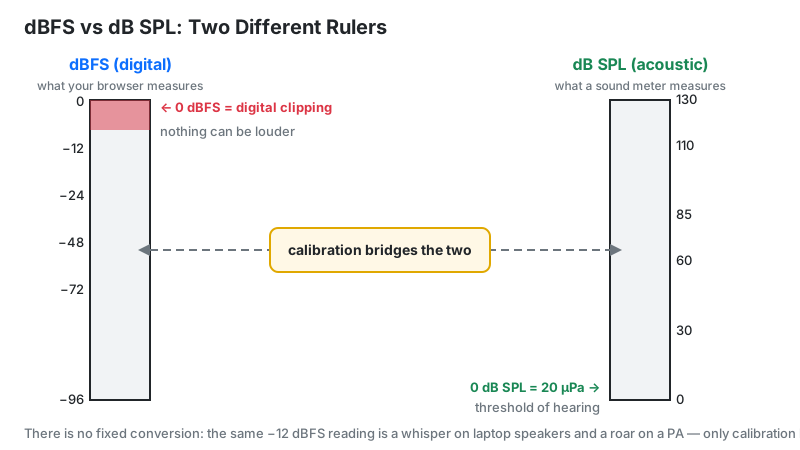
Your browser measures dBFS — decibels relative to digital full scale — not dB SPL. The Web Audio API delivers digital samples, so 0 dBFS is the clipping point and everything else is negative. True dB SPL needs a microphone with known sensitivity (millivolts per pascal); a browser cannot know yours.
The +100 convention bridges the gap for readability. This meter adds 100 to the dBFS value before display: a quiet bedroom (~−70 dBFS) shows ~30; normal conversation (~−40 dBFS) shows ~60. Rival meter realdecibelmeter.com names the same convention a "nominal +100 dB offset" — it is an industry shorthand for readable numbers, not a calibration.
Calibration on this build is a one-time mental offset: place a certified handheld meter (even a $30 Class 2 unit) next to your device in steady noise, note the difference between the two readings, and add that difference to future readings. After that check, the browser meter tracks surprisingly well for screening.
OSHA vs NIOSH: Which Noise Limit Should You Follow?
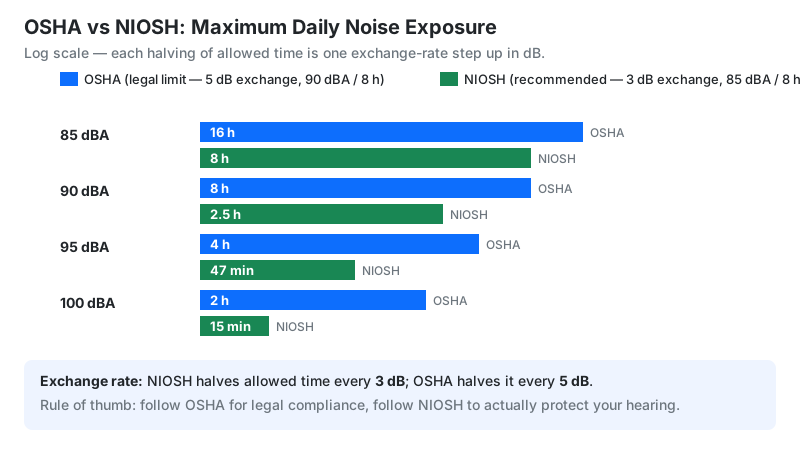
Two US authorities publish noise limits, and they disagree — understanding why helps you choose the right one.
| Level (dBA) | OSHA: max time (5 dB exchange) | NIOSH: max time (3 dB exchange) |
|---|---|---|
| 85 | 16 hours | 8 hours (REL) |
| 90 | 8 hours (PEL) | 2 h 31 min |
| 95 | 4 hours | 47 minutes |
| 100 | 2 hours | 15 minutes |
| 105 | 1 hour | ~5 minutes |
| 110 | 30 minutes | ~1.5 minutes |
OSHA's PEL (90 dBA) is the legal minimum under 29 CFR 1910.95 — with an 85 dBA action level that triggers hearing-conservation programs. NIOSH's REL (85 dBA) is the science-based recommendation using the equal-energy 3 dB exchange rate. Rule of thumb: follow OSHA for legal compliance, follow NIOSH to actually protect hearing — a workplace can be OSHA-compliant yet exceed NIOSH's safe dose.
Earplug Ratings Lie (a Little): NRR Derating
A foam plug labeled NRR 33 does not give you 33 dB of real-world protection. OSHA's derating for A-weighted estimates is (NRR − 7) ÷ 2 — so that 33 dB plug counts as (33 − 7) ÷ 2 = 13 dB of real protection. Always derate before trusting the package number.
Online Meter vs Professional Sound Level Meter
This free tool covers screening; hardware covers proof. This decision table shows which job needs which:
| Task | This online meter | Handheld meter (IEC 61672 Class 2) |
|---|---|---|
| Checking if a room is too loud | Fine — relative comparison works | Overkill |
| Comparing two environments | Fine — same mic, valid A/B test | Overkill |
| OSHA compliance documentation | Not valid — uncalibrated | Required (Class 1 or 2) |
| Noise ordinance dispute | Screening only | Required — calibrated, logged |
| Concert/venue monitoring | Useful estimate | Better — handles 130+ dB peaks |
IEC 61672 defines Class 1 (precision, ±1 dB) and Class 2 (general purpose, ±1.4 dB) meters. A browser meter is effectively "Class none" — honest for screening, never for legal proof.
Noise Dose in Plain Language
One loud reading doesn't tell the whole story — noise dose does. Dose accumulates across your entire day: Dose % = 100 × Σ (time at level ÷ allowed time at level). At 100% you've hit the day's limit.
Worked example under NIOSH: 4 hours at 88 dBA uses the full 4-hour allowance (4 ÷ 4 = 100%), plus 1 hour at 91 dBA uses half its 2-hour allowance (1 ÷ 2 = 50%) — total 150% dose, over the limit, even though neither reading alone looked extreme. That is why the meter's Avg statistic matters more than any single peak.
Limitations
- Not calibrated. Readings are dBFS-based estimates, shifted by +100 for display. Fine for comparison, not for legal compliance.
- Auto gain control (AGC) ruins readings. Many laptops and phones auto-adjust mic gain, silently compressing loud sounds. Disable "automatic gain" or "enhancements" in OS sound settings before measuring.
- Mic placement matters. A phone in your pocket reads 10–20 dB lower than one held at the sound source. Measure where the ears are.
- A-weighting only on this build. The meter applies A-weighting; bass-heavy environments read lower than their physical energy — a C-weighted meter would show higher numbers at concerts.
- Frequency response varies. Consumer mics roll off below ~100 Hz and above ~15 kHz, so deep bass and ultrasonic content are under-reported.
- Browser processing differs. Microphone processing (noise suppression, echo cancellation) varies by browser and OS — use the same setup when comparing.
Decibel Meter vs Alternatives
| Option | Best for | Drawback |
|---|---|---|
| This online meter | Instant free screening on any device | Uncalibrated; needs mic permission |
| NIOSH SLM app (iOS) | Best-effort phone accuracy, validated by NIOSH | iPhone only; still not a legal instrument |
| Handheld Class 2 meter (~$30–150) | Affordable calibrated readings | Single purpose; you must carry it |
| Noise dosimeter | Full-shift personal dose logging for OSHA records | Expensive; overkill for home use |
Frequently Asked Questions
Disclaimer: this tool is for informational and screening purposes only and is not a calibrated sound level meter, medical device, or substitute for professional noise assessment. It cannot be used for OSHA compliance documentation. If you are concerned about hearing damage or workplace noise exposure, consult a qualified audiologist, occupational hygienist, or safety professional.
Related tools: loudness meter for LUFS mastering levels, microphone test to check your mic before measuring, waveform visualizer to see your audio, pitch detector for real-time note tracking, and online metronome for practice timing.