Online Metronome
Last updated: October 23, 2026 · Written by the Pitch Detectors Editorial Team
A free online metronome with steady browser clicks from 20–300 BPM, time signatures from 2/4 to 7/8, and a visual beat display. Set the tempo, pick a meter, press play.
500 ms
2.00 s
120
Allegro
Key Takeaways
- A metronome holds your tempo: it clicks steady beats at the BPM you set, so your timing stops drifting mid-piece.
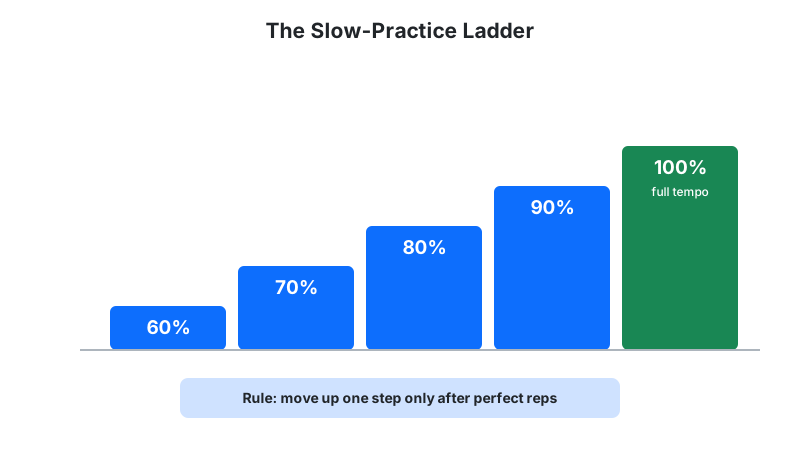
- Start at 60% of performance tempo: play the passage perfectly three times in a row, then add 4–8 BPM. Speed is a byproduct of accuracy.
- Subdivide to tighten up: 8th or 16th clicks expose rushing and dragging that quarter-note clicks hide.
- This metronome spans 20–300 BPM with time signatures from 2/4 to 7/8, accenting beat 1 of every bar.
- Find any song's tempo first with BPM tap tempo, then practice it here.
What Is an Online Metronome?
An online metronome is a free tempo-keeping tool that plays precise clicks at a set beats-per-minute rate, right in your browser. Choose a BPM and time signature, press play, and it marks every beat — with a distinct accent on beat 1 — while flashing visual beat indicators in sync.
Musicians use it to build steady timing, learn difficult passages at reduced tempos, and keep ensembles together. Unlike a phone app, this one needs no install and works on any device with a browser and speakers.
How This Metronome Works
This metronome generates its clicks with a Web Audio oscillator, scheduled by a repeating browser timer. The exact mechanics:
- Set the tempo: the slider spans 20–300 BPM; the ±1/±10 buttons fine-tune it, and the marking presets jump straight to 60, 80, 100, 120, 140, or 180 BPM.
- Pick a meter: time-signature buttons (2/4 through 7/8) set how many clicks form a bar.
- Press play: the timer fires each beat and an oscillator plays a 50 ms sine blip — 1,000 Hz on beat 1, 800 Hz on the other beats — while the beat dots flash in sync.
- Read the telemetry: milliseconds-per-beat and seconds-per-bar compute live for DAW sync work.
Change the tempo or the time signature while it plays and the metronome restarts the bar from beat 1 — the accent can never land mid-bar by accident.
Beat interval follows ms per beat = 60,000 ÷ BPM — at 120 BPM each click lands exactly 500 ms apart.
Tempo Math and Worked Example
Two formulas govern every metronome:
beat interval (ms) = 60,000 ÷ BPM · bar duration (s) = beats per bar × 60 ÷ BPM
Worked example — 96 BPM in 4/4:
- Beat interval: 60,000 ÷ 96 = 625 ms between clicks.
- Bar duration: 4 × 60 ÷ 96 = 2.5 seconds per bar.
- A 32-bar practice loop: 32 × 2.5 = 80 seconds per repetition.
The same arithmetic converts any tempo into delay times: at 120 BPM a quarter-note delay is 500 ms, an 8th is 250 ms, a 16th is 125 ms.
One wrinkle matters in the /8 meters: there, the BPM counts each eighth-note click. A 6/8 bar at 120 BPM spans 6 × 500 ms = 3.00 seconds, and if you feel the bar in two, each dotted-quarter pulse lasts 1.5 seconds — a sway of 40 pulses per minute, not 120.
How to Use the Online Metronome
- Dial your BPM: drag the slider, tap ±1/±10 for precision, or tap a tempo-marking preset (60, 80, 100, 120, 140, 180).
- Choose the meter: 4/4 for most music, 3/4 for waltzes, 6/8 for compound feels, 5/4 or 7/8 for odd meters.
- Press the center play button: the downbeat accent (higher pitch) marks beat 1 of each bar.
- Play along: start with simple material at a comfortable tempo, then raise the BPM in small steps.
Reading Your Result: Italian Tempo Markings
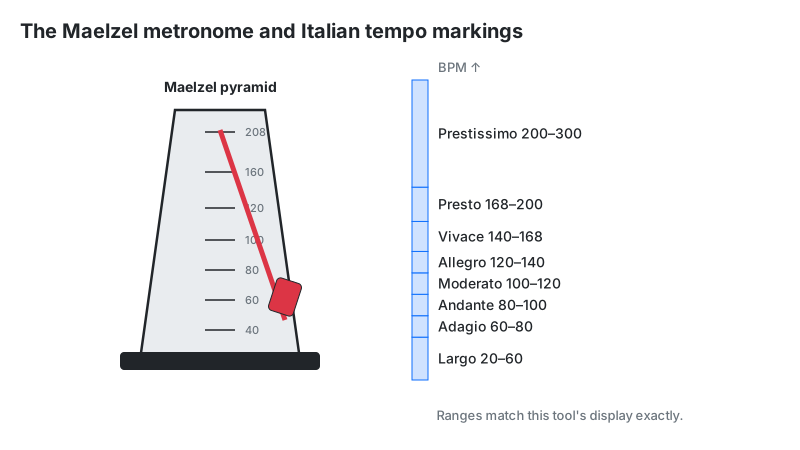
The widget labels your tempo with its traditional Italian marking. These are the exact ranges this tool displays — set 60 BPM and it reads Adagio, not Largo:
| Marking | BPM range | Character |
|---|---|---|
| Largo | 20–59 | Broad, very slow |
| Adagio | 60–79 | Slow, stately |
| Andante | 80–99 | Walking pace |
| Moderato | 100–119 | Moderate |
| Allegro | 120–139 | Fast, cheerful |
| Vivace | 140–167 | Lively, brisk |
| Presto | 168–199 | Very fast |
| Prestissimo | 200–300 | As fast as possible |
Published references draw these boundaries a few BPM either way — treat the marking as a character guide, and the number as the fact.
Common Tempos: Where Genres Live
Most recorded music clusters between 80 and 180 BPM, and each genre favors a band inside that span. Use the table to sanity-check a tempo you tapped out, or to pick a realistic practice target for the style you play:
| Genre | Typical BPM | Marking on this tool |
|---|---|---|
| Ballads and slow worship | 60–90 | Adagio – Andante |
| Hip-hop and R&B | 85–100 | Andante – Moderato |
| Pop and rock | 100–140 | Moderato – Vivace |
| House | 120–130 | Allegro |
| Techno | 125–140 | Allegro – Vivace |
| Drum & bass | 170–180 | Presto |
These are conventions, not rules — individual tracks stray. Dubstep, for instance, is produced near 140 BPM but usually felt in half time, at 70.
Swing and Shuffle: What Those Percentages Mean
Straight clicks have zero swing; swing delays the off-beats. At 66.7%, each off-beat shifts by two-thirds of a step, turning pairs of 8ths into a 2:1 long-short triplet shuffle — the classic jazz ride feel. Around 58% loosens a groove without sounding like a shuffle.
This metronome clicks straight time only; it has no swing control. Program swung grooves on our rhythm pattern maker, where the Swing slider runs 0–60%.
Why 20–300 BPM? The Maelzel Scale Story
The metronome's range echoes the classic Maelzel scale: Johann Maelzel's mechanical metronome, patented in 1815, settled on a pendulum scale of 40–208 BPM. Digital metronomes kept the familiar span and extended it: 20 BPM for extreme slow practice, 300 for blast beats and speed drills.
Below ~40 BPM, most musicians stop feeling the pulse and start counting subdivisions instead — which is exactly what the subdivision practice below is for. Above ~208, individual clicks blur together, and players feel the half-time pulse instead.
Subdivisions: The Secret to Actually Improving
The fastest way to fix shaky timing is to subdivide: hear 8th or 16th notes instead of quarters. Quarter-note clicks let you rush the gaps unnoticed; subdivisions put a click on every slice of time, exposing exactly where you drag or hurry.
Practice method with this tool: double the click rate and let each click stand for a subdivision. To drill a 60 BPM passage in 8ths, set the metronome to 120 BPM and treat every click as an 8th note — the accent then marks every second click, so count your bars in click pairs. Same absolute time, twice the information. For true subdivision clicks at the beat tempo, our rhythm pattern maker builds subdivision exercises on the same principle.
The goal is to land your notes exactly with the click, so the two sounds disappear into each other. When you hear the click separate from your playing, that gap is your timing work.
The Timing Accuracy Question, Answered Honestly
Browser metronomes using JavaScript timers are accurate enough for practice, but not sample-perfect. This tool schedules clicks with a repeating timer, which can jitter by a few milliseconds when the browser is busy — inaudible while practicing, but not suitable for scientific measurement.
True sample-accurate timing schedules clicks ahead on the Web Audio clock (AudioContext.currentTime), which runs on a dedicated audio thread. For practice, recording, and rehearsal, the difference is academic: your own timing variance dwarfs any timer jitter. Bluetooth adds roughly 100–250 ms of output latency, depending on the codec — the delay is constant, so beats stay evenly spaced, but wired headphones give the tightest feel. For DAW-grade click tracks, render the click in your DAW instead.
The Silent-Bar Test: Measure Your Internal Clock
The silent-bar test tells you whether the tempo lives in your body or only in the click. Play 4 bars along with the metronome, stop it, keep playing for 1 bar of silence, then start it again. Landing on beat 1 when the click returns means your internal clock holds.
Start with 3 bars on and 1 bar off; shrink the sounding bars as you improve. This tool restarts on beat 1, so the test stays fair — count carefully through the silence. Failing it at first is normal; it is the single fastest drill for building internal time.
Odd Meters: Counting 5/4 and 7/8 Without Fear
Odd meters are just familiar chunks glued together. Count 5/4 as 3+2 ("ONE-two-three-FOUR-five") and 7/8 as 2+2+3 or 3+2+2 — the metronome's accent always marks beat 1, so your job is grouping the rest.
| Meter | Common groupings | Where the accent lands |
|---|---|---|
| 5/4 | 3+2 or 2+3 | Beat 1 |
| 7/8 | 2+2+3 or 3+2+2 | Beat 1 |
Start at half tempo with the accent loud in your mind, clap the grouping before touching your instrument, and only then play. Most musicians learn 7/8 in a single focused session this way; the fear is bigger than the difficulty. Remember what the number means here: in 7/8 the BPM counts eighth-note clicks, so 90 BPM produces a bar of 7 × 667 ms ≈ 4.67 seconds.
Limitations
- Timer-based, not sample-accurate: a few milliseconds of jitter is possible under heavy browser load — fine for practice, not for measurement.
- No subdivision or swing clicks: the tool clicks beats only; subdivide mentally or use the rhythm pattern maker.
- No tap tempo: you set the BPM directly — find a song's tempo first with the BPM tap tempo tool.
- Fixed accent pattern: beat 1 is always accented — music with displaced accents needs a programmable click.
- Settings are not saved: the metronome keeps no tempo or meter between visits — reload the page and it opens at 120 BPM in 4/4.
- Sound depends on your device: laptop speakers smear transients; wired headphones give the tightest feel. Some phones pause web audio when the screen locks, so keep the screen on during practice.
Online Metronome vs Alternatives
| Method | How it works | Best for | Watch out for |
|---|---|---|---|
| This metronome | Browser timer clicks, 20–300 BPM | Free practice anywhere | Millisecond jitter possible |
| Mechanical metronome | Pendulum escapement | Visual pulse; no batteries | Audible mechanism; limited range |
| DAW click track | Sample-accurate audio clicks | Recording sessions | Requires a DAW open |
| Drum loop | Grooving percussion pattern | Musical feel practice | Hides timing flaws behind groove |
Tempo markings are conventional ranges, not exact standards — interpretations vary by era and ensemble. Timing is generated in-browser for practice purposes.