BPM ↔ Milliseconds Converter
Convert BPM to milliseconds and vice versa for delay times, reverb decay, and LFO sync.
Delay Times at 120 BPM
| Note Value | Normal (ms) | Dotted (ms) | Triplet (ms) |
|---|
Frequency (Hz) for LFO Sync
0.50 Hz
1.00 Hz
2.00 Hz
4.00 Hz
BPM to MS Calculator: Delay Times & Note Values
Last updated: October 23, 2026 · Written by the Pitch Detectors Editorial Team
A BPM to ms calculator converts musical tempo into exact millisecond durations for delay times, reverb pre-delays, and LFO rates — and converts the length of one beat back into BPM. Enter any tempo to get every note value from a full bar of 4/4 down to a 64th note, each in straight, dotted, and triplet form. At 120 BPM one beat lasts 500 ms, an eighth note 250 ms, and a dotted eighth 375 ms — this page returns those values at your tempo.
Key Takeaways
- Quarter note = 60,000 ÷ BPM ms — the single formula behind every value on this page.
- Dotted notes multiply by 1.5; triplet notes multiply by 2/3. Two rules replace all memorization.
- The classic dotted-eighth delay is 352 ms at 128 BPM and 375 ms at 120 BPM.
- Reverse mode reads the length of one beat: 500 ms per beat = 120 BPM (60,000 ÷ ms). A multi-beat loop must be divided by its beat count first.
- LFO rate in Hz = BPM ÷ 60 — an eighth-note wobble at 120 BPM runs at 4 Hz.
What Is BPM to MS Conversion?
Every tempo-synced effect in a DAW performs this calculation silently. Set a delay to "dotted 8th" and the plugin derives milliseconds from the project BPM behind the scenes. The numbers matter most where sync does not exist: hardware pedals, vintage-style plugins without sync, reverb pre-delays (most reverbs accept ms only), and DJ effects on standalone gear.
How This BPM to MS Calculator Works
This calculator converts in both directions. BPM → ms mode takes a tempo and returns the millisecond duration of seven note values — a full bar of 4/4, half, quarter, eighth, 16th, 32nd, and 64th notes — each in straight, dotted, and triplet form, plus the matching LFO rate in Hz for the bar, half, quarter, and eighth. ms → BPM mode reverses the math: enter the length of one beat and read the tempo it implies.
Methodology: quarter note ms = 60,000 ÷ BPM; subdivisions use fixed ratios (eighth = ×0.5, dotted eighth = ×0.75, eighth-note triplet = ×1/3); reverse mode uses BPM = 60,000 ÷ ms on a single beat's length; LFO rate uses Hz = BPM ÷ 60 per quarter note. For this review we executed the widget's own code and checked every table value and frequency against an independent implementation at five tempos (87.5, 100, 120, 128, and 174 BPM) — 120 BPM → 500 ms quarter, 375 ms dotted 8th, 166.67 ms 8th triplet; 468.75 ms per beat → 128 BPM; 128 BPM → 4.27 Hz eighth-note LFO — and every result matched exactly.
BPM to MS Formulas and Worked Example
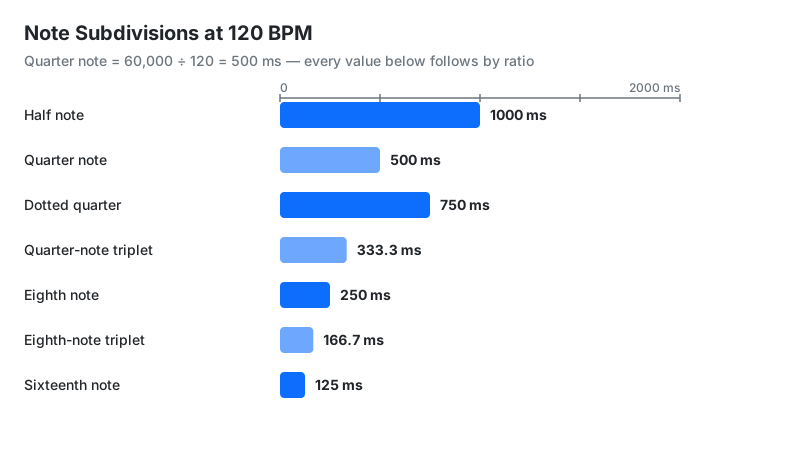
The number 60,000 is the count of milliseconds in one minute. One beat at 120 BPM takes half a second — 500 ms — and every other value follows by ratio:
- Quarter note = 60,000 ÷ BPM
- Eighth note = 30,000 ÷ BPM (half a quarter)
- Dotted eighth = 45,000 ÷ BPM (quarter × 0.75)
- Eighth-note triplet = 20,000 ÷ BPM (quarter × 1/3)
- Sixteenth = 15,000 ÷ BPM · 32nd = 7,500 ÷ BPM
- Dotted anything = straight value × 1.5 · Triplet anything = straight value × 2/3
- ms → BPM = 60,000 ÷ ms · LFO Hz = BPM ÷ 60
Worked example: dotted-eighth delay at 128 BPM:
- Quarter note: 60,000 ÷ 128 = 468.75 ms
- Dotted eighth = quarter × 0.75: 468.75 × 0.75 = 351.6 ms ≈ 352 ms
- Triplet for contrast: 468.75 × 1/3 = 156.3 ms per eighth-note triplet
- Eighth-note LFO rate: (128 ÷ 60) × 2 = 4.27 Hz
How to Use This Calculator
- Choose a direction with the mode tabs: BPM → ms turns tempo into delay times; ms → BPM turns a loop or sample length into tempo.
- BPM → ms mode: type the tempo (20–300 BPM) or tap a quick preset such as 128 or 174.
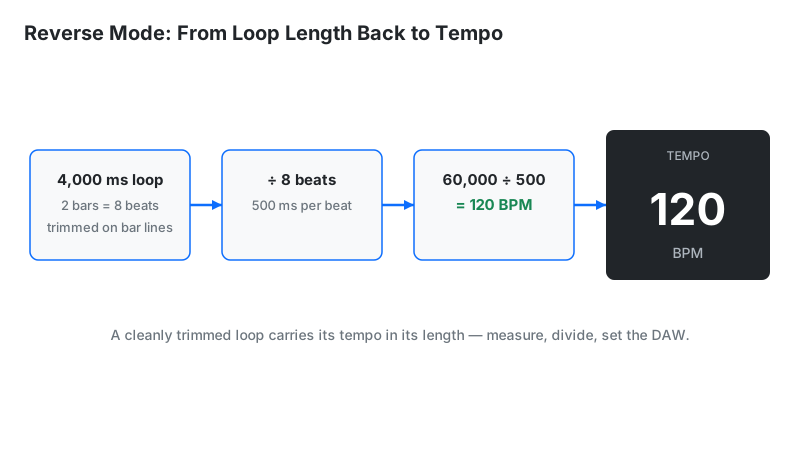
- ms → BPM mode: type the length of one beat in ms. For a loop, divide its total length by the number of beats first — a 4,000 ms two-bar loop is 500 ms per beat.
- Read the subdivision table: every note value in ms, ready to dial into a delay, reverb pre-delay, or LFO.
- Copy the LFO rate in Hz for filter wobbles, tremolo, and auto-pan locked to the track.
Measuring the tempo first? Find it with the BPM Tap Tempo tool, then convert it here.
Reading Your Result
The table lists every rhythmic value at the entered tempo. Each row answers one production question:
| Readout | Meaning | Next step |
|---|---|---|
| 1 Bar (4/4) | Four beats in ms — this row assumes 4/4 time | Check loop lengths and bar-long effect cycles against this |
| Quarter / 8th / 16th | Straight subdivisions in ms | Dial straight delays and echo throws from these |
| Dotted 8th | 0.75 of a beat — the classic rhythmic delay | Set ping-pong delays here (352 ms at 128 BPM) |
| Triplets | 3 notes in the time of 2 | Shape shuffle-feel delays and trap hi-hat rolls |
| 32nd / 64th | The shortest values in the table | Reverb pre-delay lives here — a 64th note (31.25 ms at 120 BPM) is a vocal starting point |
| LFO Hz | Modulation rate locked to tempo | Sync filter wobbles and tremolo without a sync button |
| Reverse: BPM | Tempo implied by one beat's length | Identify a loop's tempo after dividing its length by its beat count |
Why 60,000? The Number Behind Every Value
60,000 is the number of milliseconds in one minute. A quarter note at X BPM fills 1/X of a minute, so its duration is 60,000 ÷ X ms. That single fact generates the whole table: an eighth note is half a quarter (30,000 ÷ BPM), a sixteenth is a quarter of one (15,000 ÷ BPM).
Dotted and triplet values follow two more rules. A dot adds half the note's value (×1.5), making a dotted eighth equal to three sixteenths. A triplet fits three notes into the space of two (×2/3), making an eighth-note triplet one-third of a quarter. The quarter-note value plus these two rules derives any table entry by hand.
Quick-Reference Delay Chart
For the tempos producers reach for most, the key values are printed here so they can be read — or screenshotted for a session notebook — without touching the calculator. Every figure is this page's own computed output at that tempo, to two decimal places:
| Tempo | Quarter | 8th | Dotted 8th | 8th triplet | 16th |
|---|---|---|---|---|---|
| 120 BPM | 500.00 ms | 250.00 ms | 375.00 ms | 166.67 ms | 125.00 ms |
| 128 BPM | 468.75 ms | 234.38 ms | 351.56 ms | 156.25 ms | 117.19 ms |
| 140 BPM | 428.57 ms | 214.29 ms | 321.43 ms | 142.86 ms | 107.14 ms |
| 174 BPM | 344.83 ms | 172.41 ms | 258.62 ms | 114.94 ms | 86.21 ms |
Pre-Delay: The Reverb Setting Everyone Ignores
Pre-delay is the millisecond gap between the dry signal and the start of the reverb tail. Set it to a tempo-synced subdivision — usually a 32nd or 64th note (62.5 ms and 31.25 ms respectively at 120 BPM, less as tempo rises) — and the reverb breathes with the track instead of smearing the transient. Longer values detach the reverb into an audible echo; shorter values muddy the attack.
Most reverb plugins accept pre-delay in ms only, never as note values — the exact gap this calculator fills. Start vocals around 20–40 ms, keep drums shorter (10–25 ms) to protect the punch, and stretch pads toward an eighth note for spacious rhythmic tails.
Budget the whole tail, not just the gap. Pre-delay plus decay is what the listener hears as one reverb length, so make the sum land on a note value. For an eighth-note tail at 120 BPM (250 ms total) with a 32nd-note pre-delay (62.5 ms), set the decay to 187.5 ms: the tail still starts late, but it finishes on the grid instead of washing past the next beat.
Compressor Attack and Release in Tempo
Compressors are the other place millisecond values meet the grid. Attack decides how much of the transient survives; release decides whether the gain recovers in time with the music. Set the release to a subdivision from the table — an eighth note is 234.38 ms at 128 BPM, a quarter note 468.75 ms — and the gain reduction breathes on the beat instead of pumping at an unrelated rate. Bus compression on dance tracks is the classic case: a release that returns just before the next kick keeps the low end steady without swallowing it.
Attack is usually kept off the grid on purpose: very fast attacks shave transients flat, while a common starting range of 10–30 ms lets the hit through before the gain turns down. The release is where tempo sync pays off — read the value for your tempo above, then fine-tune by ear. The table gives the grid; the track decides the final setting.
Reverse Mode: Finding the Tempo of Loops and Samples
A drum loop with no tempo tag still carries its tempo in its length — but the reverse mode reads one beat, not the whole loop. Measure the loop, count its beats, and divide first: a two-bar loop in 4/4 has 8 beats, so a 4,000 ms loop is 4,000 ÷ 8 = 500 ms per beat, and entering 500 ms returns 120 BPM. Enter the full 4,000 ms instead and the readout says 15 BPM — the correct tempo for a single beat lasting four seconds, not for your loop. The same division works for any cleanly trimmed loop: one bar ÷ 4 beats, four bars ÷ 16.
Trim accuracy decides the result: a two-bar loop cut 50 ms too long reads about 1.5 BPM slow, and the error grows as loops get shorter. Zoom into the waveform, cut on zero crossings at the exact bar lines, then measure. For chopped samples and risers, the reverse readout places the sample in the right tempo family for clean time-stretching in the DAW.
Why Your "Synced" Delay Still Sounds Off
Four culprits, ordered by likelihood. Wrong subdivision: the groove needs dotted-eighth movement, but the delay sits on straight eighths — half the rhythmic feel lives in that dot. Swing: mathematically straight delays fight shuffled or swung grooves; nudge the ms value a few percent late or reach for a swing-matched delay. Manual ms vs. DAW sync: hardware pedals and some plugins ignore mid-song tempo changes — only true sync follows a ramp. Sample rounding: at 44.1 kHz one sample lasts 0.0227 ms, so sub-millisecond precision has no meaning in practice; round to whole milliseconds.
LFO Rates in Hz From Any BPM
An LFO cycling once per quarter note completes BPM ÷ 60 cycles per second. At 120 BPM that is 2 Hz; eighth-note modulation doubles it to 4 Hz; a bar-long sweep in 4/4 drops to 0.5 Hz. These rates drive synth filters, tremolo, and auto-pan on gear with no sync button.
Three rates cover most sound design: eighth-note wobble = BPM ÷ 30 Hz, quarter-note pulse = BPM ÷ 60 Hz, bar-long sweep = BPM ÷ 240 Hz (in 4/4). Dubstep's signature wobble — eighth notes at 140 BPM — is 140 ÷ 30 ≈ 4.67 Hz.
Limitations
- Straight time only. Swing, shuffle, and rubato need manual adjustment — arithmetic does not feel groove.
- Millisecond rounding. Values round to whole or tenth ms; at 44.1/48 kHz sample rates, sub-millisecond differences have no audible meaning.
- One tempo per calculation. Tracks with tempo ramps or meter changes need one calculation per section.
- Reverse mode reads one beat. It cannot count a loop's beats for you — divide the loop length by the beat count yourself, and trim cleanly: sloppy cuts and reverb tails inflate the per-beat ms and deflate the BPM result.
- Hz panel covers straight values only. Bar, half, quarter, and eighth rates are shown; for a dotted modulation cycle divide the straight rate by 1.5, and for a triplet cycle multiply it by 1.5.
BPM to MS vs Alternatives
| Method | Precision | Use when |
|---|---|---|
| This calculator | Exact ms + all subdivisions | Dialing hardware, pre-delays, LFO Hz, reverse tempo detection |
| DAW sync button | Sample-accurate, follows tempo maps | Mixing in the box with tempo-synced plugins |
| Tap tempo + math | ±1–4 BPM input error | Finding the tempo first, then converting |
| Ear / trial and error | Rough | Creative sound design where "feel" beats math |
Use the calculator for the numbers, the sync button for convenience, and your ears for the final call — when the math says 352 ms but 348 ms grooves harder on a swung track, the groove wins.
Frequently Asked Questions
Related DJ & Music Production Tools
- BPM Calculator — Work out tempo, track length, or total beat counts with exact math.
- BPM Tap Tempo — Tap along with any live track to measure its tempo by ear.
- BPM to Speed Calculator — Turn tempo changes into pitch-fader percentages and speed ratios.
- Song Key Finder — Detect a track's musical key and its Camelot wheel value for harmonic mixing.