How to Use the BPM to Speed Converter
- Enter the Original BPM of your source track, drum loop, or sample (e.g.,
100). - Enter the Target BPM you want to match in your mix or project (e.g.,
120), or click any of the quick preset buttons. - Click Convert to see the playback speed multiplier
(e.g.,
1.20×) and a plain-English verdict with the whole-percent change (e.g.,20% faster) — the multiplier goes into a DAW time-stretch dialog; the percentage is what a pitch fader shows.
BPM to Speed Calculator: Playback Speed & Pitch
Last updated: October 23, 2026 · Written by the Pitch Detectors Editorial Team
A BPM to speed calculator converts a tempo change into a playback speed multiplier and a one-line verdict. Moving a 100 BPM track to 120 BPM needs 1.20× speed — the calculator reports "20% faster." From that single multiplier, this page derives the exact pitch percentage, the semitone shift, and the new duration. DJs, producers, and video editors use these ratios to match tempos, shift keys, and retime media precisely.
Key Takeaways
- Speed multiplier = target BPM ÷ original BPM — 120 ÷ 100 = 1.20×.
- Pitch % = (target − original) ÷ original × 100 — the same change reads as +20%.
- +1 semitone = ×1.05946 speed (+5.946%) — the ratio behind every key change.
- Duration runs inverse: new length = old length ÷ multiplier.
- Key lock holds pitch across tempo changes but smears transients past roughly ±10%.
What Is BPM to Speed Conversion?
Speed and pitch move together in traditional playback: spin a record faster and it plays higher as well as quicker. Digital key lock (Master Tempo) separates the two, but the underlying ratio never changes. Beatmatching on CDJs, warping a sample in a DAW, and speeding up a podcast apply the same math.
How This BPM to Speed Calculator Works
Enter the original BPM and target BPM and the calculator returns two things: the speed multiplier to two decimal places (1.20×) and an interpretation line giving the change as a whole percentage ("This will play 20% faster than the original."). Four quick presets — 80→100, 100→120, 90→140, and 120→100 — fill both fields in one tap. The speed percentage, exact pitch percentage, semitone and cent shift, and duration change used in this article are not separate readouts on the tool; each is worked out from that multiplier with the formulas below, so every figure here can be reproduced by hand.
Methodology: multiplier = target ÷ original; pitch % = (target − original) ÷ original × 100; semitones = 12 × log₂(multiplier); cents = semitones × 100. For this review we executed the widget's own code on eleven BPM pairs and compared its display with the exact ratios: 100→120 shows 1.20× and "20% faster"; 120→100 shows 0.83× and "17% slower" (exact: 0.8333×, −16.67%); 128→130 shows 1.02× and "2% faster" (exact: 1.0156×, +1.56%). The pattern is consistent — the displayed multiplier is the exact ratio rounded to two decimals, and the verdict percentage is calculated from that rounded multiplier rather than the exact ratio. Every semitone, cent, and duration figure in this article was computed from the exact ratio and cross-checked independently.
BPM to Speed Formulas and Worked Example
Three formulas cover every conversion:
- Speed multiplier = Target BPM ÷ Original BPM
- Pitch change % = (Target − Original) ÷ Original × 100
- Semitones = 12 × log₂(Speed multiplier) — cents = semitones × 100
Worked example: pitching a 100 BPM track up to 120 BPM:
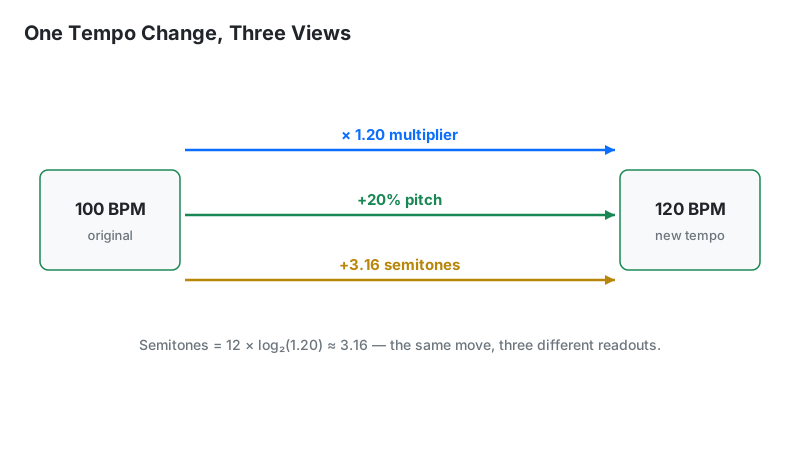
- Multiplier: 120 ÷ 100 = 1.20×
- Pitch change: (120 − 100) ÷ 100 × 100 = +20%
- Semitones: 12 × log₂(1.20) = 12 × 0.263 = +3.16 semitones (about a minor third)
- Duration effect: a 4-minute track now runs 4 ÷ 1.20 = 3 minutes 20 seconds
Second example — the everyday DJ pairing, 120 → 128 BPM: multiplier 128 ÷ 120 = 1.0667×; pitch change +6.67%; semitones 12 × log₂(1.0667) = +1.12 semitones. The calculator displays this pair as 1.07× with a "7% faster" verdict — correct to its two-decimal display, but the exact figures above are the ones to use when judging whether the key still fits the next track.
How to Use This Calculator
- Enter the original BPM — the tempo of the track or sample right now.
- Enter the target BPM — the tempo to reach.
- Tap a quick preset (80→100, 100→120, 90→140, 120→100) for common jumps instead of typing.
- Press Convert and read the multiplier and the interpretation line. For an exact pitch % or semitone figure, run the multiplier through the formulas on this page.
- Apply the pitch % on a DJ pitch fader, or the multiplier in a DAW time-stretch dialog.
Planning a full transition between two tracks? The DJ Transition Calculator maps the mix, and the BPM Calculator locks the exact tempos first.
Reading Your Result
The calculator itself displays the first two rows. The remaining rows are worked out from the multiplier with the formulas on this page — they are labelled "derived" so the two kinds of figure are never confused:
| Readout | Meaning | Next step |
|---|---|---|
| Speed multiplier (displayed) | Playback rate ratio to two decimals (1.20×) | Enter in DAW time-stretch or video speed controls |
| Interpretation (displayed) | Whole-percent verdict ("20% faster"), calculated from the rounded multiplier | Use as a quick fader estimate; prefer the exact pitch % below for fine work |
| Speed % (derived) | Multiplier as a percent (120%) = multiplier × 100 | Match software tempo sliders |
| Pitch % (derived) | Fader-style change (+20%) = (multiplier − 1) × 100, from the unrounded ratio | Dial directly on a DJ pitch fader |
| Semitones / cents (derived) | Musical key shift (+3.16 st) = 12 × log₂(multiplier) | Check key compatibility with the Song Key Finder |
| Duration change (derived) | New track length = old length ÷ multiplier | Plan set timing and radio edits |
The Three Numbers, Disentangled
Multiplier, speed %, and pitch % describe the identical change from different starting points. Speed % = multiplier × 100, and pitch % = speed % − 100. So 1.20× = 120% speed = +20% pitch. Confusion usually starts at the hardware: Pioneer-style faders display pitch % (±8%), while DAW warp dialogs and video players display speed multiplier or % (1.00×). Convert between the two by adding or subtracting 100.
The semitone figure is the musician's view of the same multiplier: it shows how far the key moves, which decides harmonic mixing. A +20% pitch shift is +3.16 semitones — enough to clash with the outgoing track unless key lock is engaged or the keys are compatible.
Precision note: the calculator's verdict rounds twice — the multiplier to two decimals, then the percentage to a whole number, taken from the rounded multiplier. So 128→130 BPM reads "2% faster" although the exact change is +1.56%, or +0.27 semitones. For key-critical work, compute from the unrounded ratio (target ÷ original) with the formulas above instead of the displayed verdict.
The 5.946% Rule: Semitones From Speed
One semitone equals a speed ratio of 21/12 = 1.05946 — a +5.946% pitch change. Memorize that number to estimate any key shift mentally:
| Semitones | Speed change | Example at 120 BPM |
|---|---|---|
| +1 (minor 2nd) | +5.95% | 127.1 BPM |
| +2 (major 2nd) | +12.25% | 134.7 BPM |
| +3 (minor 3rd) | +18.92% | 142.7 BPM |
| +7 (perfect 5th) | +49.83% | 179.8 BPM |
| +12 (octave) | +100% | 240 BPM (2.00×) |
The reverse direction works the same way: a +6% pitch nudge is effectively one semitone, so a harmonic mix clashing by a semitone has an exact fader fix. For precise key changes between tracks, pair this with the Key Transposition tool.
Pitch Fader Ranges: What ±8% Actually Covers
Standard DJ pitch faders cover ±8% — enough for most same-genre mixing, not for cross-genre jumps. Each common range spans these BPM windows:
| Fader range | At 120 BPM | At 128 BPM | At 174 BPM |
|---|---|---|---|
| ±8% (standard) | 110.4 – 129.6 | 117.8 – 138.2 | 160.1 – 187.9 |
| ±16% (wide) | 100.8 – 139.2 | 107.5 – 148.5 | 146.2 – 201.8 |
| ±50% (ultra-wide) | 60 – 180 | 64 – 192 | 87 – 261 |
Rule of thumb: when the gap exceeds the fader range, stop forcing it — bridge with a transition track in between, or mix the outgoing track's outro into the incoming intro where tempo matters less.
Key Lock On or Off? The Quality Tradeoff
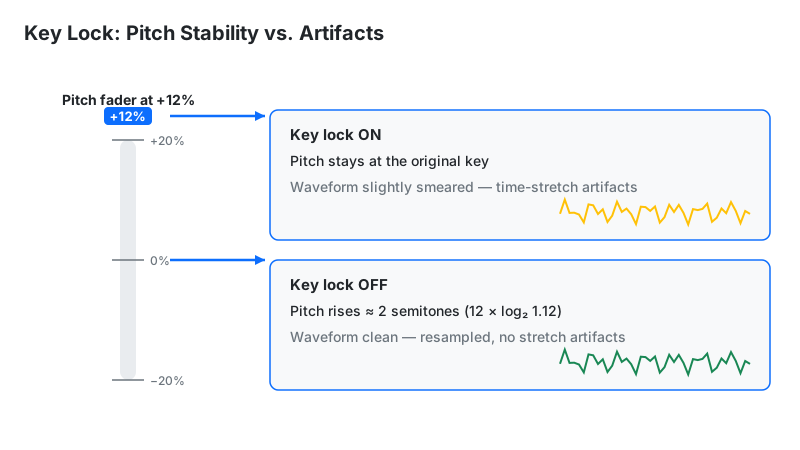
Key lock (Master Tempo on Pioneer, Keylock on Denon) time-stretches audio to change tempo while holding pitch constant. It makes harmonic mixing possible across wide BPM gaps. The price is audio quality: time-stretch smears transients, and the artifacts turn audible past roughly ±10% — first on vocals, acoustic drums, and heavily compressed audio.
Practical policy: key lock ON for harmonic blends wider than ±6%, where a key clash is the bigger danger; key lock OFF for small adjustments (±3% or less), scratching, and turntablism, where the natural pitch nudge sounds better and the algorithm would only add smear. A phasey or "underwater" sound with key lock on is the algorithm itself — narrow the gap or switch it off.
Speed Math for Video Editors
The same ratios retime video. Converting 24 fps film to 25 fps PAL is a 25÷24 = 1.0417× speed-up (+4.17% pitch — the reason PAL audio sounds slightly sharp). Slow motion at 50% speed doubles duration and drops pitch one octave. Learning playback at 0.75× stretches a 4-minute lesson to 5:20 and drops pitch about 5 semitones — fine for watching, useless for playing along without pitch-preserving slowdown.
Limitations
- Two-decimal display. The multiplier is rounded to two decimals and the verdict percentage is calculated from that rounded value, so small changes display coarsely: 128→130 BPM shows "2% faster" for an exact change of +1.56%.
- Very small changes read as "No change." When the ratio rounds to 1.00×, the verdict says "No change — same speed as the original BPM" even if the tempos differ slightly — entering 120 → 120.5 BPM does this (verified against the tool). Use exact ratios from the formulas for sub-1% work.
- Linear resampling assumed. The math describes simple speed change; key-lock time-stretch follows the same ratios and adds algorithm artifacts the numbers cannot show.
- Extreme shifts degrade audio. Past about ±25%, even strong time-stretch sounds unnatural — plan transitions instead of forcing the gap.
- Equal-temperament math. Real instruments drift from perfect 12-TET; a calculated +3.00 semitones can beat slightly against a live-recorded track.
- No swing or groove modeling. Ratios are exact; feel is not — a mathematically perfect match can still sound wrong on swung material.
BPM to Speed vs Alternatives
| Method | Precision | Use when |
|---|---|---|
| This calculator | Multiplier to 2 dp + whole-% verdict; exact figures derivable from the ratio | Planning pitch moves, key shifts, video retiming |
| DJ pitch fader by ear | ~±0.5% | Live beatmatching where feel matters more than numbers |
| DAW time-stretch | Sample-accurate | Warping audio with key lock in production |
| Tap tempo | ±1–4 BPM input | Finding the starting tempo before converting |
Calculate the number here, then execute by ear — the math locates +20%, but only listening confirms the blend works.