BPM Calculator
Calculate BPM (Beats Per Minute) from time and beat count, or find the duration for a specific number of beats at any tempo.
BPM Result
120 BPM
500 ms
2.00 s
4
House/Pop
BPM Calculator – Calculate Tempo, Time Duration & Beat Count
Last updated: October 23, 2026 · Written by the Pitch Detectors Editorial Team
A BPM calculator converts between tempo, time, and beat count with exact math: enter any two values and it finds the third. Count 32 beats in 16 seconds and you get exactly 120 BPM. DJs, producers, and musicians use it to set DAW tempos, sync delays, and plan track lengths.
Key Takeaways
- BPM = (beats ÷ seconds) × 60 — the single formula behind all three modes.
- One beat at 120 BPM lasts exactly 500 ms (60,000 ÷ BPM).
- Calculated BPM is exact; tap tempo carries ±1–4 BPM of human error.
- To sync two tracks, adjust pitch by (target − current) ÷ current × 100%.
- The calculator counts quarter-note beats in 4/4 — half-time and 6/8 need interpretation (see below).
What Is BPM?
Tempo is one of the three variables this calculator juggles, alongside elapsed time and beat count. They lock together mathematically: fix any two and the third is determined. That relationship is what makes the calculator useful in both directions — finding the tempo of a recorded loop, or finding how long your 64-bar arrangement will run at a chosen tempo. One abbreviation, two fields: BPM counts heartbeats per minute in medicine and fitness too, but every formula on this page assumes beats in music, not a pulse.
How This BPM Calculator Works
This calculator solves the tempo–time–beats triangle in three modes. Calculate BPM takes a beat count and a measured duration and returns tempo. Calculate Time takes a BPM and beat count and returns seconds — the mode arrangers use to time intros, drops, and outros. Calculate Beats takes BPM and seconds and returns how many beats fit, useful for slicing loops to exact bar lengths.
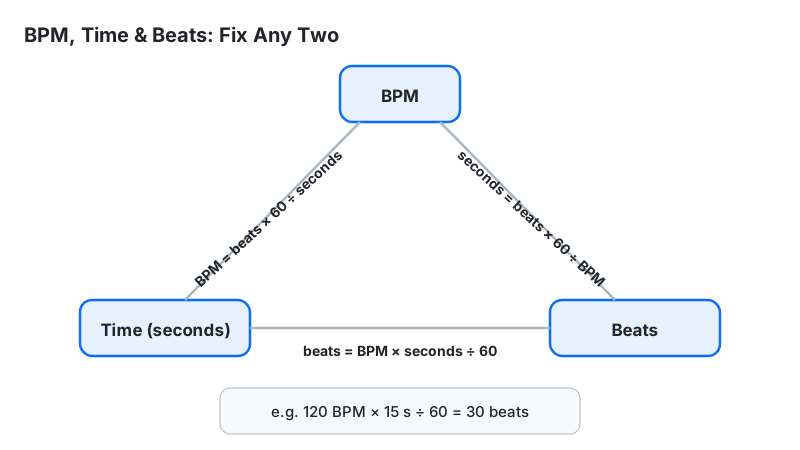
Methodology: BPM = (beats × 60) ÷ seconds; seconds = (beats × 60) ÷ BPM; beats = (BPM × seconds) ÷ 60. Each result includes beat duration (60,000 ÷ BPM ms), one 4/4 bar length, and a genre classification. The widget's calculation code was executed against hand-calculated values in all three modes (32 beats in 16 s → 120.0 BPM; 120 BPM × 32 beats → 16.00 s; 120 BPM over 60 s → 120.0 beats) and at the genre-bracket boundaries (119.9 → Pop/Rock, 120 → House/EDM, 135 → Techno/Trance) — every result matched the formulas exactly.
BPM Formulas and Worked Example
All three modes derive from one relationship: beats per minute means beats divided by minutes.
- BPM = (Number of beats ÷ Seconds) × 60
- Seconds = (Number of beats ÷ BPM) × 60
- Beats = (BPM ÷ 60) × Seconds
- Beat duration = 60,000 ÷ BPM (milliseconds)
Worked example: you count 32 beats in 16 seconds of a loop:
- Divide beats by seconds: 32 ÷ 16 = 2 beats per second
- Multiply by 60: 2 × 60 = 120 BPM
- Beat duration: 60,000 ÷ 120 = 500 ms per beat
- One 4/4 bar (4 beats): 500 × 4 = 2,000 ms = 2 seconds
Reverse check with Calculate Time mode: a 32-beat section at 120 BPM lasts (32 ÷ 120) × 60 = 16 seconds — consistent both ways.
Full-track example: a song at 128 BPM running 3 minutes 30 seconds holds 128 × 3.5 = 448 beats = 112 bars of 4/4. Run the same math in reverse with Calculate Beats mode to find how many bars fit a fixed slot — the core calculation behind radio edits and DJ set planning.
How to Use This Calculator
- Pick a mode at the top: Calculate BPM, Calculate Time, or Calculate Beats.
- Calculate BPM mode: enter the number of beats you counted and the duration in seconds, then press Calculate.
- Calculate Time mode: enter the BPM and the number of beats (e.g. 64 for a 16-bar phrase in 4/4).
- Calculate Beats mode: enter the BPM and the duration in seconds to see how many beats fit.
- Optionally tap a quick BPM preset (60–174) to load a common genre tempo instantly.
- Read the result plus the extras: beat duration in ms, bar duration, and genre match.
Measuring tempo by ear instead? Try the BPM Tap Tempo tool, then verify the tapped value here with exact math.
How Long Should You Count? The Window Sets the Error
A one-beat counting error costs 60 ÷ window seconds in BPM — the shorter your counting window, the more a single miscount moves the result. The error does not depend on the tempo, only on how long you counted:
| Counting window | Shortcut | Cost of a one-beat miscount |
|---|---|---|
| 15 seconds | Count × 4 | ±4 BPM |
| 30 seconds | Count × 2 | ±2 BPM |
| 60 seconds | Count = BPM | ±1 BPM |
Count for 30 seconds or longer whenever the music allows it. Treat any reading from a window under 15 seconds as an estimate and measure again — the second count costs less than a mix built on the wrong tempo.
Reading Your Result
Each mode returns one headline number plus four reference readouts. Here's what each means and what to do with it:
| Readout | Meaning | Next step |
|---|---|---|
| BPM Result | Exact tempo of your loop or section | Type it into your DAW or DJ software as the project tempo |
| Beat Duration (ms) | Length of one beat in milliseconds | Use it to set delay/reverb times — see the delay table below |
| Bar Duration (s) | Length of one 4/4 bar | Multiply by bar count to time arrangements precisely |
| Beats/Bar | Assumed 4 (4/4 time) | For 3/4 or 6/8, adjust bar math manually (see time-signature note) |
| Genre Match | Typical genre for that tempo range | Sanity-check your count — a "Ballad" reading on a techno track means a miscount |
Delay Times DJs and Producers Actually Use
The beat-duration readout exists for one practical reason: tempo-synced effects. A dotted-eighth delay — the classic rhythmic echo — is 3/4 of a beat, and triplets are 2/3. Here are stage-ready values:
| BPM | Quarter note | Dotted 8th | 8th triplet | Half note |
|---|---|---|---|---|
| 120 | 500 ms | 375 ms | 333 ms | 1000 ms |
| 124 | 484 ms | 363 ms | 323 ms | 968 ms |
| 128 | 469 ms | 352 ms | 313 ms | 938 ms |
| 140 | 429 ms | 321 ms | 286 ms | 857 ms |
| 174 | 345 ms | 259 ms | 230 ms | 690 ms |
For any other tempo, compute from the beat duration: dotted 8th = beat ms × 0.75, triplet 8th = beat ms × 0.667. The dedicated BPM to Milliseconds tool calculates these instantly for any BPM.
BPM in Hertz: Tempo as a Frequency
Hertz = BPM ÷ 60 — every rate has a frequency, and a beat is a repeating event. At 120 BPM the beat repeats at exactly 2 Hz, which is the value to type into an LFO, gate, or tremolo that must pulse with the track.
| BPM | 60 | 90 | 120 | 128 | 140 | 174 |
|---|---|---|---|---|---|---|
| Beat frequency | 1.00 Hz | 1.50 Hz | 2.00 Hz | 2.13 Hz | 2.33 Hz | 2.90 Hz |
Synth LFOs and modular clocks speak in hertz, DAWs speak in BPM — this conversion is the dictionary between them. It is the beat-duration readout turned inside out: a 2 Hz beat has a period of 1,000 ÷ 2 = 500 ms.
Genre BPM Ranges
Tempo is the fastest genre fingerprint in DJing. Use this table to identify tracks or pick compatible ones for a set:
| Genre | Typical BPM | Notes |
|---|---|---|
| Ballad / downtempo | 60–80 | Half-time feel common |
| Hip-hop / R&B | 85–115 | Often counted double-time (170–230) in trap |
| Pop / rock | 100–130 | Widest range; 120 is the classic center |
| House | 120–130 | Four-on-the-floor kick throughout |
| Techno / trance | 125–150 | Peak-time techno sits 135–145 |
| Dubstep | 140 | Half-time drums make it feel like 70 |
| Drum & bass | 170–180 | 174 is the scene standard |
The widget's genre classifier follows the same brackets (Ballad/Slow under 70, Hip-Hop/R&B under 100, Pop/Rock under 120, House/EDM under 135, Techno/Trance under 150, Dubstep under 165, Drum & Bass above). Treat it as a hint, not a verdict — genre is about rhythm and sound design as much as tempo. One related caution: classical Italian markings (Allegro, Presto) carry no fixed BPM boundaries — one tempo reference lists Allegro as 120–156 BPM while another lists it as 120–168. Markings describe mood; only BPM gives an exact number.
Tap Tempo vs Calculated BPM: When Each Wins
Use calculated BPM when you can count beats over a measured duration — it is mathematically exact. Use tap tempo when you only have the music itself, like a track playing in a club with no readout.
| Calculated BPM | Tap tempo | |
|---|---|---|
| Accuracy | Exact (to 0.1 BPM) | ±1–4 BPM of human tapping error |
| Needs | Beat count + stopwatch | Just the music playing |
| Best for | Loops, stems, arrangement timing | Live tracks, vinyl, quick checks |
| Weakness | Slow if you must count long sections | Drifts on songs with tempo changes |
Pro workflow: tap to get close, then count 32 beats against a stopwatch and calculate for the exact number. That two-step takes under a minute and beats either method alone.
Beatmatching Math: Syncing Two Tracks
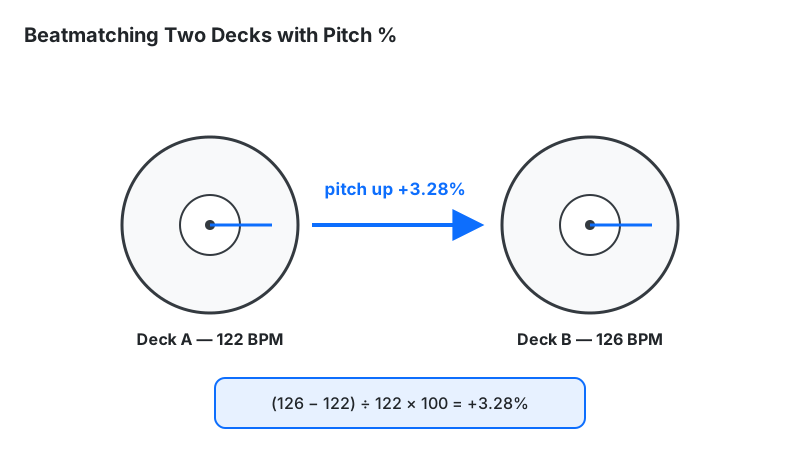
To beatmatch, express the tempo gap as a pitch percentage: pitch % = (target BPM − current BPM) ÷ current BPM × 100. Move the slower track's pitch fader up by that amount and the tempos lock.
Worked example: mixing a 122 BPM track into a 126 BPM track: (126 − 122) ÷ 122 × 100 = +3.28%. Push the 122 track's pitch fader to +3.3% and both run at 126. Standard DJ pitch faders cover ±8%, which handles gaps up to about 10 BPM at house tempos — wider gaps need the BPM to Speed Calculator or a planned transition track. One more number worth knowing: at 120 BPM, 1 BPM equals 0.83% of pitch — so ±1 BPM of tap-tempo error is already a bigger gap than most beatmatching corrections. That is the practical reason to verify tapped tempos by counting before a mix. For key-compatible transitions at the new tempo, check the DJ Transition Calculator.
The Time-Signature Trap
This calculator counts quarter-note beats in 4/4 time — the default of virtually all electronic music. Two common situations break that assumption. In 6/8 time (common in ballads and Afro-Cuban music), the beat is a dotted quarter, so counting all eighth notes doubles your reading. In half-time / double-time feels (trap at "140" that feels like 70, drum & bass counted at 87), the same audio gives two valid BPM numbers depending on which pulse you count.
The fix is awareness, not math: decide which pulse the drums emphasize, count that, and note the feel. If your result says 70 BPM on a track that clearly bangs like 140, you counted the half-time pulse — double it. Even in straight 4/4, the calculator measures the pulse you counted, not the one you intended: counting hi-hats instead of kick drums doubles the reading. Always ask which beat level the number describes before trusting it.
Limitations
- Assumes steady tempo. Live drummers drift; rubato passages breathe. The result is an average over your measured interval — count longer sections (32+ beats) for a stable average.
- Assumes 4/4 quarter-note beats. 6/8, 3/4, and half-time feels need manual interpretation (see above).
- Garbage in, garbage out. A one-beat miscount over 16 seconds shifts the result by nearly 4 BPM at 120. Count carefully, count longer, or measure twice (see the count-window table above).
- Genre match is approximate. Tempo hints at genre but doesn't define it — 128 BPM could be house, trance, or pop.
BPM Calculator vs Alternatives
| Method | Accuracy | Use when |
|---|---|---|
| This BPM calculator | Exact | You can count beats and measure time |
| Tap tempo | ±1–4 BPM | Music is playing and you need a fast estimate |
| DAW auto-detect | Usually ±1 BPM | Analyzing full audio files in production |
| Metronome matching | ~±1 BPM | Finding tempo by ear with an audible reference |
For production work where delay times and sample slicing depend on it, calculated BPM is the reference standard — verify tap and auto-detect readings against it before committing to an arrangement.
Frequently Asked Questions
Related DJ & Music Production Tools
- BPM Tap Tempo — Tap along with live tracks to measure tempo by ear.
- BPM to Milliseconds — Calculate dotted, triplet, and straight delay and reverb sync times.
- BPM to Speed Calculator — Find playback speed percentages and pitch shift values.
- Song Length from BPM — Find track duration from tempo and bar count.
This calculator is a planning and education tool. Its results are exact calculations from the numbers you enter — error creeps in through the count, not the math — so confirm tempo by ear before a live set or final mix.