Free DJ Tools: BPM, Key & Mixing Calculators
Last updated: October 23, 2026 · Written by the Pitch Detectors Editorial Team
These 11 free DJ tools calculate BPM, detect song keys and Camelot codes, convert tempo into delay times and pitch shifts, check mix compatibility, and plan set lengths. Everything runs in your browser — no install, no sign-up, and your audio files never leave your device.
BPM Calculator
Calculate beats per minute from time and beats. Essential for beat matching and tempo analysis.
BPM Tap Tempo
Find the BPM of any song by tapping along to the beat. Real-time tempo detection.
BPM to Milliseconds
Convert BPM to milliseconds for delay times, reverb settings, and sync calculations.
Song Key Finder
Analyze an audio file to detect its musical key and Camelot code for harmonic mixing and mashups.
DJ Transition Calculator
Calculate optimal transition points and tempo adjustments for smooth mixes.
DJ Set Length Calculator
Plan your set: how many tracks you need, average track length, and total duration for any set length.
Scales Practice Generator
Generate practice sequences for scales, set tempo, direction, repeats, and play a simple tone or metronome.
Mix Compatibility Checker
Check whether two tracks mix well together based on BPM and key analysis.
Key Transposition Calculator
Transpose musical keys up or down by any number of semitones.
BPM to Speed Converter
Convert beats per minute (BPM) to playback speed multiplier.
BPM → Pitch (Semitone) Calculator
Convert a tempo change into the exact pitch shift in semitones when you skip time-stretching.
Key Takeaways
- 11 free tools covering tempo (BPM calculator, tap tempo, BPM→ms, BPM→speed, BPM→pitch), key (song key finder, key transposition), and mixing (transition calculator, mix compatibility checker, set length planner, scales practice).
- Beatmatching ends with tempos exactly equal: at 128 BPM, a gap of just 0.5 BPM pulls two tracks a full beat apart in two minutes — and audibly out of phase within seconds. Close is not locked.
- Harmonic mixing matches musical keys as well as tempos, using the Camelot wheel's compatibility rules.
- One semitone equals a 5.95% tempo change, so a ±6% pitch-fader move shifts pitch by about one semitone — the math behind key-matching a track by fader alone.
- All analysis runs locally in your browser; audio files are never uploaded.
What Are DJ & Music Production Tools?
Definition: DJ and music production tools are calculators and analyzers for the numbers behind mixing: tempo in beats per minute, musical key, pitch relationships, and set timing. They help DJs beatmatch tracks, mix in compatible keys, sync effects to the beat, and plan set lengths — without installing DJ software.
Use them for track prep (BPM and key before a gig), booth problem-solving (how far to move the pitch fader), and studio work (the delay time that matches 128 BPM). Each tool does one job, instantly, in the browser — on desktop or phone.
The 11 Tools in This Category
BPM Calculator — compute beats per minute from a counted number of beats over a timed interval. The manual, always-works method.
BPM Tap Tempo — tap along to any song (keyboard, mouse, or screen) for a real-time BPM reading.
BPM to Milliseconds — convert BPM into delay and reverb times in milliseconds so effects sync to the beat.
Song Length from BPM Calculator — estimate a track's duration from its BPM and bar count, handy for set planning.
Song Key Finder — analyze an audio file to detect its musical key and Camelot code for harmonic mixing.
DJ Transition Calculator — calculate tempo adjustments and timing for smooth transitions between two tracks.
DJ Set Length Calculator — plan a full set: how many tracks you need for a given duration at your average track length.
Scales Practice Generator — generate scale practice routines with tempo, direction, and repeat control.
Mix Compatibility Checker — check whether two tracks mix well together based on BPM and key analysis.
Key Transposition Calculator — transpose musical keys up or down by semitones for remixes and mashups.
BPM to Speed Converter — convert a BPM change into a playback-speed multiplier.
How to Choose the Right Tool
| Your task | Use this tool |
|---|---|
| Find a track's tempo | BPM Tap Tempo or BPM Calculator |
| Sync a delay to the beat | BPM to Milliseconds |
| Find a track's musical key | Song Key Finder |
| Check if two tracks mix together | Mix Compatibility Checker |
| Plan transition timing | DJ Transition Calculator |
| Plan how many tracks a set needs | DJ Set Length Calculator |
| Shift a track's key to match another | Key Transposition Calculator |
| See how tempo change affects pitch | BPM → Pitch (Semitone) Calculator |
BPM to Milliseconds: Syncing Effects to the Beat
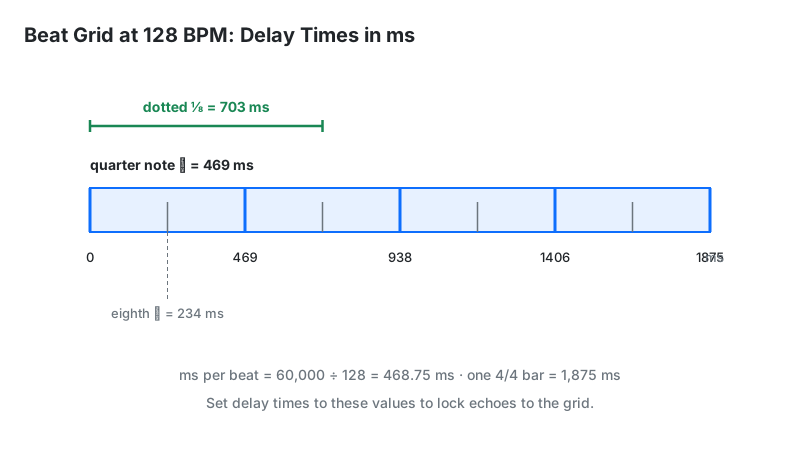
A quarter-note delay at a given BPM lasts 60,000 ÷ BPM milliseconds. Eighth notes halve it; dotted-eighth notes (the classic rhythmic delay) multiply it by 0.75. The BPM to Milliseconds tool computes these instantly — here are common values:
| BPM | Quarter note | Eighth note | Dotted eighth |
|---|---|---|---|
| 120 | 500 ms | 250 ms | 375 ms |
| 124 | 484 ms | 242 ms | 363 ms |
| 128 | 469 ms | 234 ms | 352 ms |
| 140 | 429 ms | 214 ms | 321 ms |
Why it matters: a delay time even 20 ms off the grid sounds sloppy against the beat, while a synced dotted-eighth delay sits inside the groove and makes transitions feel wider. Set your delay to the table value, then nudge by ear.
Harmonic Mixing and the Camelot Wheel
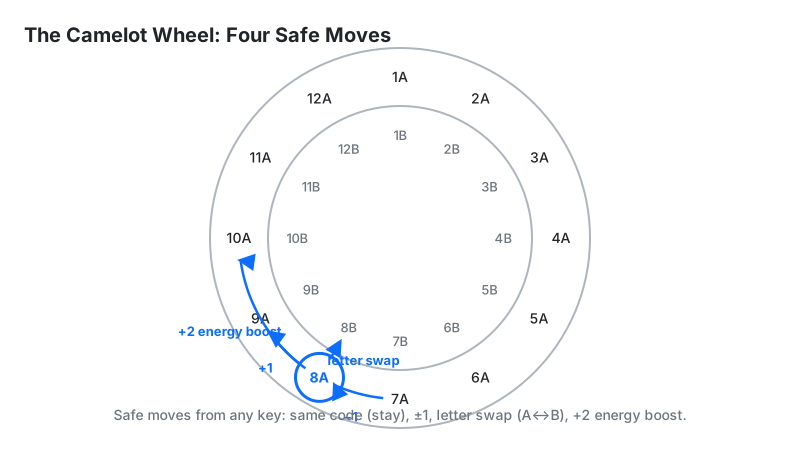
Beatmatching aligns tempos; harmonic mixing aligns keys so combined tracks don't clash. The Camelot wheel assigns each key a code (like 8A for A minor) and defines which codes mix safely:
| Move on the wheel | Example (from 8A) | Result |
|---|---|---|
| Same code | 8A → 8A | Perfect match — always safe |
| ±1 number, same letter | 8A → 7A or 9A | Adjacent keys — smooth, safe |
| Same number, letter swap | 8A → 8B | Relative major/minor — safe |
| +2 numbers ("energy boost") | 8A → 10A | Key change up a whole tone — lifts energy |
The Song Key Finder reports the Camelot code for your track, and the Mix Compatibility Checker applies these rules to a pair of tracks. One detail trips up beginners: moving one semitone is not one step on the wheel — it is seven. Raising 8A (A minor) by a semitone lands on 3A (B♭ minor), because the wheel is arranged in fifths rather than semitones. Some software prints the same wheel as Open Key notation, where Camelot 8A becomes 1m and 8B becomes 1d. One caution: automatic key detection is right most of the time but not always — if a mix sounds wrong despite "compatible" codes, trust your ears and verify against a second source.
The ±6% Rule: Pitch Faders and Semitones
Moving a pitch fader changes tempo and pitch together (unless key lock is on). The math: one semitone equals a 5.95% tempo change (the 12th root of 2). So a ±6% fader range covers roughly one semitone up or down, ±12% covers about two.
Two practical uses. First, key-matching by ear: if the incoming track is one semitone flat of the playing track, pushing the fader to about +6% brings it into key. Second, range discipline: CDJs default to ±10%, but switching to ±6% gives finer control for beatmatching — a classic technique for tight mixes. The BPM → Pitch (Semitone) Calculator computes the exact pitch shift for any tempo change, and the BPM to Speed Converter handles the tempo-ratio side.
Who These Tools Are For
Beginner DJs learn beatmatching math and harmonic mixing without expensive software.
Working DJs prep tracks fast: BPM, key, and set math in seconds on a phone backstage.
Producers and remixers sync effects, transpose keys, and check pitch/tempo relationships.
Mashup creators verify key and tempo compatibility before committing to an edit.
Students and teachers demonstrate tempo, key, and pitch relationships interactively.
Limitations
- Key detection isn't perfect. Automatic analysis can mislabel keys, especially with atonal intros, key changes mid-track, or heavy effects — verify by ear for important mixes.
- Key tags disagree between engines. Rekordbox, Serato, Mixed In Key, and browser analyzers can report different keys for the same track — the disagreement peaks on tracks with ambiguous or shifting tonal centers. Treat a detected key as strong evidence, not a fact.
- Local files only. Analysis works on files on your device (MP3, WAV, FLAC, AIFF, AAC, OGG); streaming URLs and YouTube links aren't supported.
- Compatibility scores are guidance, not verdicts. Energy, arrangement, and phrasing matter as much as BPM and key — a "compatible" pair can still sound wrong.
- No substitute for practiced ears. These tools compute the numbers; beatmatching by ear and reading a crowd still come from practice.
Browser Tools vs. DJ Software
| These browser tools | Rekordbox / Serato | Mixed In Key | |
|---|---|---|---|
| Cost | Free | Free–paid tiers | Paid |
| Install | None | Required | Required |
| BPM + key analysis | Yes, per-track | Yes, library-wide | Yes, batch with cue points |
| Best for | Quick checks, learning the math | Full DJ workflow | Bulk library key analysis |
For practice timing, pair these with the Online Metronome; for scale work, the Scale Finder.