Mix Compatibility Checker: DJ Key & BPM Tool
Last updated: October 23, 2026 · Written by the Pitch Detectors Editorial Team
A mix compatibility checker scores whether two tracks blend cleanly — key harmony on the Camelot Wheel plus tempo match on the BPM gap. Enter both tracks’ BPM and Camelot key below — no audio upload, no track catalog — for an instant verdict and transition tips when a pair only partly fits.
Outgoing Track (Track A)
Incoming Track (Track B)
Compatibility Assessment:
✓ Good Match✓ Compatible
✓ Easy Mix
2 BPM
Actionable Mixing Instructions:
Key Takeaways
- Mix compatibility has two halves: key harmony (Camelot Wheel) and tempo match (BPM difference). Both must pass for a clean blend.
- The rubric scores each half −1 to +3 and adds them: 5–6 = Excellent, 3–4 = Good, 1–2 = Possible, 0 or less = Not Recommended.
- Same Camelot code always mixes cleanly; ±1 step with the same letter shifts the music up a perfect fifth (the energy-boost move), while a diagonal move (±1 plus a letter change) shares fewer notes and scores lower at +1.
- ±3 BPM is the easy-mix line — a 2.3% pitch shift at 128 BPM, comfortably inside a standard ±8% pitch fader.
- The recommendation box follows fixed bands — key score ≥2 / 0–1 / below 0, BPM gap 0 / ≤3 / ≤6 / above 6 — so identical inputs always produce identical advice. No black box.
What Is Mix Compatibility?
Mix compatibility is a measure of whether two tracks can be blended smoothly in a DJ set. It judges two things: do the musical keys harmonize (so melodies and basslines don't clash), and are the tempos close enough to beatmatch without audible pitch damage? When both pass, a transition sounds like one continuous piece of music.
DJs call the key side harmonic mixing — choosing the next track by musical key instead of feel alone. The tempo side is beatmatching: aligning beats per minute so both tracks run in sync. Most train-wreck transitions fail on one of these two axes, which is why this checker tests both at once. The checker scores the BPM and key values you enter; it does not listen to or analyze audio. If you don't know a track's key yet, run it through our Song Key Finder first.
How This Calculator Works
This calculator grades your two tracks with a transparent scoring rubric — the same logic running in the widget above, published here so you can check exactly why a pair passes or fails. Each axis earns −1 to +3 points. Every rule in the tables below is the exact rule the widget applies — including the wrap-around: 12 and 1 are neighbors on the wheel, so 12A → 1A counts as an Adjacent Key, not a clash.
Key compatibility scoring (Camelot Wheel)
| Score | Rating | Rule | Example |
|---|---|---|---|
| +3 | Perfect Match | Identical Camelot code | 8A → 8A |
| +3 | Relative Key | Same number, different letter (relative major/minor) | 8A → 8B |
| +2 | Adjacent Key | ±1 step, same letter (a perfect fifth apart) | 8A → 9A |
| +1 | Close Key | ±1 step, different letter | 8A → 9B |
| 0 | Distant Key | ±2 steps away | 8A → 10A |
| −1 | Key Clash | Anything further | 8A → 3B |
One rule deserves a second look: the diagonal move. Stepping ±1 and changing letter (8A → 9B) moves the tonic a fifth and swaps major for minor, so the two scales share fewer notes than a same-letter fifth step (8A → 9A). That is why the diagonal earns +1 while the same-letter step earns +2. Most Camelot charts lump both moves together as “compatible”; this rubric grades the difference.
Tempo compatibility scoring (BPM difference)
| Score | Rating | BPM difference |
|---|---|---|
| +3 | Exact Match | 0 BPM |
| +2 | Easy Mix | 1–3 BPM |
| +1 | Moderate | 4–6 BPM |
| 0 | Challenging | 7–10 BPM |
| −1 | Difficult | More than 10 BPM |
The two scores are added together for the overall verdict. The wheel math behind the key score comes from the circle of fifths: neighboring Camelot numbers sit a fifth apart and share nearly all their scale notes, which is why ±1 mixes sound smooth while distant jumps clash. The BPM bands come from pitch-fader math: 3 BPM at 128 is 2.3%, 6 BPM is 4.7%, 10 BPM is 7.8% — each band sits at a meaningfully different point on a ±8% fader.
Compatibility Score Formula and Worked Example
Total score = Key score (−1 to +3) + BPM score (−1 to +3)
Worked example: Track A is 128 BPM in 8A; Track B is 126 BPM in 9A.
- Key score: 8A → 9A is +1 step, same letter = Adjacent Key = +2.
- BPM score: |128 − 126| = 2 BPM difference = Easy Mix = +2.
- Total: 2 + 2 = 4 → Good Match. The key rises a fifth while the tempo nudge stays inside the easy zone.
Contrast: 8A at 128 BPM against 3B at 128 BPM scores key −1 (Key Clash) and BPM +3 (Exact Match) for a total of 2 — only a Possible Mix. Tempo alone never guarantees a good blend.
Tier boundaries, checked: 8A/128 vs 8A/128 = 3 + 3 = 6 (Excellent); 8A/128 vs 10A/135 = 0 + 0 = 0 (Not Recommended); 8A/128 vs 9B/131 = 1 + 2 = 3 (Good, at the floor of the tier). The rubric has no hidden weights — what you see is what the widget computes.
How to Use This Calculator
- Enter Track A's tempo: the outgoing track's BPM (find it with our BPM Calculator if needed).
- Select Track A's key: its Camelot code (e.g. 8A) from the dropdown.
- Enter Track B's tempo and key the same way for the incoming track.
- Read the verdict: key result, tempo result, and overall match update instantly, with transition recommendations underneath.
Reading Your Result
Your overall verdict falls into one of four tiers. Each tier tells you what to do next:
| Total score | Verdict | What it means | Next step |
|---|---|---|---|
| 5 to 6 | Excellent Match | Keys harmonize and tempos are close. | Blend freely — try a long 32-bar blend. |
| 3 to 4 | Good Match | Compatible with minor adjustment. | Nudge the pitch fader; keep the blend under 16 bars. |
| 1 to 2 | Possible Mix | One axis is weak. | Use a quick cut, echo-out, or transition effect instead of a long blend. |
| 0 or less | Not Recommended | Keys clash or tempo gap is too wide. | Pick a different track, or bridge with a third track in between. |
How the Recommendation Box Decides
The advice box under the verdict follows fixed rules — no guesswork. It reads your two sub-scores and fires the matching guidance every time:
| Condition | Advice you get |
|---|---|
| Key score ≥ 2 | Blend melodies and vocals freely — the keys are harmonically compatible |
| Key score 0–1 | EQ-filter mids and highs, keep the transition under 16 bars, blend during a percussion breakdown |
| Key score below 0 | Avoid overlapping melodic parts — use a drop swap, echo-out, or cut on the downbeat |
| BPM gap = 0 | No pitch fader adjustment needed |
| BPM gap 1–3 | Small pitch nudge, transparent to the dancefloor |
| BPM gap 4–6 | Enable Master Tempo (key lock) to preserve vocal pitch |
| BPM gap above 6 | Transition through a breakdown, half-time rhythm, or tempo ramp |
The box turns green, amber, or red with the verdict — and identical inputs always produce identical advice. That determinism is the point: you can learn the rubric once and predict the box before it appears.
Pro Mixing Techniques
Energy boost mixing: raising intensity a perfect fifth
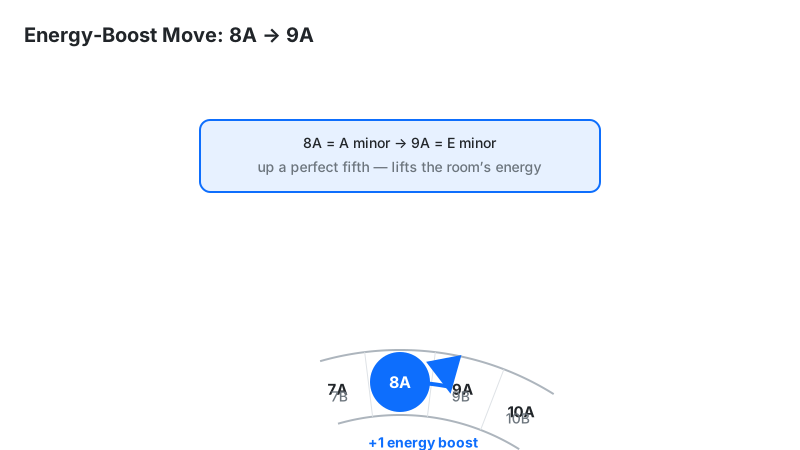
Moving +1 Camelot number (e.g. 8A → 9A) shifts the music up a perfect fifth — 7 semitones. Our ears hear a fifth as a lift: the same melody feels brighter and more urgent. DJs use this "energy boost" to escalate a set before a peak-time track; moving −1 does the reverse and cools the room. One caveat from Mixed In Key itself: the key change alone doesn't guarantee a rise — loudness, groove, and where you enter the track decide whether the room actually lifts. Try the interval first with our Key Transposition tool.
Why ±3 BPM is the "easy" line
The widget calls a 1–3 BPM gap an Easy Mix because of pitch-fader math. A standard DJ pitch fader spans ±8% (Pioneer CDJ). At 128 BPM, 3 BPM is only a 2.3% shift — comfortably inside the fader, with no audible strain. A 10+ BPM gap needs ~8% or more, which sits at the fader's edge and is where most DJs engage key lock or choose another track.
The bands are fixed in BPM, but a pitch fader works in percent — so the same BPM gap is a bigger fader move on a slower track:
| Base tempo | 3 BPM gap | 6 BPM gap | 10 BPM gap |
|---|---|---|---|
| 100 BPM | 3.0% | 6.0% | 10.0% |
| 120 BPM | 2.5% | 5.0% | 8.3% |
| 128 BPM | 2.3% | 4.7% | 7.8% |
| 140 BPM | 2.1% | 4.3% | 7.1% |
| 174 BPM | 1.7% | 3.4% | 5.7% |
Key lock: when it saves a mix and when it wrecks it
Key lock (Master Tempo) holds a track's musical pitch steady while you change its tempo, using time-stretching. It saves mixes with 6–10 BPM gaps — but past roughly ±6% shift, time-stretching smears transients and thins vocals, an artifact dancers can hear. Rule of thumb: inside ±3 BPM, leave key lock off; at a 4–6 BPM gap, switch it on — that is exactly the band where the recommendation box tells you to; past that, pick a closer track.
Half-time and double-time transitions
Tracks at a 0.5× or 2× tempo ratio — say 70 BPM against 140 BPM — share the same beat grid: every downbeat of the slower track lands on the faster one's. That makes them mixable despite a huge BPM number gap. Hip-hop DJs ride 70↔140 transitions constantly; the trick is matching phrases, not just beats, so the switch lands on a natural break.
Honest note: this calculator's rubric has no ratio exception, so it scores these pairs Difficult. That warning is correct for naive blends — and wrong when your phrases align. Override the score by ear here.
Camelot vs Open Key Notation
Camelot (1A–12B, from Mixed In Key) and Open Key (1m–12d, used by Traktor and Lexicon) describe the same 24 keys with different labels. "m" means minor (the Camelot A side), "d" means major (the B side, from German dur). Use whichever your DJ software displays — the mixing rules are identical.
| Camelot | Open Key | Musical key |
|---|---|---|
| 8A | 1m | A minor |
| 8B | 1d | C major |
| 9A | 2m | E minor |
| 9B | 2d | G major |
| 11A | 4m | F♯ minor |
| 11B | 4d | A major |
Converting is mechanical: subtract 7 from the Camelot number (wrapping around 1–12), then swap A→m and B→d. 8A becomes 1m, 9B becomes 2d, 11A becomes 4m. Both wheels ascend by fifths in the same direction — Open Key simply starts its count at C major / A minor (1d / 1m). Rekordbox and Serato show Camelot-style codes; Traktor shows Open Key — check which one your library uses before a gig.

Limitations
- Key detection isn't perfect. Software key analysis mislabels a real share of tracks. Independent accuracy tests (bascurtiz’s comparisons of key-detection tools, published by Digital DJ Tips) put accuracy between roughly 43% and 77% depending on the tool — even the best mislabels about one track in four. If a "Perfect Match" sounds wrong, trust your ears and re-analyze.
- Energy and phrasing aren't scored. Two compatible tracks still clash when a vocal sits on the other's drop — phrase matching matters as much as key.
- No half-time/double-time exception. The rubric scores 70-vs-140 BPM pairs Difficult even when the beat grids align; override it when phrases match.
- Genre conventions differ. Hip-hop and drum & bass DJs routinely break harmonic rules with cuts and doubles; the rubric fits smooth house/techno-style blending best.
- Live key changes fool the math. Tracks that modulate mid-song (common in pop) get one label but contain two keys.
- Whole-BPM inputs only. The tempo fields read whole numbers, so tracks tagged 128.0 and 128.4 BPM both enter as 128 — a sub-BPM drift between two “identical” tags stays invisible here.