How to Use the DJ Set Length Calculator
- Mode 1 (Calculate Tracks Needed): Enter your scheduled set length in Hours
and Minutes (or click any quick preset like
1 houror2 hours), then input your typical Average Track Length (e.g.,4:30). The calculator instantly returns your minimum tracks, a recommended pool with a 20–40% cushion, the full buffer count (+50%), and your pacing rate in tracks per hour. - Mode 2 (Calculate Set Duration): Enter the total number of prepared tracks in your playlist along with their average length. The tool projects the total playtime in hours and minutes.
- Important: enter the played portion (cue point to fade), not the file length. This calculator has no separate overlap control — blend minutes are already inside the played portion you type.
DJ Set Length Calculator: Tracks for Any Set
Last updated: October 23, 2026 · Written by the Pitch Detectors Editorial Team
A DJ set length calculator converts your slot length into a track count — or a tracklist into total playtime. Enter your set time and average played minutes per track; it divides the minutes to give minimum tracks, a 20–40% recommended pool, and a +50% buffer count. Measure the played portion (cue point to fade), not the file length: a "4:30" file you play for 3:00 advances the clock 3 minutes, not 4:30.
Key Takeaways
- Tracks needed = set minutes ÷ average played minutes per track. Played minutes (cue point to fade) decide the count, not file length.
- This calculator has no overlap input. Blend minutes live inside the played portion you enter — measure from the moment a track takes over the mix to the moment the next track takes over.
- Recommended pool = minimum × 1.2–1.4; buffer count = minimum × 1.5. The widget shows all three tiers, updated live.
- Quick-cut genres need 2–3× more tracks per hour than long-blend genres. Techno runs 12–15/hr; hip-hop runs 24–30/hr.
- Reverse mode turns a fixed tracklist into total playtime — aim to fill 85–90% of your slot, never 100%.
What Is a DJ Set Length Calculator?
Running out of music mid-set is a rite of passage nobody wants twice. The math looks trivial until you measure honestly: a "2-hour set" with 4:30 tracks is not 27 tracks — enter a 3:30 played portion and the same slot needs 35. This calculator does that arithmetic in both directions: time → tracks and tracks → time.
How This Calculator Works
Two modes cover both planning directions. Set-length mode: enter hours and minutes plus your average played length (minutes:seconds), and it returns the track count. Track-count mode: enter how many tracks you have and their average played length, and it returns total playtime in hours and minutes. There is no separate overlap control — blended minutes live inside the played portion you type.
Methodology: tracks needed = set minutes ÷ average played minutes (rounded up); recommended pool = tracks × 1.2 to × 1.4; buffer count = tracks × 1.5; set duration = track count × average played minutes. We verified the widget against hand calculations on five sample inputs (60 ÷ 4.5 = 13.3 → 14 tracks; 120 ÷ 3.5 = 34.3 → 35; 15 × 4 = 60 min; 90 ÷ 2.5 = 36; 45 ÷ 3 = 15) — every result matched exactly.
Set Length Formulas and Worked Example
- Tracks needed = set minutes ÷ average played minutes per track (round up)
- Recommended pool = tracks needed × 1.2 to × 1.4
- Buffer count = tracks needed × 1.5
- Set duration = track count × average played minutes
- Tracks per hour = 60 ÷ average played minutes
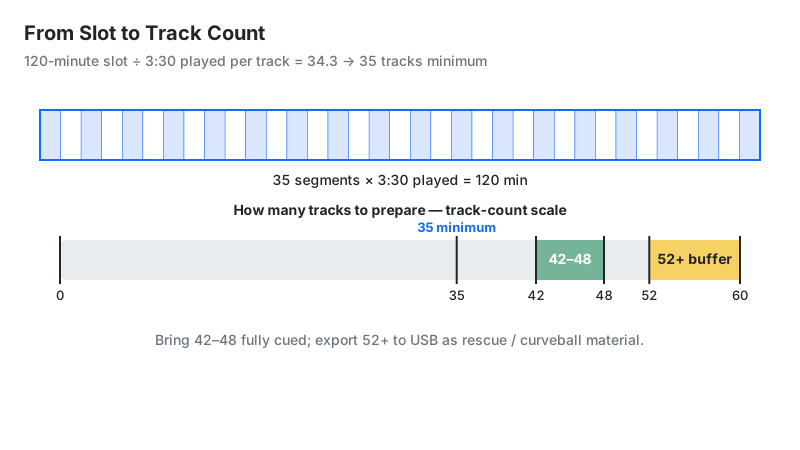
Worked example: a 2-hour (120 min) set, with a 3:30 played portion per track:
- Tracks needed: 120 ÷ 3.5 = 34.3 → 35 tracks
- Recommended pool: 34.3 × 1.2 = 41.1 → 42, up to 34.3 × 1.4 = 48.0 → 48 — 42–48 tracks
- Buffer count: 34.3 × 1.5 = 51.4 → 52+ tracks on the USB
- Pacing: 60 ÷ 3.5 = 17.1 tracks per hour
- The classic mistake: entering the 4:30 file length gives 120 ÷ 4.5 = 27 tracks — and you run out ~25 minutes early (27 × 3.5 = 94.5 min)
How to Use This Calculator
- Choose a mode: set length → tracks, or track count → duration.
- Enter your slot in hours and minutes (e.g. 2 hours, 0 min), or tap a quick preset.
- Enter average track length as minutes:seconds — your played portion (cue point to fade), not the file length (see below).
- Read three numbers: minimum tracks, the recommended pool (20–40% extra), and the buffer count (+50%).
- In track-count mode, enter how many tracks are in your crate and their average played length to get total playtime.
- Export the buffer count to USB, not the minimum.
Planning the transitions themselves? Use the DJ Transition Calculator to time your blends in bars and seconds.
Reading Your Result
| Readout | Meaning | Next step |
|---|---|---|
| Minimum tracks | Tracks to fill the slot exactly | Multiply by 1.2–1.4 for your working pool |
| Recommended | Working pool with 20–40% headroom | Prepare this many, fully cued |
| With buffer | Full crate at +50% | Export this many to USB |
| Tracks/hour | Your pacing rate | Compare against your genre's row in the table below |
| Set duration (reverse mode) | Playtime of your fixed tracklist | If it overshoots the slot, shorten played portions or cut tracks |
In duration mode the result panel keeps its tracks-mode labels. Read the headline total and the tracks/hour figure; the three lower figures switch to counts derived from your list size — your track count, a range from 70% of it up to the full count, and a +30% figure — not the 20–40% and +50% preparation tiers that tracks mode shows.
Played Portion vs. File Length: The Number Everyone Gets Wrong
Your files say 4:30. You play 2:45 of each — intro, main section, out before the outro. Always enter the played portion: cue point to fade, the minutes a track actually occupies your clock. For most club genres that is 60–70% of the file length; for radio edits and quick-cut hip-hop it drops under 50%.
Overlap lives inside this number. The minutes where two tracks play at once belong to neither track's played portion alone — so measure from the moment a track takes over the mix to the moment the next track takes over. One correction changes everything: a 120-minute set at 4:30 file length suggests 27 tracks, but at a 2:45 played portion you need 44 (120 ÷ 2.75 = 43.6 → 44). DJs who plan on file length chronically underprepare; plan on played portion and the math matches the night.
Tracks Per Hour by Genre
Pacing is genre DNA. Check the widget's tracks/hour readout against this table — if your techno set shows 30 tracks an hour, your played portion is too short for the style:
| Genre | Typical played portion | Overlap style | Tracks/hour |
|---|---|---|---|
| Techno / deep house | 4–5 min | Long blends (1–2 min) | 12–15 |
| House / tech-house | 3–4 min | Medium blends (~1 min) | 15–20 |
| Open-format / pop | 2–3 min | Quick cuts (~30 sec) | 20–30 |
| Hip-hop / R&B | 2–2.5 min | Quick cuts, drops | 24–30 |
| Drum & bass | 2–3 min | Double drops (~45 sec) | 20–30 |
| Trance | 4–5 min | Long blends (1–2 min) | 12–15 |
The Safety Buffer Rule: What 20–40–50 Means
Never bring exactly what the math says. The widget's three tiers exist for a reason: the minimum fills the slot; the recommended pool (20–40% more) covers requests and direction changes; the buffer count (+50%) covers overruns and dead gear. Requests, a dead dancefloor, an MC segment, technical hiccups — the night deviates from the plan.
For a 2-hour set needing 35 tracks: prepare 42–48 fully cued and export 52+ to USB. Organize the extras so they are reachable mid-set — a "rescue" folder of proven floor-fillers and a "curveball" folder for direction changes. The buffer costs nothing (it is the same USB stick) and has saved more sets than any mixing trick. Promoters remember the DJ who handled the 30-minute overrun gracefully, not the one who looped the last track.
Reverse Mode: Fitting a Fixed Tracklist Into a Slot
Sometimes the tracklist is fixed — a themed set, a label showcase, a competition routine — and the question flips: does it fit? Enter your track count and average played length in reverse mode. If the total overshoots your slot, two levers fix it: shorten played portions (tighter cuts) or cut tracks (the honest one).
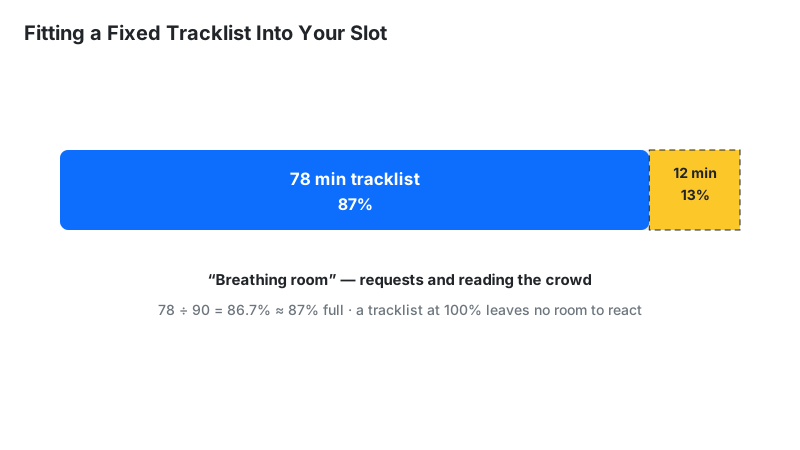
A useful target: keep the tracklist at 85–90% of the slot. The remaining 10–15% is breathing room for crowd-reading — the difference between a rigid playlist and a live set.
Sharing the Slot: B2B and Split Sets
The formula does not change when two DJs share one slot — the total track count stays the same, and each DJ prepares a share plus a personal buffer. A 2-hour back-to-back set at a 3:30 played portion still needs 35 tracks in total. Alternating evenly, that is roughly 18 tracks each — and each DJ exports a separate +50% buffer (18 × 1.5 = 27 tracks per USB), because a partner's spare tracks are not your rescue folder.
Split slots run per segment. Calculate each block with that block's pacing: a 1-hour warm-up at a 4:30 played portion needs 14 tracks, while a 1-hour peak block at 3:30 needs 18. The handover track belongs to whoever plays it — agree it in advance so it sits on one list, not both, and not neither.
Limitations
- Duration mode drops leftover seconds. Its headline total shows whole hours and minutes only — a tracklist totaling 67.5 minutes reads "1h 7m", and up to 59 seconds can vanish from the display. When a strict clock matters, work from the unrounded product (track count × played minutes) instead of the headline.
- Averages hide variance. A 7-minute epic plus a 90-second edit averages 4:15 but plays nothing like it — outliers skew the count.
- One number covers every track. Real played portions vary track to track; the calculator uses a single average for all of them.
- Crowd-reading isn't math. The calculator plans capacity, not programming — energy arc and track selection stay human work.
- Talking, requests, and gear issues consume clock time the formula can't see; the buffer tiers exist for exactly this.
Set Length Planning vs Alternatives
| Method | Accuracy | Use when |
|---|---|---|
| This calculator | Exact math on your estimates | Planning any set with known pacing |
| Timed rehearsal | Exact (for that run) | Competition routines and recorded mixes |
| Rule of thumb (~20/hr) | Rough | Back-of-napkin estimates only |
| Playlist duration sum | Overstates — ignores blending | Never for planning — it counts every overlap twice |
For gig planning, the calculator beats rules of thumb; for recorded mixes, nothing beats a timed rehearsal. Use both: calculate first, rehearse the tricky transitions.