Rhythm Pattern Maker
Last updated: October 23, 2026 · Written by the Pitch Detectors Editorial Team
What Is a Rhythm Pattern Maker?
A rhythm pattern maker is an online step sequencer that lets you program drum grooves by toggling steps on a grid. Each column is a slice of musical time and each row is a drum sound; the pattern loops continuously. This free tool gives you a 16-step grid (expandable to 32 or 64), 7 drum voices, tempo and swing controls, two drum kits, and JSON export/import.
The step sequencer is one of the oldest ideas in electronic music: divide a bar into equal steps, decide which steps trigger a sound, and loop it. This tool brings that workflow to your browser with hits scheduled ahead on the Web Audio clock.
Key Takeaways
- A 16-step grid = one bar of 16th notes in 4/4 time; steps 1, 5, 9, and 13 are the quarter-note downbeats.
- Each step's length in milliseconds is 15,000 ÷ BPM — at 120 BPM every step lasts exactly 125 ms.
- Swing delays the off-beat 16ths only, by a fraction of one step: about 33% on this slider is a full triplet shuffle, and the classic MPC pocket lands near 12–16% here. Downbeats never move.
- Start from genre blueprints (four-on-the-floor, boom-bap, tresillo) instead of an empty grid.
- Export JSON opens your pattern as JSON text in a new tab — copy it, keep it, and rebuild it in any DAW from the same step numbers.
How This Rhythm Pattern Maker Works
This tool schedules every drum hit on the Tone.js Transport clock, wired directly to the Web Audio API's hardware clock. Standard browser timers like setTimeout drift under CPU load; the Transport clock pre-schedules each hit against audio-hardware timestamps, so a 120 BPM loop stays locked to the grid.
Methodology: each active cell maps to a sixteenth-note subdivision of the pattern length. Tempo (40–240 BPM) sets the pulse; Division re-maps the grid to quarter, eighth, sixteenth, or triplet-sixteenth notes; Swing (0–60%) delays the off-beat sixteenths by that fraction of one step. The sounds are real samples streamed from the Tone.js audio library: the Classic kit pairs CR78 kick, snare and hi-hat with TR-505 open hat, clap, percussion and rim, while the 505 kit uses TR-505 samples for all seven voices. Last reviewed: October 2026.
Step Timing Math and Worked Example
Every step sequencer runs on one formula. In 4/4 time, one bar holds 4 quarter-note beats, and each beat divides into 4 sixteenth notes — 16 steps per bar. The time each step occupies is:
Step duration (ms) = 15,000 ÷ BPM
(Because one quarter note lasts 60,000 ÷ BPM milliseconds, and a sixteenth note is one quarter of that.) Here is what that means at common tempos:
| Tempo | Typical genre | One step lasts | One bar lasts |
|---|---|---|---|
| 92 BPM | Boom-bap hip-hop | 163.0 ms | 2.61 s |
| 120 BPM | Pop / funk | 125.0 ms | 2.00 s |
| 128 BPM | House | 117.2 ms | 1.88 s |
| 140 BPM | Trap (half-time feel) | 107.1 ms | 1.71 s |
| 174 BPM | Drum and bass | 86.2 ms | 1.38 s |
Worked example: at 128 BPM, one step = 15,000 ÷ 128 = 117.2 ms. A four-on-the-floor kick on steps 1, 5, 9, and 13 lands every 4 × 117.2 = 468.8 ms — exactly one quarter-note apart.
How to Use This Rhythm Pattern Maker
- Set the BPM: drag the tempo slider (40–240). Start near your genre's home tempo — 90–95 for boom-bap, 124–128 for house, 140 for trap. Tap along with our BPM tap tempo tool if you're matching an existing track.
- Choose the pattern length: 16 steps = 1 bar, 32 = 2 bars, 64 = 4 bars. Use 16 for sketching, 32–64 when your fill needs room to breathe.
- Pick a division: 1/16 for standard programming, 1/8 for half-time feels, Triplet 16 for shuffles and trap rolls.
- Select a drum kit: Classic (CR78-style samples) loads by default. The 505 kit is listed in the same menu, but switching mid-session is unreliable — see Limitations before you rely on it.
- Program the grid: click cells to toggle hits — click and drag to paint runs. Clicking a step previews its sound immediately.
- Dial in swing: start near 12–18% for a hip-hop pocket — swing scales differ between machines, and about 33% on this slider is already a full triplet shuffle. Leave it at 0% for rigid techno quantization.
- Play, randomize, export: hit Play to loop the pattern, Randomize for algorithmic inspiration, Clear to start over, and Export JSON to view and copy your pattern as JSON text.
Reading Your Pattern: Where the Beats Fall
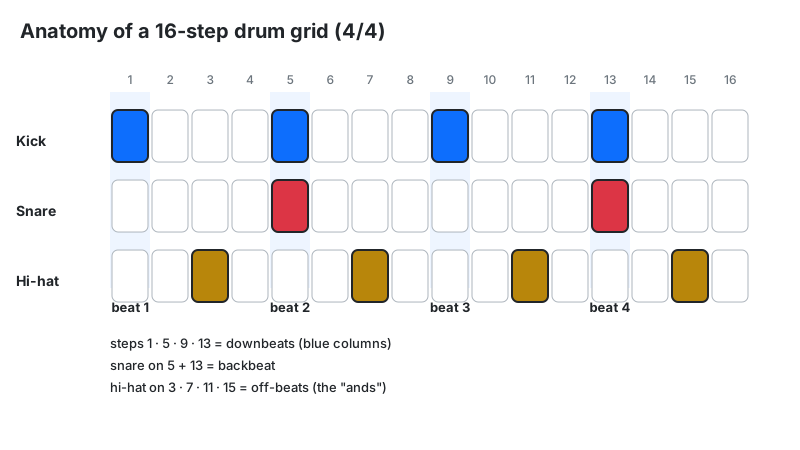
On a 16-step grid in 4/4, not all steps are equal. Steps 1, 5, 9, and 13 are the quarter-note downbeats — the pulse you nod your head to. Steps 3, 7, 11, and 15 are the "ands" between beats, where off-beat hi-hats live. Everything else is sixteenth-note detail.
| Steps | Musical position | Typical role |
|---|---|---|
| 1, 5, 9, 13 | Quarter-note downbeats | Kick drum foundation |
| 5, 13 | Beats 2 and 4 | Snare / clap backbeat |
| 3, 7, 11, 15 | Off-beats ("ands") | Open hats, syncopation |
| 2, 4, 6, 8, 10, 12, 14, 16 | Sixteenth subdivisions | Hi-hat drive, ghost notes, rolls |
Genre Groove Blueprints: Copy These Step Patterns
Start from a genre's rhythmic DNA, then change 2–3 steps to make it yours:
- House / Techno (124–128 BPM): kick on 1, 5, 9, 13 (four-on-the-floor); clap on 5, 13; open hats on 3, 7, 11, 15; closed hats on every even step.
- Boom-bap hip-hop (90–94 BPM): kick on 1, 7, 10; snare on 5, 13; hats on every step with swing near 12–16% on this slider — the pocket an MPC calls 56–58%. The lazy kick placement behind the grid is the whole sound.
- Trap (140 BPM, half-time feel): kick on 1, 8, 11; snare on 9 only (the "third-beat" snap); rapid hat rolls on 14–16 using the Triplet 16 division.
- Dembow / Reggaeton (~100 BPM): kick on 1, 4, 7, 9, 12, 15 — the tresillo's 3+3+2 grouping played twice across the bar; snare on 5 and 13 for the backbeat over it. That tresillo kick skeleton is non-negotiable.
- Drum and bass (172–176 BPM): kick on 1, 11; snare on 5, 13; two-step hats shuffling on the off-beats. Speed does the work — keep the pattern sparse.
Swing Percentage Translated to Milliseconds
Swing delays every off-beat sixteenth — steps 2, 4, 6, 8 and so on — by a fraction of one step's duration. The offset formula is:
Swing offset (ms) = (Swing% ÷ 100) × Step duration (ms)
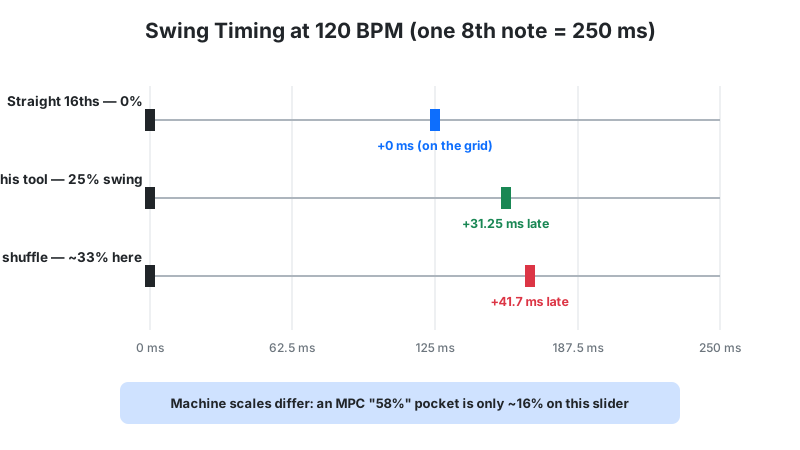
Worked example: at 120 BPM with the slider at 25%, one step lasts 125 ms. Each off-beat step shifts later by 0.25 × 125 = 31.25 ms. That small delay is the difference between a robotic grid and a head-nodding groove — long enough to feel, short enough to stay locked.
Reference points on this slider: 0% is machine-straight; about 33% equals a true triplet shuffle (the off-beat sits two-thirds through its pair, a 2:1 ratio); the 60% maximum pushes off-beats 60% of a step late — an extreme shuffle, well past triplet.
Read this slider on its own scale. On an MPC, swing percentages start at 50% for straight timing and the classic boom-bap pocket sits at 54–62%. This slider starts at 0% for straight, so the same pocket lands near 8–24% here, and the MPC's 66.7% triplet point lands near 33%. Same delays, different zero point — convert by the delay you want, not by the printed number.
Swing moves only the off-beats. The "e" and "a" of each beat shift; downbeats — and the snare on beats 2 and 4 — stay exactly in time, the way classic drum machines like the MPC and TR-909 handle swing.
From Browser to DAW: The Export Workflow
The Export JSON button opens your pattern as JSON text in a new browser tab — nothing downloads. The JSON holds your step grid (each drum voice as a row of 0s and 1s, where 1 is a hit) plus the pattern length. It does not store your BPM, swing, kit, or division, so note those separately. To continue in a DAW:
- Export the JSON, copy the text from the new tab, and save it in a text editor.
- In your DAW's drum sequencer (Ableton Drum Rack, FL Studio Channel Rack, or Logic's Step Sequencer), set the same BPM and step count.
- For each drum voice, enable the steps marked 1 — the grid transfers 1:1.
- Re-apply swing in the DAW with its groove/swing control, converting from this slider's scale using the swing section above.
Keep the JSON files as versioned sketches (chorus-v1.json, chorus-v2.json) — they weigh kilobytes, and Import JSON reloads any of them from a paste for quick auditioning.
Choosing a Pattern Length for Song Sections
Pattern length is an arrangement decision, not just a bigger grid. 16 steps (1 bar) is for sketching and for sections that must feel hypnotic — techno intros, trap verses. 32 steps (2 bars) lets you write call-and-response: keep bar one simple, add a fill or variation in bar two. 64 steps (4 bars) fits a full phrase with an intro, build, and turnaround — ideal for choruses and drops.
A practical workflow: sketch the verse at 16 steps, expand to 32 for the pre-chorus with one added fill, and open the full 64 for the chorus. For bar-to-time conversions at your tempo, use the BPM to milliseconds calculator.
Polyrhythm vs. Polymeter: Stop Mixing Them Up
A polyrhythm layers two subdivisions over the same timespan — 3 evenly spaced hits in the time of 2 beats (the 3:2 hemiola). A polymeter layers two different bar lengths sharing the same step duration — a 4-step loop against a 5-step loop, realigning every 20 steps (their lowest common multiple).
On this grid, accent steps 1, 6, and 11 — the closest grid positions — against straight quarter-note kicks for a 3-against-4 polyrhythm. A true polymeter can't loop here: every row shares the one pattern length you select, so voices can't cycle at different lengths. Take that idea to a DAW — a 12-step phrase against this 16-step bar realigns every 48 steps, their lowest common multiple.
Limitations
- Browser audio latency varies. The Transport clock keeps timing tight, but Bluetooth headphones and heavy system load can add 20–100 ms of output delay. Use wired headphones for critical groove work.
- Export is JSON text, not audio or MIDI. It opens in a new browser tab instead of downloading, and it stores only the grid and pattern length — BPM, swing, kit and division are not saved. You rebuild the sound in a DAW or re-record the browser output.
- No per-step velocity. Every hit plays at full volume, so ghost notes and accents must be programmed with density rather than dynamics.
- Fixed 4/4 framework. Odd meters like 7/8 or 5/4 can't be represented on the 16-step grid; approximate them with muted steps or use a DAW.
- Two kits only. The Classic and 505 kits cover a lot of ground, but they won't replace a full sample library for acoustic genres.
- Kit switching is unreliable. Choosing the 505 kit mid-session unloads the current samples and the tool asks for a page reload — and a reload restarts the tool on the Classic kit. Treat Classic as the working kit; the 505 option cannot be auditioned reliably in a normal session.
- Small speakers hide the low end. Phone and laptop speakers roll off hard below a few hundred hertz, so the kick loses its weight — judge the mix on headphones before you commit to a pattern.
Rhythm Pattern Maker vs. Alternatives
| Approach | Best for | Trade-off |
|---|---|---|
| This step sequencer | Fast groove sketching, learning rhythm theory | 16-step grid, two kits, JSON export only |
| DAW piano roll (Ableton, FL Studio) | Full productions, velocity, automation | Paid software, steeper learning curve |
| Drum pads / finger drumming | Human feel, live performance | Requires practice; timing depends on you |
| Hardware drum machines (TR-8S, MPC) | Tactile workflow, stage use | Costs hundreds of dollars |
| Online metronome | Practicing timing against a click | No drum sounds or patterns |
Use this tool to find the groove in minutes, then move to a DAW when the arrangement needs velocity, effects, and mixing. Pair it with the Scale Finder when your loop needs a bassline in key.
Frequently Asked Questions
This rhythm pattern maker is a free creative sketching tool for learning and inspiration. Patterns you program are yours to use in your own music.