Online Pitch Detector
Last updated: October 23, 2026 · Written by the Pitch Detectors Editorial Team
Real-time voice & pitch analyzer for musicians and vocalists
Get Started:
- Click the START button below
- Click "Allow" when asked about microphone access
- Sing or play a note into your microphone
- Watch the note appear on screen and on the piano keyboard
- The tuning meter shows if you're sharp (right), flat (left), or in tune (center)
Piano Keyboard
A pitch detector listens through your microphone and instantly shows which musical note you produce, its frequency in Hertz, and how many cents sharp or flat you are. This one runs entirely in your browser — nothing installs, and no audio leaves your device. Press START, allow microphone access, and sing or play one steady note.
Key Takeaways
- This detector finds your note with autocorrelation: it measures how fast your sound wave repeats and converts that rate into a note, a frequency, and a cents reading.
- The big display shows the nearest note plus octave; below it sit the exact frequency in Hz and your cents sharp or flat.
- It hears one note at a time — voice, flute, and single guitar strings work; chords, drums, and heavy distortion do not.
- A noise gate ignores sounds quieter than an RMS level of 0.01, so room hum never prints a false note — the display holds your last reading, and "--" appears only before your first note registers.
- Everything runs locally in your browser — no audio is recorded, stored, or sent anywhere.
What Is a Pitch Detector?
Singers check intonation during practice; instrumentalists use detectors as tuners; teachers use them for ear training — students see the note they sang and how far it drifted. Browser-based detectors need no app download: the Web Audio API gives any modern browser the raw microphone data the math needs.
How This Pitch Detector Works
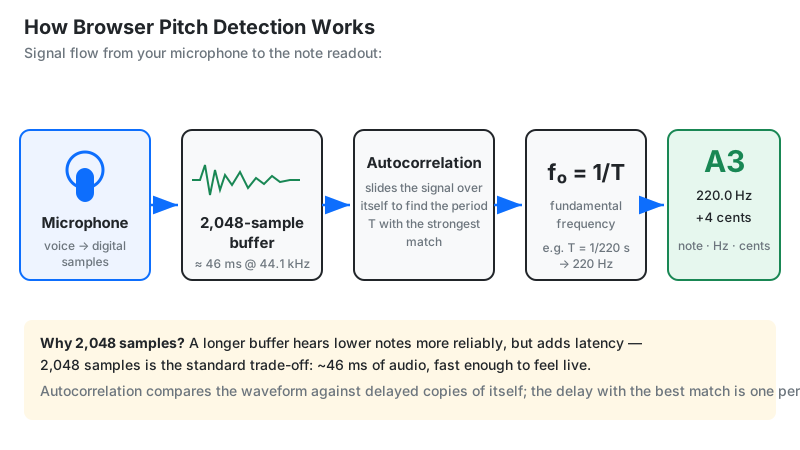
This detector grabs short slices of microphone audio, measures how fast the waveform repeats, and turns that rate into a note name, a frequency, and a cents reading.
The browser requests the microphone with getUserMedia and routes the stream into the Web
Audio API. An analyser node captures 2,048-sample slices — about 43 milliseconds at the common 48 kHz sample rate. A normalized autocorrelation algorithm compares each
slice against time-shifted copies of itself; the shift with the strongest match is the wave's period
(τ), and the fundamental frequency is f₀ = sample rate ÷ τ. This
time-domain approach stays accurate on low notes, where FFT analysis suffers from spectral leakage.
The tool maps f₀ to the chromatic scale at A4 = 440 Hz with the MIDI formula n = 69 + 12 × log₂(f₀ ÷ 440). Rounding n gives the nearest note; the leftover fraction becomes the cent deviation: cents = 1200 × log₂(f₀ ÷ target). Two guardrails keep the display honest: sounds quieter than an RMS level of 0.01 are rejected instead of printing a false note, and only 50–2000 Hz is reported. The integer-multiple harmonics riding on your fundamental are ignored — the algorithm tracks the whole wave's repetition rate.
| Detection Parameter | This Tool's Value |
|---|---|
| Analysis window | 2,048 samples (~43 ms at 48 kHz) |
| Noise gate | RMS below 0.01 rejected |
| Detection range | 50–2000 Hz |
| Correlation threshold | 0.9 |
| Display latency | ~30–60 ms |
Methodology note: this chain was verified by running the page's own note-mapping code on fixed reference frequencies in October 2026 — 440 Hz reads A4 at 0 cents, 446 Hz reads A4 at +23 cents, and silence returns no reading. The best-known refinement of the method is the YIN algorithm (de Cheveigné & Kawahara, JASA, 2002).
From Voice to Note: The Math, Step by Step
Here is exactly what happens inside the tool when you sing a slightly sharp A at 446 Hz:
- Capture: the analyser grabs 2,048 samples — one 43 ms slice of your voice.
- Period hunt: autocorrelation finds the strongest repetition at τ ≈ 107.6 samples.
- Frequency: f₀ = 48,000 ÷ 107.6 ≈ 446 Hz.
- Nearest note: 69 + 12 × log₂(446 ÷ 440) = 69.23, which rounds to MIDI 69 — A4.
- Tuning: 1200 × log₂(446 ÷ 440) = +23.4 cents against the 440 Hz target — the display rounds to +23 sharp.
- Accuracy score: 100 − 23 = 77%; the needle sits at about 66% of the meter's width, right of the green zone — the meter maps ±50 cents onto 15%–85% of its width.
Every reading on screen is this chain, refreshed many times per second.
How to Use This Pitch Detector
Press START, allow the microphone, and sing or play one steady note — the tool does the rest.
- Press "🎤 START DETECTION." The button turns red and reads STOP while listening.
- Click Allow when your browser asks for microphone permission (fixes below if no prompt appears).
- Sing or play one steady note — a straight "ah" with no vibrato reads cleanest.
- Read the big display: note plus octave (e.g. A4), exact frequency in Hz, and cents sharp (+) or flat (−).
- Watch the tuning needle: left is flat, right is sharp, centered in green is in tune.
- Check the piano keyboard — your note lights up — and the stat boxes for note, frequency, and accuracy.
- Press STOP when finished to release the microphone.
Reading Your Result
The cents number tells you how far you are from perfect tuning — and whether the gap matters:
| Cents Off | What It Sounds Like | What to Do |
|---|---|---|
| 0–5 | In tune — inaudible to nearly everyone | Nothing. This is a finished tuning job. |
| 6–15 | Slightly off — trained ears catch it in isolation | Fine for practice; adjust before recording. |
| 16–50 | Clearly audible; at 50 you are a quarter tone off | Retune the string or nudge the pitch. |
| 51–100 | Approaching the next semitone — sounds like the wrong note | Stop and check you are aiming at the right note. |
+ means tune down, − means tune up. String players approach from below: tuning up keeps string tension settled. The accuracy score is 100 minus your cent deviation. Convert any cent gap with the cents calculator.
Match Your Note to a Vocal Range
Sing your lowest and highest comfortable notes into the detector, then find your voice type in this table:
| Voice Type | Typical Note Range | Fundamental Frequency Range |
|---|---|---|
| Bass | E2 – E4 | 82.41 Hz – 329.63 Hz |
| Baritone | A2 – A4 | 110.00 Hz – 440.00 Hz |
| Tenor | C3 – C5 | 130.81 Hz – 523.25 Hz |
| Contralto | F3 – F5 | 174.61 Hz – 698.46 Hz |
| Mezzo-Soprano | A3 – A5 | 220.00 Hz – 880.00 Hz |
| Soprano | C4 – C6 | 261.63 Hz – 1046.50 Hz |
The vocal range finder walks through this test note by note.
Why the Reading Jumps: 6 Common Glitches and Fixes
A jumping reading is almost never a broken detector:
| What You See | Why It Happens | Fix |
|---|---|---|
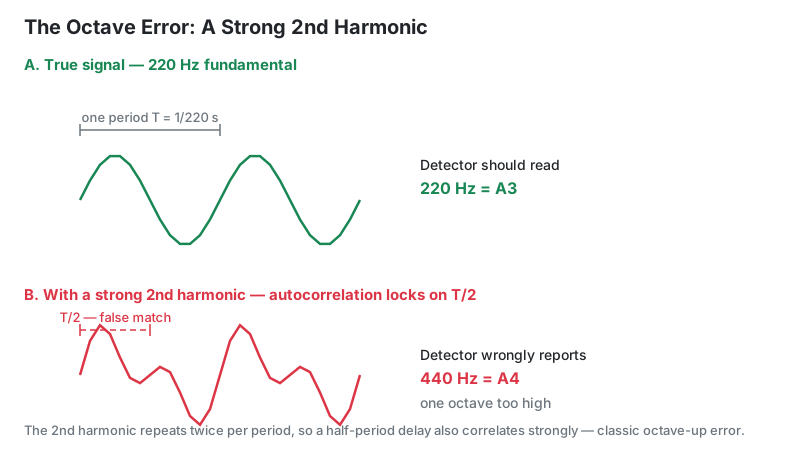
| Note an octave too low or high (A3 instead of A4) | Octave error: a strong second harmonic makes the period look half or twice as long | Get closer to the mic and use a purer vowel |
| No note appears when you start singing | Your signal is under the 0.01 RMS noise gate, so the reading is rejected — the display stays on "--" or holds your previous note | Move closer, raise input volume, unmute the mic |
| Needle flickers with nobody singing | Background noise (fan, traffic) analyzed as signal | Move somewhere quieter; keep the mic close |
| Reading wobbles ±20 to 50 cents | Natural vibrato — your pitch is genuinely moving | Sing a straight tone to find your center first |
| Note flips between two pitches | Consonants and breath between sustained notes | Hold one vowel ("ah", "oo"); avoid "s"/"t" sounds |
| Display lags behind your voice | The 43 ms analysis window plus one screen refresh | Normal — hold each note a little longer |
Microphone Not Working? Permission and HTTPS Fixes
If START shows the warning box or nothing happens, the cause is almost always a blocked microphone permission. Mic access requires a secure context (HTTPS), per MDN's Web API documentation — this site is served over HTTPS, so the browser should prompt you. If it does not, the permission was likely denied earlier:
- Chrome / Edge: click the camera icon left of the address bar, set Microphone to Allow, reload.
- Safari (Mac): Safari menu → Settings → Websites → Microphone → Allow for this site. iPhone: Settings → Safari → Microphone → Allow.
- Firefox: click the lock icon in the address bar, clear the blocked microphone permission, reload.
One more trap: in-app browsers (Instagram, TikTok, Facebook) usually block microphone access. Open the page in Safari or Chrome instead.
Still nothing? Test the mic itself with the microphone test tool — if that page hears you, the fault is this page's permission, not your hardware.
Can a Pitch Detector Hear Chords?
No — this detector hears exactly one pitch at a time. Autocorrelation assumes one repeating period. A chord stacks two or more competing periods, so the strongest match jumps between them and the display flickers between notes. The same happens with piano notes under the sustain pedal, drums, and heavily distorted guitar.
Works well: voice, whistling, flute, trumpet, violin, and single guitar or bass strings played cleanly. For naming chords, use the chord identifier instead — it is built for harmony; this tool is built for single melodic lines.
The 439 Hz Story: Why Concert Pitch Is A440
A440 is a compromise — and the original agreement was 439 Hz, not 440. In 1939 an international conference settled on 440 Hz for the A above middle C, splitting the difference between the lower French pitch (435 Hz, the diapason normal set by law in 1859) and higher pitches used elsewhere. The conference first agreed on 439 Hz; accounts say it moved to 440 partly because 439, a prime number, was awkward to generate with the lab equipment of the day. ISO adopted 440 Hz in 1955 as ISO 16 and reaffirmed it in 1975.
That is this detector's reference. In practice pitch still drifts — many European orchestras tune to 441–444 Hz — so if your ensemble tunes sharp of 440, expect a reading a few cents flat. The tool is right; your reference just differs.
Limitations
- One note at a time. Chords, double-stops, and percussion produce flickering or wrong readings.
- Fixed A440 reference. It cannot follow an ensemble tuned to 442 Hz — interpret cents against your own reference.
- Vibrato, bends, and scoops register as tuning errors. The detector measures what it hears, not what you meant.
- Range is 50–2000 Hz. Sub-bass below about 50 Hz (roughly G1) and whistle tones above roughly B6 fall outside detection.
- Sources under the 0.01 RMS noise gate are ignored. The display keeps its last reading rather than chasing room noise, so a quiet passage never prints a note.
- Mic processing varies. Phones and laptops apply noise suppression and echo cancellation you cannot always switch off, which can smear the waveform — and room echo adds delayed copies of your note.
- About 30–60 ms of latency. Fine for practice, not for sample-accurate recording work.
Pitch Detector vs. Alternatives
Pick the tool that matches the job. One distinction first: a pitch detector names any note you play and shows its exact frequency; a tuner starts from a known target — a string or note — and tells you whether to tune up or down. Use the detector to identify notes, the tuner to adjust an instrument to them.
| Tool | Best For | Trade-off |
|---|---|---|
| This online pitch detector | Free instant note + Hz + cents; no install | Needs mic + HTTPS; one note at a time |
| Clip-on vibration tuner | Tuning on a noisy stage (feels vibration, ignores room noise) | Costs money; one instrument |
| Online guitar tuner | Tuning each string to its target note | Guitar-specific only |
| DAW pitch editor (Melodyne, Auto-Tune) | Fixing pitch in recorded audio | Paid; edits recordings, doesn't train your ear |
| Tuning fork or pitch pipe | A reliable acoustic reference, no battery | One fixed pitch; no cents readout |