Transpose Calculator: Shift Notes, Chords & Keys
Last updated: October 23, 2026 · Written by the Pitch Detectors Editorial Team
A transpose calculator shifts every note of a melody or chord progression up or down by a fixed number of semitones, so the music lands in a new key with every interval untouched. Type note names — flats, sharps, and octave numbers included — set the shift, and copy the result. Chord symbols go in as roots: enter C, F, G for a C-major progression, and the calculator returns the transposed roots.
Key Takeaways
- Transposition moves every note by the same interval, so a melody keeps its character and harmony — it only sounds higher or lower.
- One semitone = one half step = one guitar fret. Twelve semitones = one octave.
- A capo on fret n raises the sounding pitch n semitones; to find the shapes for a target key, transpose the target chords down by the fret number.
- B♭ trumpet sounds a major 2nd (2 semitones) below its written pitch; E♭ alto sax sounds a major 6th (9 semitones) below.
- Every result carries an octave number and a sharp spelling: a bare C returns as C4, and F♯ stands in for G♭ — respell to match your key signature.
What Is Musical Transposition?
Musical transposition is shifting a melody, chord progression, or complete piece up or down by a fixed interval while preserving all internal interval relationships. Every note moves the same distance, so the music keeps its harmonic character — it sounds in a higher or lower key. Three musicians transpose for three different reasons:
- Singers move a song 1–4 semitones so the highest notes sit inside a comfortable range.
- Guitarists combine a transposed chart with a capo to keep easy open shapes in a new key.
- Arrangers rewrite concert-pitch parts for transposing instruments — a B♭ trumpet part sits 2 semitones above the piano part it plays along with.
How This Transpose Calculator Works
The calculator numbers the twelve chromatic pitches 0–11 (C = 0 through B = 11), adds your semitone shift, and wraps around the octave boundary. Crossing the boundary adjusts the octave number automatically: C4 shifted down 1 semitone returns B3, and B♭ shifted up 2 returns C5 — the note climbs into the next octave exactly where the piano keyboard does.
Input is normalized before the math runs: flat spellings convert to sharp equivalents (D♭ → C♯, B♭ → A♯), lowercase works (bb is read as B♭), and the ♭/♯ symbols are accepted beside ASCII b and #. A note without an octave number is treated as octave 4 — a bare C transposed +2 returns D4.
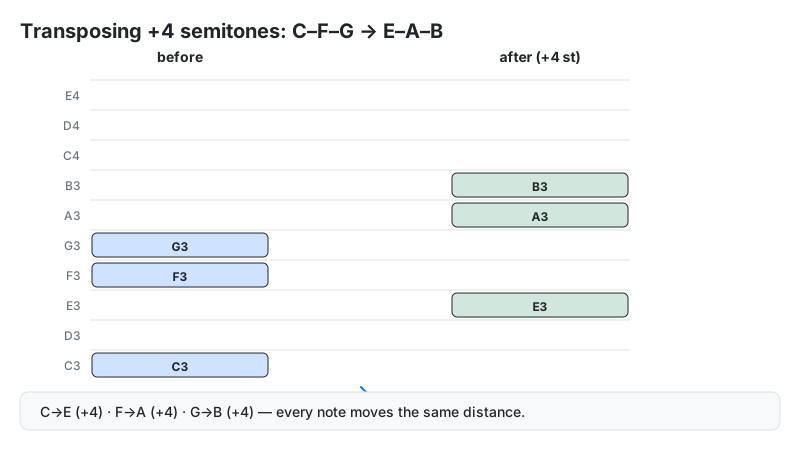
Method: new index = (note index + semitones + octave shift × 12) mod 12. Every worked example on this page was produced with the calculator's own code and checked against manual chromatic-scale counting — C, F, G at +4 returns E4, A4, B4, and E4 at −4 returns C4.
Interval math follows twelve-tone equal temperament (12-TET), the standard tuning of modern Western music.
Sources: transposing-instrument intervals per Steps to Music Theory (TAMUCC) and Music Theory Academy.
Transposition Formula and Worked Example
Transposing is addition on the chromatic scale. Count the starting note as position 0, then move up or down the requested number of half steps:
Transposed note = start note + semitones (mod 12)
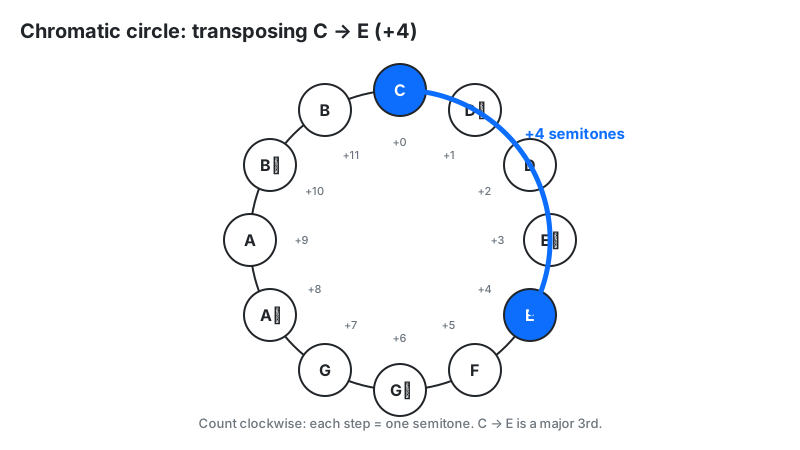
Worked example: transpose the I–IV–V progression in C major (C – F – G) up 4 semitones:
- C + 4: C→C♯(1)→D(2)→D♯(3)→E(4)
- F + 4: F→F♯(1)→G(2)→G♯(3)→A(4)
- G + 4: G→G♯(1)→A(2)→A♯(3)→B(4)
- Result: the calculator displays E4 – A4 – B4 — the I–IV–V progression in E major. Same shape, new key; the 4 is the default octave it assigns to bare note names.
How to Use the Transpose Calculator
- Enter notes or chord roots: type note names separated by commas (e.g.
C, E, Gfor a melody,C, F, Gfor chord roots). Add octave numbers where the exact register matters (C4, B♭3). - Set semitones: enter a positive number to transpose up or a negative number to transpose down (e.g.
-2). - Octave shift (optional): the dropdown moves the whole result 1–3 octaves up or down, independent of the semitone shift.
- Press Transpose (or hit Enter inside the notes field) to see the result; Copy Result pastes it into your chord chart or notation software.
- Keyboard shortcut: with the notes field unfocused, press ↑ / ↓ to nudge the transposition up or down one semitone at a time.
Reading Your Result: Common Transpositions
Your result lists each input note shifted by the requested interval, with its octave number attached. Musicians reach for these transpositions most often:
| Goal | Semitones | Example |
|---|---|---|
| Up a whole step | +2 | C → D |
| Down a whole step | −2 | D → C |
| Up a minor 3rd | +3 | A → C |
| Up a major 3rd | +4 | C → E |
| Up a perfect 4th | +5 | C → F |
| Up a perfect 5th | +7 | C → G |
| Up one octave | +12 | C4 → C5 |
Next step: if the result contains many sharps in a flat key (or vice versa), respell the enharmonic notes to match your key signature — see the spelling section below.
Capo Transposition Chart: Fret to Semitone
A guitar capo transposes by exactly one semitone per fret. Clamp it on fret n and every chord shape you play sounds n semitones higher than written.
| Capo fret | Semitone shift | G-shape chords sound as | C-shape chords sound as |
|---|---|---|---|
| 1 | +1 | A♭ | D♭ |
| 2 | +2 | A | D |
| 3 | +3 | B♭ | E♭ |
| 4 | +4 | B | E |
| 5 | +5 | C | F |
Example: you know your G-shape fingerings but the singer wants A major — clamp the capo on fret 2 (+2 semitones: G→G♯→A) and play your familiar shapes. Fret 4 reaches B (+4 semitones). Confirm in the calculator: G, C, D at +4 returns B4, E4, F♯4.
The reverse direction confuses most beginners. A capo raises the sounding pitch; this calculator changes the written notes. To keep a song in its original key after transposing the chart up, move the capo down by the same number of frets — transpose +2 (C→D on paper) and slide the capo from fret 3 to fret 1, and the audience still hears the original key. To drop the capo entirely, transpose the chart up by the capo's fret number: a capo-3 chart transposed +3 plays with no capo at the same pitch.
Transposing Instruments: Semitone Chart
A transposing instrument sounds at a different pitch than the written notes. Convert between concert pitch (the actual sounding pitch) and written pitch (what the player reads) with the semitone values below.
| Instrument | Sounds below written | Semitones | To get written pitch from concert pitch, transpose |
|---|---|---|---|
| B♭ trumpet, clarinet, soprano sax | Major 2nd | −2 | Up 2 semitones |
| E♭ alto sax, alto clarinet | Major 6th | −9 | Up 9 semitones |
| F horn, English horn | Perfect 5th | −7 | Up 7 semitones |
| B♭ tenor sax, bass clarinet | Major 9th | −14 | Up 14 semitones |
| A clarinet | Minor 3rd | −3 | Up 3 semitones |
| Guitar | Octave | −12 | Up 12 semitones |
| Piccolo | Sounds an octave higher | +12 | Down 12 semitones |
Example: the band plays in concert B♭. The trumpet player needs their part written a major 2nd higher — in C. Enter the concert-pitch notes with +2 semitones and hand the result to the trumpet section.
Enharmonic Spelling: F♯ or G♭?
After transposing, you may get a sharp spelling where a flat reads better — or the reverse. F♯ and G♭ are the exact same pitch (enharmonic equivalents); the right spelling is the one that fits your key signature. The calculator itself demonstrates the point: enter E♭ at −2 semitones and it returns C♯4 — the correct pitch, spelled the sharp way. Working in E♭ major, write D♭ instead.
- Sharp keys (G, D, A, E major): prefer sharps — write F♯, C♯, G♯.
- Flat keys (F, B♭, E♭, A♭ major): prefer flats — write G♭, D♭, B♭.
- Rule of thumb: each letter name should appear once per scale. If your transposed scale already has a G, the altered note is better spelled as F♯ than G♭.
The 15 major key signatures — and where the enharmonic pairs come from:
| Sharp keys | Accidentals | Flat keys | Accidentals |
|---|---|---|---|
| G | F♯ | F | B♭ |
| D | F♯, C♯ | B♭ | B♭, E♭ |
| A | F♯, C♯, G♯ | E♭ | B♭, E♭, A♭ |
| E | + D♯ | A♭ | + D♭ |
| B | + A♯ | D♭ | + G♭ |
| F♯ | + E♯ | G♭ | + C♭ |
| C♯ | + B♯ | C♭ | + F♭ |
Three pairs are enharmonic equivalents — B = C♭, F♯ = G♭, C♯ = D♭: identical pitch, different spelling. No key signature mixes sharps and flats. (C major, with no accidentals, completes the set of 15.)
This calculator always outputs sharp spellings, so in flat keys do a quick find-and-replace: C♯→D♭, F♯→G♭, G♯→A♭, A♯→B♭, D♯→E♭.
Transposing for a Vocalist: A 4-Step Workflow
Moving a song into a singer's comfortable key is the most common real-world transposition. Follow these steps:
- Find the original key. Check the key signature or the final chord of the song (e.g. original key: E major).
- Find the singer's key. Have them hum the chorus; identify the key where the highest note sits comfortably (e.g. they top out happily in C major).
- Count the semitones. E down to C is 4 semitones (E→E♭ = 1, D = 2, D♭ = 3, C = 4), so transpose by −4.
- Transpose and sanity-check the range. Run the chord progression through the calculator at −4, then confirm the new highest and lowest melody notes sit inside the singer's range — transposing down drags the low notes down too.
The Nashville Number Shortcut
The Nashville Number System writes chords as scale degrees (1, 4, 5) instead of letter names, which makes a progression key-independent. "1 – 5 – 6 – 4" is C–G–Am–F in C major and G–D–Em–C in G major — no recalculation needed.
Convert a progression to numbers once, in the original key, and you never transpose again — just read the numbers in any new key. Session players use it daily because a bandleader can call "take it up a whole step" mid-rehearsal and nobody rewrites a chart. For the distance between any two notes, try our interval calculator.
Limitations
- Chord suffixes are not transposed. The parser reads one note per entry: Cm, Fmaj7 and similar symbols pass through unchanged — the autocomplete suggestions included. Enter the root (C, F) and re-attach the suffix (m, maj7) to the result yourself.
- Digits are octave numbers. Entering
G7is interpreted as the note G in octave 7, not a G dominant-7th chord. Transpose the root (G) and re-add the extension (7) yourself. - Output uses sharp spellings only. Flat inputs are normalized to sharps before transposing (B♭ becomes A♯). See the enharmonic section above for converting results back to flats in flat keys.
- Double accidentals are not parsed. Spellings like E♯ or F♭ pass through unchanged; enter the enharmonic natural or single-accidental note instead.
- Key signatures are not rewritten. The calculator moves pitches; you still need to update the key signature on your sheet music.
- Twelve-tone equal temperament assumed. Historical temperaments and microtonal music divide the octave differently.
- Capo math is sounding pitch. The tool shifts written notes; it does not track which fret your hand plays. Use the reverse-arithmetic rule in the capo section to convert between the two.
Transpose Calculator vs Alternatives
| Method | Best for | Drawback |
|---|---|---|
| This transpose calculator | Quick, exact semitone shifts of notes and progressions, with octave control | Sharp-only spelling; chord suffixes and key signatures handled manually |
| Manual chromatic counting | Learning the theory deeply | Slow and error-prone past a few notes |
| DAW transpose (MIDI) | Full arrangements with playback | Requires a DAW and MIDI data |
| Capo | Guitarists staying in easy chord shapes | Only raises pitch; limited to ~5 useful frets |
| Nashville numbers | Bands that change keys on the fly | Learning curve; useless for fixed sheet music |
Frequently Asked Questions
Related tools: cents calculator for fine-tuning pitch differences, note to frequency for exact Hz values, pitch shift calculator for audio files, and key transposition for DJ sets.