Free Pitch Detector Tools: Tune, Analyze & Convert
Last updated: October 23, 2026 · Written by the Pitch Detectors Editorial Team
Pitch detector tools measure, convert, and calculate musical pitch. These 9 free tools tune instruments, name notes from your microphone in real time, convert between frequencies and note names, and handle the math of cents, transposition, and harmonics. Pick a card below — no sign-up, no downloads.
Guitar Tuner
Real-time tuner for guitar, bass, and ukulele: play a string and see the note plus cents sharp or flat.
Pitch Detector
Live pitch analyzer for voice and instruments: sing or play and watch the note, frequency, and cents update instantly.
Pitch Shift Calculator
Work out the exact semitone or cent shift that moves audio between keys or tunings, without changing tempo.
Vocal Range Finder
Sing your lowest and highest comfortable notes into the mic and get your range plus voice-type classification.
Frequency to Note
Convert any frequency in Hz to its corresponding musical note with cents deviation.
Note to Frequency
Get the exact frequency in Hz for any note, at A4 = 440 Hz or your choice of tuning standard.
Cents Calculator
Measure the distance in cents between any two frequencies or notes.
Transpose Calculator
Move notes, chords, and scales up or down by any number of semitones — written to concert pitch and back.
Harmonic Series
Enter a fundamental frequency and see its overtone series with frequencies and cents offsets.
Key Takeaways
- 9 free tools: guitar tuner, pitch detector, pitch shift calculator, vocal range finder, two frequency↔note converters, cents calculator, transpose calculator, and harmonic series calculator.
- The international tuning standard is A4 = 440 Hz (ISO 16) — every converter on this page defaults to it.
- A cent is 1/100 of a semitone; cents = 1200 × log₂(f₂/f₁). Trained ears hear mistuning from about 5–10 cents.
- Browser pitch detection runs autocorrelation-style algorithms on your microphone input and reports pitch in cents; your microphone and room noise set the practical accuracy, not the math.
- Nothing installs and no audio uploads: converters run on math; detectors process audio on your device.
What Are Pitch Detector Tools?
Definition: Pitch detector tools are utilities that measure, convert, and calculate musical pitch. Listening tools report the note you play or sing in real time through your microphone; math tools convert frequencies to note names, measure intervals in cents, or transpose music between keys — no microphone needed.
Players tune instruments with them, singers check intonation and find their range, and arrangers do the arithmetic of transposition and tuning systems. The listening tools need only a browser with microphone permission; the math tools need nothing but the page.
The 9 Tools in This Category
Guitar Tuner — real-time tuner for guitar, bass, and ukulele: play a string and read the note plus cents sharp or flat.
Pitch Detector — live pitch analyzer for voice and instruments; watch the detected note, frequency, and cents update as you play or sing.
Pitch Shift Calculator — the exact semitone or cent shift that moves audio from one key or tuning to another, tempo unchanged.
Vocal Range Finder — sing your lowest and highest comfortable notes into the mic; get your range and voice-type classification.
Frequency to Note — any frequency in Hz becomes the nearest note name with cents deviation.
Note to Frequency — any note becomes its exact frequency in Hz, at your choice of tuning standard.
Cents Calculator — the distance in cents between two frequencies or two notes.
Transpose Calculator — notes, chords, and scales moved by any number of semitones, including written↔concert pitch for transposing instruments.
Harmonic Series — a fundamental frequency expanded into its overtone series, with frequencies and cents offsets.
How to Choose the Right Tool
| Your task | Use this tool |
|---|---|
| Tune a guitar, bass, or ukulele | Guitar Tuner |
| See what note you're singing or playing live | Pitch Detector |
| Find your voice type | Vocal Range Finder |
| Convert 442 Hz to a note name | Frequency to Note |
| Find the exact Hz of F♯3 | Note to Frequency |
| Measure how far apart two pitches are | Cents Calculator |
| Move a song from C to E♭ | Transpose Calculator |
| See the overtones of a 110 Hz fundamental | Harmonic Series |
Cents: The Unit That Measures "In Tune"
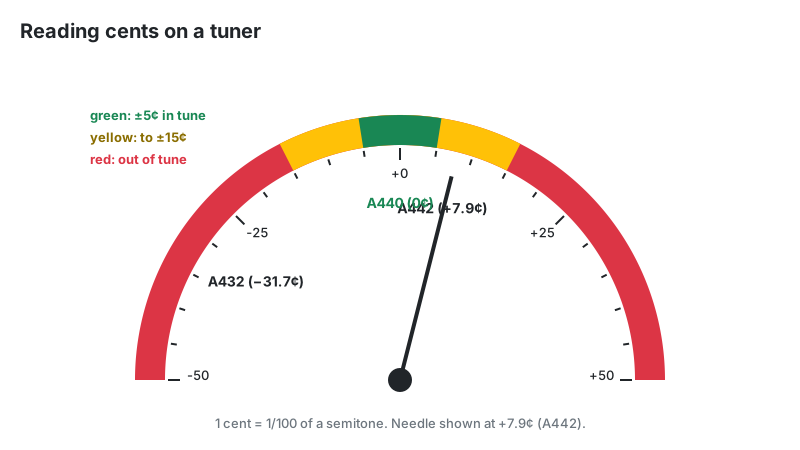
A cent is one hundredth of an equal-tempered semitone — 100 cents per semitone, 1,200 per octave. The formula turns any frequency ratio into cents:
cents = 1200 × log₂(f₂ / f₁)
This one formula powers the Cents Calculator, the deviation readout in Frequency to Note, and the needle on the tuners. Four reference points worth knowing:
| Comparison | Cents | What it means |
|---|---|---|
| A4 = 432 Hz vs. 440 Hz | −31.8 | The "432 Hz tuning" sits about a third of a semitone flat of standard |
| A4 = 442 Hz vs. 440 Hz | +7.9 | Common orchestral tuning, slightly sharp of standard |
| Just major third (5:4) vs. equal-tempered | −13.7 | Equal temperament's major third sounds noticeably sharp to a just-intonation ear |
| Human detection threshold | ~5–10 | Most trained listeners hear mistuning from about 5–10 cents |
Practical rule: within ±5 cents counts as in tune for ensemble playing; studio work often demands ±3 cents.
How Browser Pitch Detection Works
Grant microphone access and the browser captures audio, then runs a pitch-detection algorithm — usually autocorrelation or its refined descendant YIN. The algorithm finds the period that best repeats in the waveform and converts it to a frequency. The Web Audio API's AnalyserNode supplies the raw samples; all processing happens on your device.
The math resolves pitch to the nearest cent; how steady the reading looks in practice depends on your microphone and your room. Three things degrade it: background noise (the algorithm locks onto the loudest periodic signal — possibly a fan), room reverberation (reflections smear the periodicity), and weak fundamentals (some instruments and vocal fry produce stronger overtones than fundamental, causing octave errors). If the tuner jumps an octave, play or sing louder and closer to the mic. For level checks rather than pitch, the Decibel Meter shows what your mic is actually hearing.
Transposing Instruments: Why the Transpose Tool Exists
Many wind instruments transpose: the written note differs from the sounding pitch. A B♭ trumpet's written C sounds as B♭ — a major second lower. Arrangers constantly convert written pitch to concert pitch, and the Transpose Calculator automates that conversion.
| Instrument | Transposition | Written C sounds as |
|---|---|---|
| B♭ trumpet, clarinet, tenor sax | Down a major 2nd | B♭ |
| E♭ alto sax, baritone sax | Down a major 6th | E♭ |
| F horn | Down a perfect 5th | F |
| Piccolo | Up one octave | C (one octave higher) |
| Double bass, guitar | Down one octave | C (one octave lower) |
To convert written pitch to concert pitch, transpose downward by the instrument's interval (upward for piccolo). Guitar music already accounts for its octave transposition, so guitarists ignore it.
Vocal Ranges and Voice Types
The Vocal Range Finder measures your lowest and highest comfortable sung notes and maps them to the standard choral voice types. These boundaries are approximate — real voices overlap them.
| Voice type | Typical range |
|---|---|
| Soprano | C4 – C6 |
| Mezzo-soprano | A3 – A5 |
| Contralto | F3 – F5 |
| Tenor | C3 – C5 |
| Baritone | A2 – A4 |
| Bass | E2 – E4 |
Range is only half the classification. Tessitura — where your voice sounds best and tires least — matters as much. A baritone who can squeak out a C5 is still a baritone if his comfortable notes sit in the A2–A4 band.
The Harmonic Series and Why Instruments Sound Different
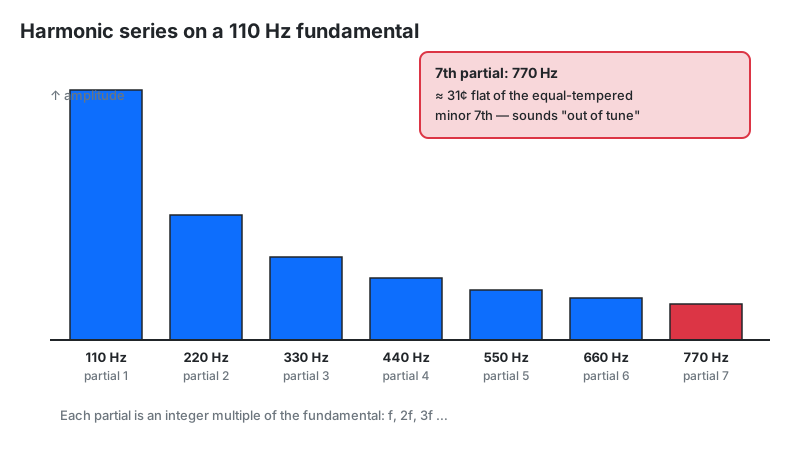
Play an A at 110 Hz and you hear more than 110 Hz — you hear 110, 220, 330, 440 Hz, and beyond: integer multiples of the fundamental. That stack is the harmonic (overtone) series, and its relative strengths decide what makes a trumpet sound like a trumpet and a flute like a flute. The Harmonic Series tool lists these partials with frequencies and cents offsets. The 7th partial sits about 31 cents flat of equal temperament — the reason brass players lip it up.
Who These Tools Are For
Instrumentalists tune before practice and check intonation during it.
Singers find their range and voice type, and verify they hold pitch on long phrases.
Arrangers and composers transpose parts for transposing instruments and convert note names to frequencies for synths and samplers.
Audio students see the math behind tuning systems — cents, just intonation, the harmonic series — made concrete.
Limitations
- Microphone quality sets the ceiling. Laptop mics in noisy rooms give jumpy readings; a quiet room matters more than an expensive mic.
- Polyphonic audio confuses detectors. These tools track one pitch at a time — chords and full mixes need dedicated polyphonic software.
- Equal temperament is assumed. Note-name converters use 12-tone equal temperament; just-intonation and microtonal contexts need manual adjustment.
- Octave errors happen. Strong overtones can make a detector report double or half the true pitch — if the reading looks wrong, it probably is.
Browser Tools vs. Hardware Tuners vs. Plugins
| These browser tools | Clip-on tuner | DAW tuner plugin | |
|---|---|---|---|
| Cost | Free | $10–$40 | Often bundled free |
| Needs | Browser + mic | Batteries | A DAW session |
| Best for | Quick checks, theory math, transposition | On stage, noisy rooms (vibration sensing) | Tracking and mixing inside a project |
| Weak at | Noisy environments | Math conversions | Anything outside the DAW |