A loudness meter measures how loud audio feels to human ears, in LUFS — not just peak levels. This free online loudness meter watches your live microphone input and estimates momentary, short-term, and integrated LUFS plus a held peak readout, so you can see loudness move in real time and learn what each number means.
Key Takeaways
- LUFS measures perceived loudness per the ITU-R BS.1770 standard; streaming platforms normalize to it, not to peaks.
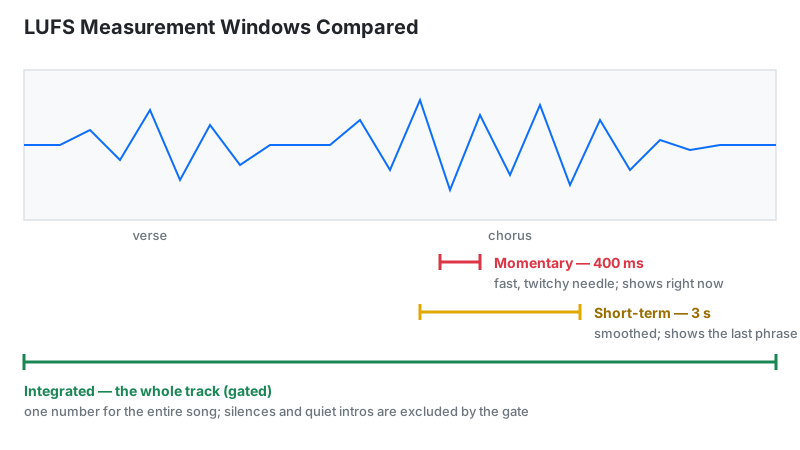
- Momentary (400 ms), short-term (3 s), and integrated (whole program, gated) answer 3 different questions.
- This browser loudness meter gives a simplified RMS-based estimate — no K-weighting, no gating, no oversampled true peak. Treat readings as guidance, not compliance numbers.
- Streaming targets: Spotify −14, YouTube −14, Apple Music −16 LUFS; keep true peak under −1 dBTP.
- Platforms turn loud masters down — crushing your track gains nothing on streaming.
What Is a Loudness Meter?
A loudness meter measures perceived loudness in LUFS (Loudness Units relative to Full Scale), following the ITU-R BS.1770 standard — unlike a peak meter, it models how human ears actually hear. Two tracks peaking at 0 dBFS can feel completely different in volume; at matched LUFS they feel the same. Every major streaming platform normalizes playback to LUFS, which makes it the number that decides how loud your music actually plays.
Real loudness meters apply K-weighting — a high-shelf lift of about 4 dB on the top octaves plus a gentle high-pass that trims sub-bass — because ears hear mids and highs as louder than lows at equal energy. This browser loudness meter skips those filters and estimates from raw signal energy, so treat its readings as a learning estimate, not a delivery number.
How This Loudness Meter Works
Press Start Loudness Meter and the page captures your microphone through the Web Audio API. This loudness meter estimates with a simplified RMS method, not the full BS.1770 chain. Each audio frame's RMS energy converts to momentary LUFS with 20·log₁₀(RMS) − 0.691, floored at −70 LUFS.
Momentary shows the latest frame. Short-term averages the last 10 updates — about half a second of audio, not a true 3-second window. Integrated is a running average of every momentary value since you pressed Start; with no silence gating, quiet passages drag it down. The peak card holds the highest sample seen so far in dBFS — a sample-peak hold, not 4×-oversampled true peak, so inter-sample overs stay invisible. The graph plots momentary LUFS over the last 60 updates.
Validation you can repeat: feed pink noise at −20 dBFS RMS into the input and momentary settles near −20.7 LUFS. A −20 dBFS-peak sine reads about −23.7 LUFS instead, because a sine's RMS sits 3 dB below its peak — the math checks out.
Last reviewed: October 2026. Method matches the on-page script; BS.1770-4, EBU R128, and Spotify/Apple/YouTube published targets referenced below.
LUFS, Gating, and True Peak: Worked Example
Integrated LUFS in the real standard is a gated average, computed in 4 steps:
- Split the track into 400 ms blocks, compute each block's K-weighted loudness
- Drop blocks below −70 LUFS (absolute gate — digital silence)
- Compute the average, then drop blocks more than 10 LU below it (relative gate — quiet verses stay, fade-outs go)
- Average the survivors = integrated LUFS
This loudness meter's integrated reading is a plain average because it skips gating — a long quiet intro pulls it down where a certified meter would discard that silence.
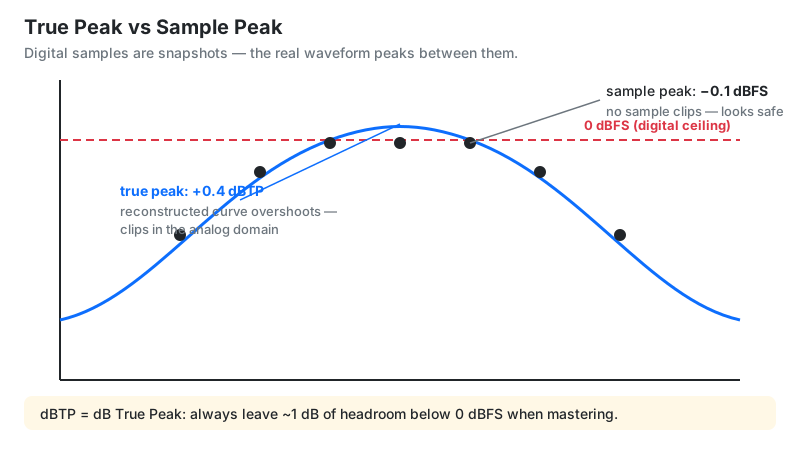
True peak example: a master peaking at −0.1 dBFS (sample peak) can still reach +0.4 dBTP between samples — invisible to normal meters, but it clips when YouTube re-encodes to AAC. That hidden half-decibel is exactly what a true-peak readout exists to catch: keep it under −1 dBTP and encoding stays clean. This page's peak card cannot see those overs — it holds sample peaks only — so verify true peak in your DAW before delivery.
Crest Factor: The Number That Judges Your Master
Crest factor is peak minus RMS, in dB — one number that exposes how squashed a master is. Take a mix peaking at −1 dBFS with RMS at −13 dBFS: 12 dB of crest factor, room to breathe. Take a brick-walled master peaking at −1 dBFS with RMS at −7 dBFS: 6 dB, heavily limited.
Read it roughly: above about 12 dB reads as dynamic; under about 8 dB reads as heavily limited. This loudness meter does not compute crest factor directly, but comparing the held peak against momentary LUFS gives the same picture — a wide gap means dynamics survived, a narrow gap means the limiter ate them.
LKFS vs LUFS: Why Two Names?
LKFS and LUFS are the same unit under two names. ITU-R BS.1770 calls it LKFS (Loudness, K-weighted, relative to Full Scale); the EBU's R128 calls it LUFS. The number is identical — a −14 LKFS master is a −14 LUFS master. US broadcast documents say LKFS (ATSC A/85 specifies −24 LKFS); European and streaming documents say LUFS. When a spec sheet switches names mid-page, nothing changed.
How to Use the Loudness Meter
- Press Start Loudness Meter and allow microphone access when the browser asks.
- Feed audio to the input — play your track through speakers near the mic, or route your interface output into the input.
- Watch Momentary for sudden jumps — a hit 6 LU above the section average may need taming.
- Watch Short-Term to compare sections: verse against chorus balance at a glance.
- Read Integrated at the end of a full pass — one number for the whole program.
- Check the Peak hold: anything near 0 dBFS means the input itself is clipping before measurement even starts.
- Compare against the platform table below to decide if your master is ready.
Measure from a clean playback path — room acoustics, mic distance, and OS auto-gain color live-mic readings.
Reading Your Result: Platform Targets
Match your integrated LUFS and true peak against where the track is going:
| Platform | Target (integrated) | True peak ceiling | What happens |
|---|---|---|---|
| Spotify | −14 LUFS | −1 dBTP | Louder masters turned down; quiet raised if headroom allows |
| YouTube | −14 LUFS | −1 dBTP | Always normalized; never turns quiet tracks up |
| Apple Music | −16 LUFS | −1 dBTP | Sound Check on by default for new installs |
| Tidal / Amazon / Deezer | −14 to −15 LUFS | −1 dBTP (Amazon −2) | Same turn-down behavior as Spotify |
| Podcast (spoken) | −16 LUFS | −1 dBTP | Matches Apple/Spotify spoken-word levels |
| Broadcast TV (US/EU) | −24 / −23 LUFS | −2 / −1 dBTP | ATSC A/85 / EBU R128 — legal delivery specs |
Next step per result: integrated within ±1 LU of target and true peak under −1 dBTP → ship it. Louder than −10 LUFS → expect turn-down; check it still sounds open. True peak over 0 dBTP → lower the limiter ceiling, don't just turn down (peaks stay).
Why Spotify Turned Your Track Down
Here is the asymmetry most pages skip: platforms always turn loud tracks down to their target, but only turn quiet tracks up if peak headroom allows — and never with limiting. A −8 LUFS crushed master gets turned down to −14 and keeps all its squashed artifacts, while a dynamic −14 LUFS master plays untouched and sounds better.
The practical takeaway: −14 LUFS is a playback level, not a mastering law. A punchy −9 LUFS master turned down to −14 retains its character; a track strangled to exactly −14 "to avoid turn-down" gains nothing and often loses life. Master for the song, keep true peak under −1 dBTP, and let normalization do its job.
Limitations
- Browser estimate, not a certified meter. No K-weighting, no dual gating, no oversampled true peak — readings guide learning and rough checks, never broadcast delivery.
- Mic and system path color readings. OS auto-gain, audio enhancements, or Bluetooth codecs shift levels — use a clean file-playback path for anything resembling a mastering decision.
- Integrated needs a full pass — and this meter has no gating. Silence and quiet intros drag its integrated down; a 10-second snippet's number is meaningless.
- The peak card is a sample-peak hold. It cannot catch inter-sample overs or codec-induced peaks; verify true peak in a DAW before delivery.
- Live input is not your file. Room sound and mic distance change momentary readings; the numbers describe what the mic hears, not necessarily your master.
Loudness Meter vs Alternatives
| Option | Best for | Drawback |
|---|---|---|
| This loudness meter | Quick free live LUFS estimate anywhere | Browser-based estimate; not a certified delivery meter |
| YouLean Loudness Meter (plugin) | In-DAW mastering with detailed stats | Requires a DAW; free tier limited |
| ffmpeg loudnorm filter | Batch file analysis and normalization | Command line; no real-time display |
| Hardware broadcast meter | Legal compliance logging | Expensive; overkill for music |
Frequently Asked Questions
Note: this tool is for educational and pre-mastering checks. It is not a certified broadcast compliance meter.
Related tools: decibel meter for SPL readings, waveform visualizer to see your audio, microphone test to check input levels, and audio trimmer to cut silence before measuring.