Free Sound Analysis Tools: dB, LUFS & Mic Tests
Last updated: October 12, 2026 · Written by the Pitch Detectors Editorial Team
These free sound analysis tools measure real-time sound levels, check loudness in LUFS, test your microphone before calls and streams, and turn uploaded audio into reactive FFT videos. Everything runs in your browser — no downloads, no sign-up, and no audio ever leaves your device.
Decibel Meter
Measure real-time sound levels using your device microphone. Min, average, max, and peak statistics plus a level-history graph — a screening estimate, not a calibrated meter.
Loudness Meter (LUFS)
Measure perceived loudness in LUFS — momentary, short-term, and integrated. Compare your mix against Spotify, YouTube, and Apple targets before publishing.
Microphone Test
Test your microphone online — check input volume, background noise, and delay with a live level meter, no software install needed.
Audio Waveform Visualizer
Upload an MP3 or WAV and watch it become a reactive FFT visual — bars, wave, or circle — then export a 60fps WebM video. No upload to any server.
Key Takeaways
- 4 free tools: Decibel Meter, Loudness Meter (LUFS), Microphone Test, and Audio Waveform Visualizer — three use your microphone; the visualizer works from uploaded audio files.
- dB, dBA, and LUFS measure different things: dB SPL is raw sound pressure, dBA weights it for human hearing, and LUFS measures perceived loudness over time.
- Browser meters are excellent relative meters (is it getting louder?) but are not calibrated SPL meters — your mic's sensitivity is unknown to the page.
- For hearing safety, NIOSH recommends no more than 85 dBA averaged over 8 hours, halving allowed time for every 3 dB increase.
- No audio is recorded, uploaded, or stored — analysis happens locally in your browser.
What Is Sound Analysis?
Sound analysis is the measurement of audio signals to understand their level, loudness, clarity, and noise content. Online sound analysis tools perform these measurements in your browser using your device's microphone and the Web Audio API — no installed software needed.
Use them to check whether a room is too loud, verify a microphone works before a call or stream, confirm a podcast's loudness hits platform targets, or turn a track into a shareable visual. They answer "how loud is this, really?" with a number instead of a guess.
The 4 Tools in This Category
Decibel Meter — measures real-time sound levels in dB through your microphone, with min/average/max/peak statistics and a level-history graph.
Loudness Meter (LUFS) — measures perceived loudness in LUFS (momentary, short-term, and integrated), the unit streaming platforms and podcasts standardize on.
Microphone Test — verifies your mic captures clean audio at usable levels: checks input volume, background noise, and delay without installing anything.
Audio Waveform Visualizer — uploads an audio file (no microphone needed) and draws it as reactive FFT visuals you can export as a 60fps WebM video.
How to Choose the Right Tool
| Your question | Use this tool |
|---|---|
| How loud is this room right now? | Decibel Meter |
| Is my podcast at the right loudness for platforms? | Loudness Meter (LUFS) |
| Is my microphone working properly? | Microphone Test |
| How do I turn my audio into a video for social? | Waveform Visualizer |
dB vs. dBA vs. LUFS: Three Numbers, Three Jobs
People say "decibels" for three different measurements. Mixing them up is the most common loudness mistake.
| Unit | Measures | Use it for |
|---|---|---|
| dB SPL | Raw sound pressure vs. 20 micropascals | Physical loudness of a space (the Decibel Meter) |
| dBA | Sound pressure weighted for human hearing | Hearing safety, noise regulations, workplace limits |
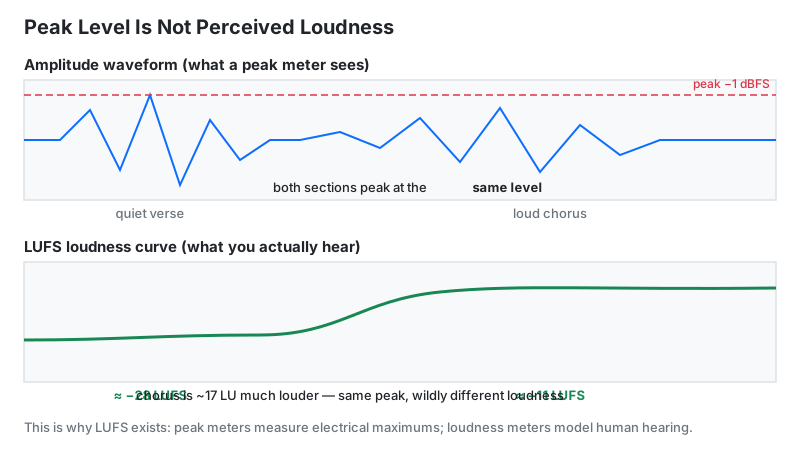
| LUFS | Perceived loudness over time (ITU-R BS.1770) | Podcasts, streaming, broadcast delivery (the Loudness Meter) |
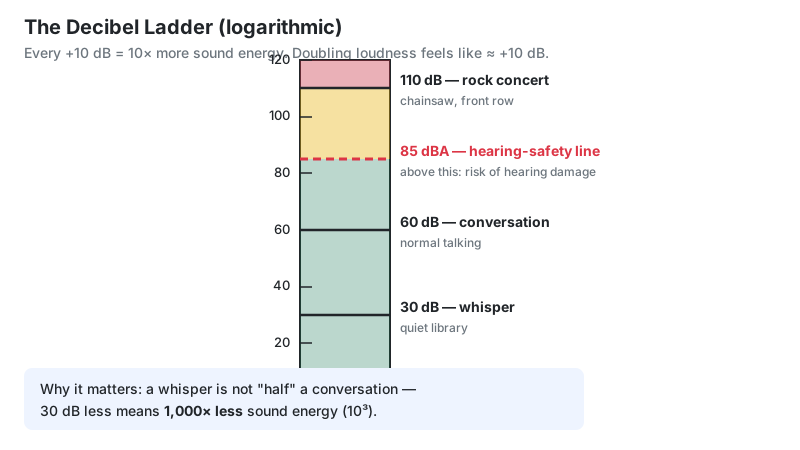
Everyday reference points: a whisper is about 30 dB, normal conversation about 60 dB, a rock concert about 110 dB. Because the decibel scale is logarithmic, 70 dB isn't "a bit louder" than 60 dB — it carries ten times the sound energy.
How Loud Is Too Loud? OSHA and NIOSH Limits
Hearing damage depends on both level and duration. Two US authorities define the limits — and they disagree on the math, which is worth knowing.
| OSHA (legal requirement) | NIOSH (health recommendation) | |
|---|---|---|
| 8-hour limit | 90 dBA (permissible exposure limit) | 85 dBA (recommended exposure limit) |
| Action level | 85 dBA — triggers a hearing conservation program | — |
| Exchange rate | 5 dB: every +5 dB halves allowed time | 3 dB: every +3 dB halves allowed time |
| At 100 dBA | 2 hours allowed | 15 minutes allowed |
The NIOSH 3 dB exchange rate follows physics (every 3 dB doubles sound energy); OSHA's 5 dB rate is the legally enforceable minimum in US workplaces. For personal listening, the conservative move is the NIOSH math: 85 dBA for 8 hours, 88 for 4, 91 for 2. Sources: OSHA 29 CFR 1910.95; NIOSH noise criteria.
LUFS Targets: What Platforms Expect
Streaming services normalize everything to a target loudness, turning louder tracks down. Mastering near the target means your audio plays at the intended level instead of being adjusted.
| Destination | Integrated loudness target | True peak ceiling |
|---|---|---|
| Spotify / YouTube (music) | −14 LUFS | −1 dBTP |
| Apple Music | −16 LUFS | −1 dBTP |
| Apple Podcasts | −16 LKFS | −1 dBFS |
| Podcasts (AES TD1008 guidance) | −18 LUFS | −1 dBTP |
Check your mix with the Loudness Meter before publishing: play the finished episode or track through it and compare the integrated reading to your platform's target. Note that older advice citing −16 LUFS stereo / −19 LUFS mono comes from the superseded AES TD1004 — the current AES TD1008 guidance centers podcast content at −18 LUFS.
Why Browser Meters Aren't Calibrated SPL Meters
A $2,000 Class 1 sound level meter is calibrated against a known reference tone, so its dB readings are absolute. A browser page has no idea how sensitive your microphone is — a phone mic, a headset, and a USB condenser all report different raw levels for the same room.
What the tools can do reliably: relative measurement. "The room got 10 dB louder when the AC kicked in" is trustworthy; "the room is exactly 52 dB" is approximate. Two more gotchas: many devices apply automatic gain control (AGC) that fights the meter — disable mic "enhancements" in your OS settings for steadier readings — and browsers can't defeat a mic's own noise floor, typically 30–40 dBA on built-in mics.
Who These Tools Are For
Podcasters and streamers verify mic health and loudness before recording.
Musicians check rehearsal-room levels against hearing-safety limits.
Remote workers and gamers test microphones before calls and streams.
Teachers and students visualize sound and run no-install acoustics demos.
Limitations
- Not calibrated instruments. Readings are approximate in absolute terms; trust them for comparisons, not compliance measurements.
- OS audio processing interferes. Automatic gain control, noise suppression, and "enhancements" can skew readings — turn them off for measurement.
- Mic quality bounds everything. Built-in mics have higher noise floors and uneven frequency response versus measurement microphones.
- The visualizer renders spectra, not oscilloscope waveforms. Its three styles plot frequency magnitudes — great for seeing energy distribution, not for spotting clipping.
- No legal standing. These tools can't certify workplace noise compliance — that requires calibrated equipment and a qualified hygienist.
Browser Tools vs. Dedicated Meters
| These browser tools | Phone SPL app | Calibrated SPL meter | |
|---|---|---|---|
| Cost | Free | Free–$30 | $200–$2,000+ |
| Calibration | None | Rough (per-device) | Traceable to standards |
| Best for | Quick checks, mic tests, LUFS | Casual spot checks | Compliance, professional acoustics |
| Needs | Browser + mic permission | Install | Hardware + calibrator |