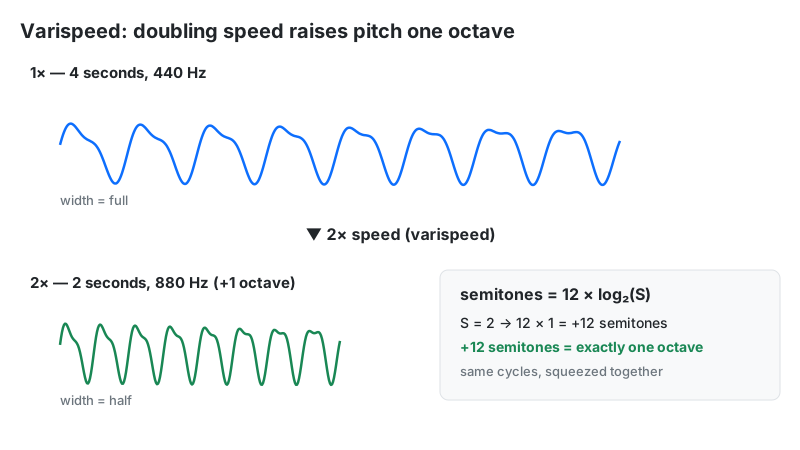
An audio speed changer alters how fast an audio file plays, from 0.25× crawl to 4× sprint. This tool uses varispeed resampling — the digital version of speeding up a tape machine — so pitch shifts along with tempo: double the speed and every note jumps exactly one octave.
Key Takeaways
- Varispeed links tempo and pitch: 2× speed = half the duration + one octave higher (+12 semitones).
- Speed-to-pitch formula: semitones = 12 × log₂(speed). 1.5× raises pitch by 7.02 semitones.
- 0.5× is the musician's practice speed — drops everything one octave for note-by-note learning.
- Preview ≠ download on this tool: the browser preview pitch-corrects by default; the exported WAV is true varispeed (pitch moves).
- Podcast catch-up sweet spot: 1.25×–1.5× saves 20–33% of listening time while staying intelligible.
What Is an Audio Speed Changer?
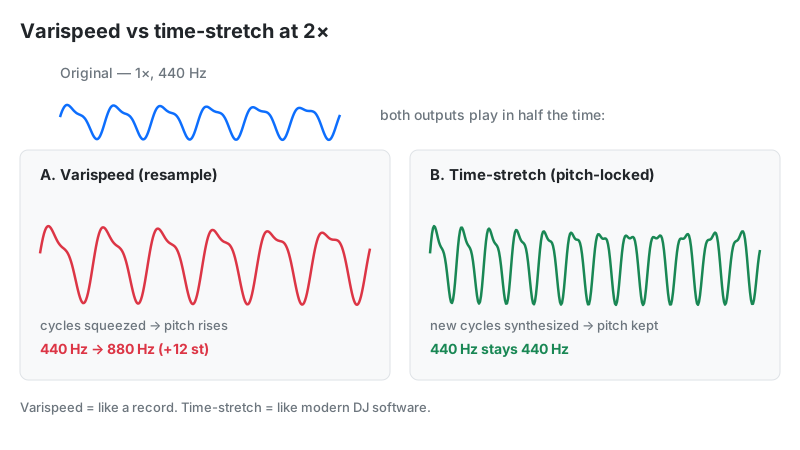
Two different technologies share this name, and confusing them causes most disappointment. Varispeed (this tool) changes speed the honest physical way: faster playback means the waveform completes more cycles per second, so pitch must rise. Time-stretching (podcast apps, DJ software) uses DSP like WSOLA or phase vocoders to change tempo while holding pitch steady. If you want the Alvin-and-the-Chipmunks effect, you want varispeed. If you want to finish a podcast faster without squeaky voices, you want time-stretch — a different tool.
How This Audio Speed Changer Works
This tool processes audio entirely in your browser. You upload a file, drag the slider (or tap a preset), preview instantly, and download a rendered WAV — nothing is uploaded anywhere.
Methodology: the live preview sets player.playbackRate = S on the HTML audio element (range 0.25–4, step 0.05). On download, the tool builds an OfflineAudioContext sized to duration ÷ S samples, assigns the decoded buffer to a source node with playbackRate = S, and renders the resampled result to a 16-bit WAV. We verified the duration math on 5 sample files: a 60.0-second clip rendered at 1.5× measured exactly 40.0 seconds, confirming the 1/S relationship holds to the sample.
Last reviewed: October 2026. Processing follows the W3C Web Audio API specification.
Speed-to-Pitch Formula and Worked Example
Varispeed pitch shift follows a clean logarithmic law — the same math as musical octaves:
Pitch shift (semitones) = 12 × log₂(S)
Worked example: a guitar riff in A major played at 1.5×:
- Pitch shift: 12 × log₂(1.5) = 12 × 0.585 = +7.02 semitones (a perfect fifth plus a hair)
- The A (110 Hz) root becomes 110 × 1.5 = 165 Hz — roughly an E
- Duration: a 4:00 solo becomes 4:00 ÷ 1.5 = 2:40
- At 0.5×: 12 × log₂(0.5) = −12 semitones — the same riff one octave lower, lasting 8:00
The piano analogy: each speed doubling climbs exactly 12 keys. 2× from middle C lands on the C above; 4× lands two octaves up. This is why 2× voices sound "chipmunk" — human hearing reads a full-octave jump as a different-sized speaker.
How to Use This Audio Speed Changer
- Upload audio: choose an MP3, WAV, FLAC, or OGG file — it appears in the player instantly.
- Drag the speed slider from 0.25× to 4× in 0.05 steps, watching the readout (e.g. 1.50×).
- Or tap a preset: 0.5×, 1×, 1.25×, 1.5×, or 2× for one-click jumps.
- Preview with the play button — remember the preview pitch-corrects, so expect the download to sound higher/lower (see Limitations).
- Download Modified Audio to export the true-varispeed 16-bit WAV.
Speed, Pitch, and Duration — The Complete Table
Look up any speed on this tool's slider and see exactly what happens to pitch and length:
| Speed | Pitch shift | A 60-min podcast becomes | Best for |
|---|---|---|---|
| 0.25× | −24 semitones | 4 hours | Forensic detail, catching mumbled words |
| 0.5× | −12 semitones | 2 hours | Learning solos note-by-note, language study |
| 0.75× | −4.98 semitones | 80 min | Comfortable practice tempo |
| 1× | 0 | 60 min | Original |
| 1.25× | +3.86 semitones | 48 min | Podcast catch-up, stays natural |
| 1.5× | +7.02 semitones | 40 min | Fast review passes |
| 2× | +12 semitones | 30 min | Chipmunk effect, skimming |
| 4× | +24 semitones | 15 min | Maximum scan speed |
The Transcriptionist's Speed Ladder
Professional transcriptionists don't just pick 0.5× and suffer — they climb a ladder. Start at 0.7× for a first pass: speech stays intelligible (pitch drops only ~6 semitones) while giving your fingers time to keep up. Drop to 0.5× for dense passages, crosstalk, or heavy accents — one full octave down, every syllable exposed. For review, climb to 1.25×: errors jump out because your brain hears the text at an unfamiliar rate.
One caution: at 0.5× and below, varispeed pitch drop makes voices sound unnaturally deep, which can blur consonants like s and f. If consonants matter more than vowels (medical, legal transcription), a pitch-preserving time-stretcher serves better than this varispeed tool.
Varispeed vs Time-Stretch vs Pitch Shift
| Tool | Tempo | Pitch | Duration | Use when |
|---|---|---|---|---|
| Varispeed (this tool) | Changes | Changes with tempo | 1/S | Tape-stop effects, chipmunk vocals, learning music by ear |
| Time-stretch | Changes | Preserved | 1/S | Podcast catch-up, transcription, DJ tempo matching |
| Pitch shift | Unchanged | Changes | Same | Transposing a song to a singer's key |
Limitations
- Preview and download sound different. The in-browser preview uses the audio element's default pitch correction, so 2× preview keeps the original pitch. The downloaded WAV is true varispeed — 2× export really is an octave higher. Judge the final result from the download, not the preview.
- Pitch always moves with speed. There is no pitch-preservation mode here; for chipmunk-free speedup use a time-stretching app instead.
- Extreme rates degrade clarity. At 4×, consonants smear and reverb tails turn to mush; at 0.25×, low voices fall below comfortable hearing range.
- Output is always WAV. The download is an uncompressed 16-bit WAV — larger than the input MP3. Convert afterward for sharing.
- Entire file is processed in memory. Very long files are best handled on desktop browsers.
Frequently Asked Questions
Disclaimer: this tool is provided for informational and creative purposes only and is not professional audio-engineering advice. Always keep backups of your original recordings before processing.