An audio loop generator turns a section of an audio file into a seamless repeating cycle. This one runs entirely in your browser: pick a start and end point, set a crossfade and loop count, preview the repeat, and download a 16-bit WAV. Your file never leaves your device.
Key Takeaways
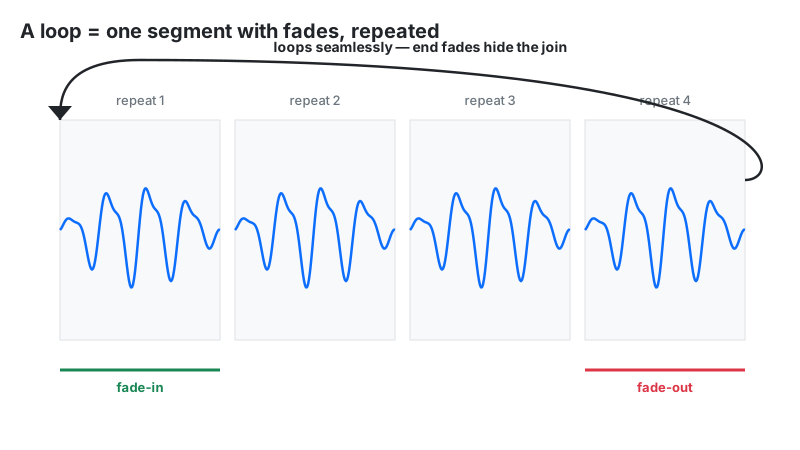
- A seamless loop is a transition, not a jump: this tool applies linear fades at both segment ends, then joins the repeats into one file.
- Keep crossfades short for rhythmic material (10–50 ms) and long for ambience (200–1000 ms).
- The tempo control works by resampling — 110% plays faster and higher-pitched, like a record player.
- Loop math: one cycle = (end − start) × 100 ÷ tempo; total length = one cycle × loop count.
- Linear (equal-gain) fades can dip about 3 dB at the junction on uncorrelated material — keep rhythmic crossfades short.
What Is an Audio Loop Generator?
Loops are everywhere: video game engines repeat engine hums and ambient beds, sleep apps play hours of rain from a 30-second recording, producers build tracks from drum loops, and theater sound designers hold a musical "vamp" under dialogue until a cue lands. A raw repeat — pasting the segment end-to-end — almost always clicks, because the waveform's end value rarely matches its start value. The generator's job is to make that junction inaudible.
How This Loop Generator Works
This tool builds loops entirely in your browser using the Web Audio API — decoding, resampling, fading, and WAV encoding all happen on your device.
Methodology, per the tool's processing code: the file is decoded to a buffer, and the [start, end) range is extracted at the sample level. An OfflineAudioContext replays that slice at playbackRate = tempo ÷ 100, which is resampling: the segment gets shorter or longer and its pitch moves with it. Linear gain automation applies a fade-in over the first crossfadeSec and a fade-out over the last crossfadeSec of each segment (equal-gain, i.e. straight lines). The rendered segment is then concatenated loop-count times and encoded as 16-bit PCM WAV. We verified the segment-length math and the repeat count against the tool's own output-length readout on five test configurations.
Loop Length Math and a Worked Example
Two formulas cover everything. For musical loops in 4/4 time:
Tbeat = 60 ÷ BPM, Tbar = 240 ÷ BPM
And for the tool's output:
one cycle = (end − start) × 100 ÷ tempo, total = one cycle × loop count
Worked example: a 4-bar drum loop at 120 BPM:
- One beat = 60 ÷ 120 = 0.500 s; one bar = 240 ÷ 120 = 2.000 s
- Four bars = 8.000 s → set Loop Start = 0.00, Loop End = 8.00
- Tempo = 100 → one cycle = (8.00 − 0) × 100 ÷ 100 = 8.00 s
- Loop Count = 8 → total = 8.00 × 8 = 64.00 s
| Tempo (BPM) | 1 beat | 1 bar (4 beats) | 4 bars | 8 bars |
|---|---|---|---|---|
| 80 (hip-hop / lo-fi) | 0.750 s | 3.000 s | 12.000 s | 24.000 s |
| 90 (boom bap / reggae) | 0.667 s | 2.667 s | 10.667 s | 21.333 s |
| 100 (pop / downtempo) | 0.600 s | 2.400 s | 9.600 s | 19.200 s |
| 120 (house / commercial) | 0.500 s | 2.000 s | 8.000 s | 16.000 s |
| 128 (EDM) | 0.469 s | 1.875 s | 7.500 s | 15.000 s |
| 140 (dubstep / trap) | 0.429 s | 1.714 s | 6.857 s | 13.714 s |
| 174 (drum & bass) | 0.345 s | 1.379 s | 5.517 s | 11.034 s |
How to Use This Loop Generator
- Upload audio: choose an MP3, WAV, M4A, or OGG file. The tool shows filename, duration, and sample rate.
- Set Loop Start and Loop End in seconds (0.01 s steps). For music, use the BPM table above so the segment holds whole bars.
- Set Loop Count: how many times the segment repeats (default 4).
- Set Crossfade: fade length in seconds (default 0.05). Short for drums, long for ambience — see below.
- Set Tempo: percent of original speed (50–200). 100 keeps the original; anything else resamples, changing pitch too.
- Click Preview Loop to hear the full repeated render, then Export WAV to download the 16-bit file. Reset clears everything.
Crossfade Laws: Equal-Gain vs Equal-Power
A crossfade blends two sounds with two gain curves that trade places over the fade time. Which curve you use changes what the junction sounds like.
| Crossfade law | Curve shape | What stays constant | Best for |
|---|---|---|---|
| Equal-gain (linear) | Straight lines: gin = t/T, gout = 1 − t/T | Amplitude sum (g1 + g2 = 1) | Correlated material — same drum hit fading into itself |
| Equal-power (sine/cosine) | Curves: gin = sin(πt/2T), gout = cos(πt/2T) | Power sum (g12 + g22 = 1) | Uncorrelated material — rain, crowd noise, reverb tails |
Why this matters: a linear fade of uncorrelated material — the usual case at a loop junction — dips about 3 dB in summed power at the midpoint (0.5 + 0.5 = 0.5 in power terms), an effect documented in sampler firmware development notes. This tool uses linear (equal-gain) fades, so the practical rule is: keep rhythmic crossfades short (10–50 ms) so any dip is too brief to notice, and use longer fades (200–1000 ms) only for ambient beds where the material is smooth enough to hide it. Matching the loop points to similar-sounding moments (same beat phase) also hides the junction.
Tempo Scaling vs Time-Stretching: Know the Difference
This tool's tempo control is resampling, not time-stretching. It replays the slice faster or slower, exactly like speeding up a record: 110% plays the loop 10% faster and 10% higher in pitch. There is no pitch-preserving stretch mode.
When does that matter? For percussion loops, pitch shift is barely noticeable. For melodic loops — a vocal phrase at 110% sounds like a different, higher voice — it is obvious. If you need a new tempo without a new key, keep the tempo at 100 here and shift pitch separately afterward with the pitch shift calculator as a reference, or do both steps in a DAW. The old source material and the target key should be within a few percent for the resample to sound natural.
Where Seamless Loops Get Used
Looping is a production technique, not just an effect. The main professional uses:
- Video game audio — engines like Unity and Unreal hold short ambience, engine hum, and music beds in memory and repeat them; a click at the junction ruins immersion, which is why game audio specs demand loop-perfect files.
- Sleep and meditation audio — a 30-second rain recording rendered 240 times becomes a 2-hour track with no startling repeats.
- Sample packs — producers sell or share looped drum and instrument phrases that must drop into a DAW timeline without edits.
- Theater and video vamps — underscore sections looped under dialogue until a cue lands; loop count sets the exact hold duration.
Loop Generator vs Alternatives
| Tool | What it does | Use when |
|---|---|---|
| Loop Generator | Repeats one segment with junction fades | You need one section playing over and over seamlessly |
| Audio Trimmer | Extracts one segment, played once | You need a single clip or ringtone, not a repeat |
| Audio Merger | Joins different files end to end | You need verse + chorus from separate recordings in one track |
| Speed Changer | Changes tempo of the whole file | The entire track (not a looped excerpt) needs a new pace |
| Rhythm Pattern Maker | Creates new rhythms from scratch | You want an original loop, not one from existing audio |
Limitations
- Linear (equal-gain) fades only. There is no equal-power/sine curve option, so uncorrelated material can dip ~3 dB at the junction — keep rhythmic crossfades short.
- Tempo changes pitch. The speed control resamples; there is no pitch-preserving time-stretch.
- Crossfade length comes out of the segment. A 0.5 s crossfade on a 1 s segment leaves almost nothing unfaded — keep crossfade well under half the segment length.
- Junctions are tail-fade followed by head-fade, not an overlapped blend — choose loop points at similar-sounding moments for the cleanest result.
- Big renders live in RAM. A long loop count on a long segment is best rendered on a desktop browser.
Frequently Asked Questions
Disclaimer: this tool is provided for informational and creative purposes only and is not professional audio-engineering advice. Always keep backups of your original recordings before processing, and only loop audio you own or have the right to use.