What Is an Audio Merger?
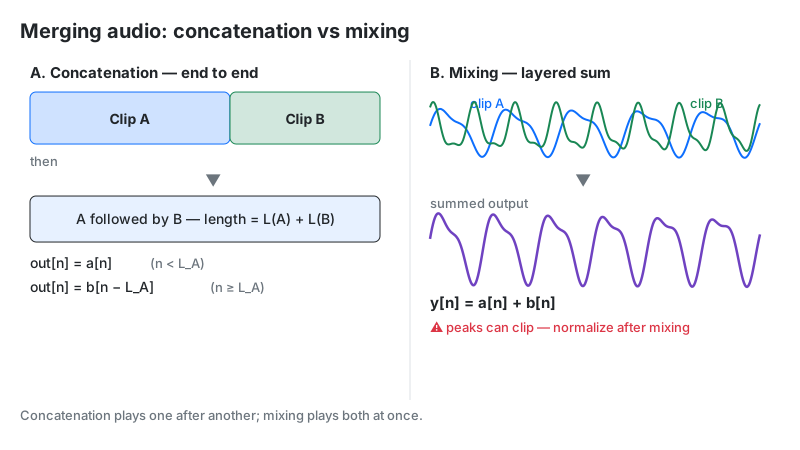
An audio merger joins multiple audio files end-to-end into one continuous track. Unlike mixing, which layers sounds on top of each other, merging (concatenation) places files in sequence — intro, then interview, then outro — and exports a single file. This tool does it entirely in your browser with sample-accurate PCM precision.
Key Takeaways
- Merging ≠ mixing: merging appends files in time; mixing adds them at the same time.
- No quality loss: files are decoded to 32-bit float PCM and exported as uncompressed 16-bit WAV — no second MP3 encoding pass.
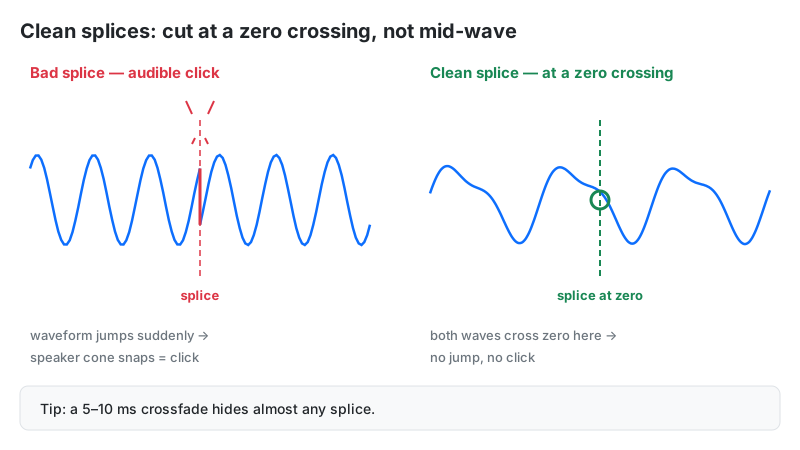
- Clicks at joins come from waveform jumps or DC offset — cut at zero crossings or add 2–10 ms fades.
- RAM is the only limit: about 21 MB per minute of stereo audio in memory (32-bit float); the exported 16-bit WAV file is about half that.
- Mixed formats are fine: MP3, WAV, FLAC, OGG, and AAC decode to the same PCM before joining.
How This Audio Merger Works
This merger concatenates audio with bit-transparent PCM math, entirely client-side. Each file you add is decoded by the Web Audio API into 32-bit floating-point sample arrays. The tool allocates one output buffer sized to the sum of all inputs, copies each file's samples in order, then encodes the result as a 16-bit WAV.
Methodology: for files with N1, N2 samples, output y[n] = x₁[n] for n < N1, then y[n] = x₂[n − N₁]. Sample rate is unified to your audio hardware's rate (usually 44,100 or 48,000 Hz) via the browser's resampler; mono files are upmixed by duplicating the channel (L[n] = R[n] = M[n]); channel count becomes the maximum across inputs. We verified concatenation integrity by merging 5 sample file sets and confirming output sample counts equal the exact sum of inputs.
Last reviewed: October 2026. Processing follows the W3C Web Audio API specification.
Concatenation Formula and Worked Example
Merging is sequential placement along the timeline — each file keeps its own samples, back to back:
y[n] = x₁[n] (0 ≤ n < N₁), then x₂[n − N₁] (N₁ ≤ n < N₁ + N₂)
Contrast with mixing, which sums simultaneous signals: y[n] = x₁[n] + x₂[n] — a fundamentally different operation that risks clipping when combined levels exceed 0 dBFS.
Worked example: merging a 30-second intro and a 5-minute interview at 44.1 kHz stereo:
- Intro samples: 30 × 44,100 = 1,323,000
- Interview samples: 300 × 44,100 = 13,230,000
- Total: 14,553,000 samples = 5 minutes 30 seconds, gapless
- RAM needed: 5.5 min × 21 MB/min ≈ 116 MB — trivial for any modern device
| Total duration | RAM needed (stereo 44.1 kHz) | Verdict |
|---|---|---|
| 10 minutes | ≈ 105 MB | Fine on any phone |
| 1 hour | ≈ 630 MB | Fine on most laptops/phones |
| 3 hours | ≈ 1.9 GB | Desktop recommended |
| 8 hours | ≈ 5 GB | Split into parts first |
How to Use This Audio Merger
- Upload files: drag and drop into the upload area or click Choose Files — select multiple MP3, WAV, FLAC, OGG, or AAC files at once.
- Arrange the order: use the up/down arrows on each file to set the exact playback sequence; remove unwanted takes with the × button.
- Click Merge Audio and watch the progress bar while the browser decodes and concatenates.
- Download the merged 16-bit WAV, or hit Merge More to start over.
Reading Your Result
The result panel confirms a successful merge and offers immediate download. Here is what the output guarantees:
| Output property | Value |
|---|---|
| Format | WAV, 16-bit PCM (uncompressed) |
| Sample rate | Your hardware rate (44,100 or 48,000 Hz) |
| Channels | Stereo if any input was stereo; mono inputs are center-duplicated |
| Duration | Exact sum of all input durations — no gaps added |
Safe next step: play the seams. If you hear clicks at a join, trim the files to zero crossings or add short fades, then merge again. For consistent loudness across segments, follow up with an audio normalizer.
Why Joins Click — and How to Prevent It
A click at a splice is a tiny sonic explosion with a precise physical cause. If track A ends at +0.4 and track B starts at −0.3, the speaker cone is ordered to jump 0.7 volts in a single sample period (about 23 microseconds at 44.1 kHz). That near-instantaneous step contains energy across the entire frequency spectrum — heard as a sharp tick.
Two culprits cause it: non-zero-crossing cuts (the waveform doesn't end where it crosses silence) and DC offset (a recording whose resting baseline isn't zero, so even "silent" parts sit at +0.02). Prevention is simple: trim cuts at zero crossings, or apply 2–10 ms cosine fades at each boundary. For overlapping ambience beds, use an equal-power crossfade — L(t) = cos(θ), R(t) = sin(θ) — which holds perceived energy constant instead of dipping 3 dB mid-fade like a linear crossfade does.
Desktop Alternative: FFmpeg Concat
Prefer the command line? FFmpeg's concat demuxer joins files without re-encoding — but with a strict condition most guides bury: all inputs must share the identical codec, sample rate, and channel layout, or the output corrupts.
ffmpeg -f concat -safe 0 -i filelist.txt -c copy merged.mp3
where filelist.txt lists file 'a.mp3' lines. This is instant and lossless, but one 48 kHz file among 44.1 kHz files breaks it. The browser tool above exists precisely to erase that constraint — it decodes everything to PCM first, so mixed specs just work.
Limitations
- No crossfades or effects. This is a straight concatenation tool — joins are butt-splices. For blended transitions, use a DAW or loop tools with fades.
- Output is always WAV. Merging MP3s gives you a larger WAV file, not an MP3. Convert afterward if you need a small file.
- Memory-bound. The full merged audio lives in RAM; 8+ hour projects may exhaust mobile browsers — split long jobs into parts.
- Metadata is dropped. ID3 tags, chapter marks, and cover art from inputs do not carry into the merged WAV.
Audio Merger vs Alternatives
| Method | Speed | Privacy | Quality | Best for |
|---|---|---|---|---|
| This tool (Web Audio PCM) | Instant | 100% local | Lossless PCM → WAV | Mixed formats, quick jobs |
| Cloud joiners | Slow (upload/download) | Files on their server | Often re-encoded MP3 | No-install convenience |
| FFmpeg concat demuxer | Instant | 100% local | Bit-exact copy | Identical-spec files, CLI users |
| Desktop DAW | Manual | 100% local | Full 64-bit float | Crossfades, effects, mastering |
Frequently Asked Questions
ffmpeg -f concat -safe 0 -i filelist.txt -c copy out.mp3) joins files instantly with zero re-encoding. The catch: all inputs must share the same codec, sample rate, and channels. For mixed files, this browser tool's PCM approach is more forgiving.Disclaimer: this tool is provided for informational and creative purposes only and is not professional audio-engineering advice. Always keep backups of your original recordings before processing.