Audiobook Progress Calculator
Last updated: October 18, 2026 · Written by the Pitch Detectors Editorial Team
An audiobook progress calculator tells you exactly where you are in an audiobook: percent complete, time finished, and time still left.
Enter the total duration and either your completed time or your remaining time — the calculator accepts both — and it returns your full progress picture instantly.
Key Takeaways
- Progress = (time completed ÷ total duration) × 100, with remaining time = total − completed.
- This calculator accepts either completed time or remaining time — a toggle converts one into the other automatically.
- Results show percent complete (one decimal place), time completed, and time remaining side by side.
- Playback speed never changes the percentage. Speed shortens real-world listening time, not the math — this tool has no speed input.
- Time-based tracking beats chapter-based tracking, because chapter lengths swing wildly within a single book.
What Is Audiobook Progress?
Listeners track progress to pace themselves through long titles, to hit reading-challenge goals, and to decide when to start the next book.
Apps show it as a bar; this calculator turns your two time values into exact numbers without an account.
Even Goodreads — the largest book-tracking platform — has no audiobook progress field: its official help guidance tells users to compute the percentage manually (current hours ÷ total hours), which is exactly what this tool automates.
How This Audiobook Progress Calculator Works
The calculator follows one consistent method. We checked every step against this page's own calculation code.
- Convert to minutes. Total hours and minutes become total minutes; your entered time becomes done minutes.
- Apply the toggle. In "Completed" mode, your entry is the time finished. In "Remaining" mode, the calculator first converts: time finished = total − time remaining. Both paths reach the same numbers.
- Compute the percentage. Percent = (time finished ÷ total time) × 100, shown to one decimal place.
- Split the remainder. Remaining time = total − finished, displayed as hours and minutes next to the completed hours and minutes.
Invalid input — a zero total, a negative result, or finished time longer than the total — triggers a prompt to fix the values rather than a misleading answer.
Formula and Worked Example
The formulas behind the results:
Percent complete (%) = (time completed ÷ total duration) × 100
Time remaining = total duration − time completed
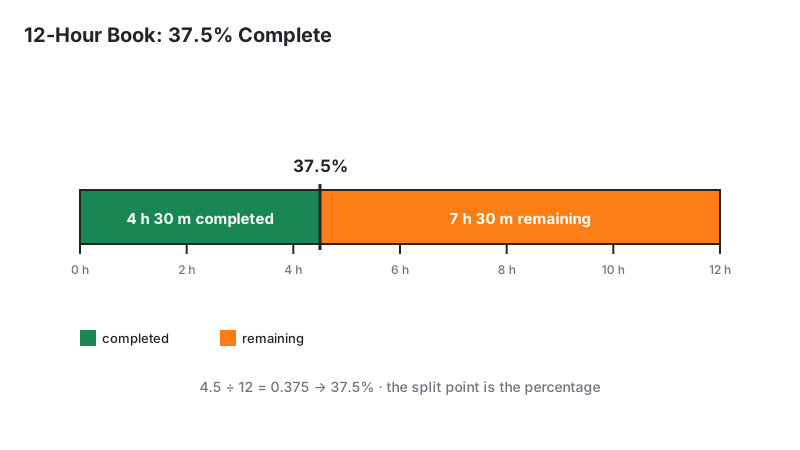
Worked example: a 12-hour audiobook, with 4 hours 30 minutes completed.
- Convert: 12 × 60 = 720 minutes total; 4 × 60 + 30 = 270 minutes completed
- Percent: 270 ÷ 720 × 100 = 37.5%
- Remaining: 720 − 270 = 450 minutes = 7 hours 30 minutes
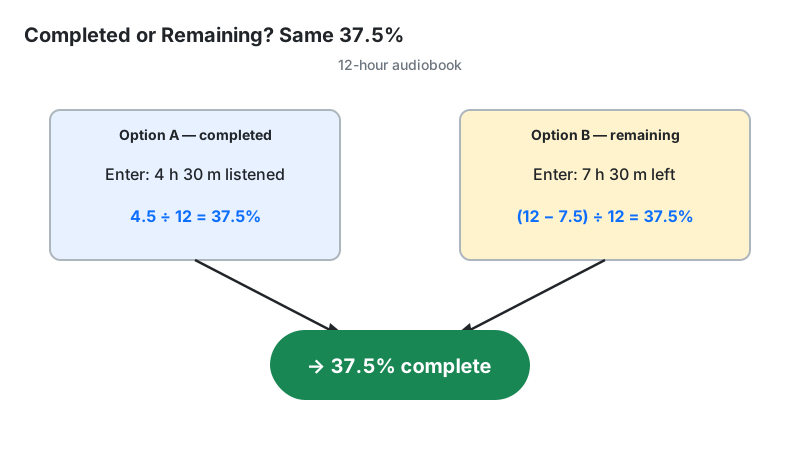
The toggle gives the same answer from the other direction: select "Remaining", enter 7h 30m, and the tool converts (720 − 450 = 270 minutes finished) before computing 37.5%.
How to Use This Audiobook Progress Calculator
- Enter the total audiobook time in hours and minutes — estimate the duration first with the audiobook length calculator if you only know the word or page count.
- Choose your input mode with the toggle: "Completed" if you know how much you have listened, "Remaining" if you know how much is left (many players show this on the chapter screen).
- Enter that time in hours and minutes.
- Click Calculate. The panel shows your percent complete, a progress bar, and two boxes: time completed and time remaining.
Switching the toggle re-labels the input field, so you always know which number the tool expects.
Reading Your Result
Three numbers appear together — each one answers a different planning question:
| What you see | What it means | Useful next step |
|---|---|---|
| Percent complete | Share of total duration finished, to one decimal place | Compare against a reading-challenge target |
| Time completed | Listening hours already banked | Log it if you track daily listening |
| Time remaining | Listening hours still ahead at normal speed | Divide by your daily listening habit to estimate your finish day |
A quick finish-day estimate: 7h 30m remaining at 1 hour of listening per day means about 8 days to finish. At 1.5x playback speed the wall-clock time shrinks, but the remaining audio time stays 7h 30m.
The Completed/Remaining Toggle: Two Ways to Enter One Number
You do not need to know how much you have listened — knowing how much is left works just as well. Many audiobook players display remaining time more prominently than elapsed time, especially on chapter screens and car displays.
The toggle exists for exactly that situation. Choose "Remaining", type what your player shows, and the calculator recovers the completed time with one subtraction (total − remaining) before running the standard percentage math.
The worked example above shows both directions landing on 37.5%.
One caution: enter the remaining time for the whole book, not just the current chapter — chapter-remaining figures will understate your progress.
Playback Speed Changes Elapsed Time, Not Your Percentage
Listening at 1.5x does not change your progress percentage.
The percentage divides audio time by audio time — both measured at normal speed — so playback speed cancels out of the math entirely.
Speed only changes how much wall-clock time the remaining hours consume.
Be precise about what this tool does and does not do: it has no playback-speed input and does not project a calendar finish date.
Those are legitimate needs, but they belong to the audiobook speed calculator, which divides durations by your chosen speed.
Use this page for "where am I", and the speed tool for "when will I finish at 1.5x".
Time-Based vs Chapter-Based Tracking
Time-based tracking is more accurate. Some listeners track "chapter 12 of 30" instead of time, but chapters in a single audiobook can range from a two-minute interlude to a forty-minute marathon.
Chapter 12 of 30 sounds like 40% — but if the first 12 chapters are the short ones, your real position might be 25%.
The chapter fraction assumes every chapter is equal; the time fraction makes no such assumption.
Time-based progress survives across editions: the unabridged and abridged versions of a title have different chapter counts but comparable time ratios.
Chapter counting is fine for casual "am I near the end" checks; for goals, challenges, or finish-date planning, use the time numbers this calculator produces.
Progress Tracking vs Alternatives
| Method | What you get | Trade-off |
|---|---|---|
| This progress calculator | % complete + completed + remaining from either input | One snapshot at a time; no history |
| Percentage calculator | Exact % to one decimal + remaining time | Completed-time input only |
| Speed calculator | Durations adjusted for playback speed | Answers "when", not "where am I" |
| In-app progress bar | Visual position, zero typing | No exact numbers on most screens |
| Chapter counting | Rough position, easy to remember | Chapters vary too much for accuracy |
Limitations
- Position is not attention. Skipped sections, sleep-timer cutoffs, and replayed chapters all move the numbers without reflecting real listening.
- No playback-speed input. The tool deliberately ignores speed; it cannot tell you when you will finish at 1.5x.
- No finish-date projection. Combine the remaining time with your own daily habit (see the Reading Your Result table) for that estimate.
- One snapshot per calculation. There is no saved history across sessions — re-enter your numbers each time you check in.
- Whole-book remaining only. Entering a chapter's remaining time instead of the book's will understate your progress; check which figure your player shows.
Frequently Asked Questions
- Measurable numbers: completion percentage, remaining hours, and a realistic finish pace replace guesses like "about halfway".
- Consistency: exact numbers make it easier to stick with long titles and reading challenges.
- Habit comparison: month-to-month figures show whether your listening is growing or slipping.
Disclaimer: this tool is provided for informational purposes only. Results are estimates based on the values you enter and are not professional advice of any kind.