Speaker Angle Calculator
Compute ideal speaker toe-in angles for stereo setups, PA systems, and multi-speaker arrays.
Last updated: October 12, 2026 · Written by the Pitch Detectors Editorial Team
Recommended Angles
Angle per Speaker: --°
Total Coverage: --°
Underlying Formula
- Per Speaker Angle: θ = arctan((Spacing/2) ÷ Distance)
- Total Coverage: = θ × 2
- For multiple speakers per side, angles are averaged for best coverage.
What Is a Speaker Angle?
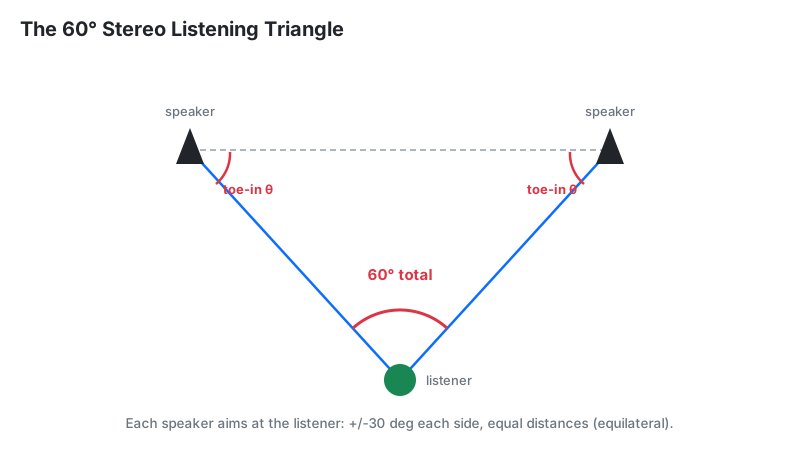
A speaker angle (toe-in angle) is the horizontal rotation of a speaker cabinet toward the listening position, measured in degrees from the straight-ahead position. Its partner concept, the listening angle, is the total angle between the left and right speakers as seen from your seat — and 60° is the long-standing reference for stereo.
Definition: A speaker angle is the horizontal toe-in of a speaker cabinet toward the listener, measured in degrees from straight ahead. Correct toe-in aims each speaker's tweeter axis at the listening position, which sharpens stereo imaging, centers the phantom image, and reduces phase problems between the two channels.
Key Takeaways
- 60° total listening angle (the equilateral triangle) is the stereo reference starting point — not a law.
- Typical toe-in is 15–30° per speaker: studio nearfields 22–30°, HiFi/bookshelf 15–22°.
- This calculator's formula: θ = arctan((spacing ÷ 2) ÷ listener distance); total coverage = 2θ.
- Official 5.1 reference (ITU-R BS.775): center 0°, fronts ±30°, surrounds ±110°.
- More toe-in narrows the sweet spot and can brighten treble — always fine-tune by ear afterward.
How This Calculator Works
This calculator treats your setup as a simple triangle: you are the apex, the two speakers form the base. It computes each speaker's toe-in with θ = arctan((spacing ÷ 2) ÷ listener distance), then doubles it for total coverage. If you run multiple speakers per side, it averages the total across them for even coverage.
Methodology: enter the perpendicular distance from your seat to the speaker plane (not the diagonal to each cabinet), the left–right spacing, and the speaker count per side. The widget applies the arctangent in degrees and returns per-speaker angle plus total coverage. The listener-zone-width field is for your own planning reference. We verified this calculator's output against hand-computed arctangent values for 5 sample inputs; all matched to one decimal place.
Last reviewed: October 2026. Trigonometry follows standard right-triangle conventions.
Formula and Worked Example
The core formula converts your room measurements into a toe-in angle:
Worked example (metric): you sit 3 m from the speaker plane, speakers 3.46 m apart:
- Half-spacing ÷ distance: (3.46 ÷ 2) ÷ 3 = 1.73 ÷ 3 = 0.577
- arctan(0.577) = 30° toe-in per speaker
- Total coverage: 2 × 30° = 60° — the classic equilateral reference
Same idea in feet: 10 ft distance, 8 ft spacing → arctan(4 ÷ 10) = arctan(0.4) = 21.8° per speaker, 43.6° total. A narrower-than-reference triangle like this usually benefits from a touch more toe-in or slightly wider spacing.
How to Use This Calculator
- Listener distance: measure straight from your seat to the imaginary line between the speakers, in meters.
- Speaker spacing: measure left tweeter to right tweeter, in meters.
- Speakers per side: leave at 1 for normal stereo; raise it for PA arrays covering a wide zone.
- Listener zone width: note how wide your seating area is, for your own planning.
- Read angle per speaker (how far to rotate each cabinet inward) and total coverage (your listening angle), then check the interpretation table below.
Reading Your Result
Your total coverage is the listening angle. Compare it against this practical guide:
| Total coverage | What it means | Next step |
|---|---|---|
| Under 40° | Narrow triangle; image may feel collapsed and mono-like | Move speakers farther apart or sit closer, then recalculate |
| 40–55° | Slightly narrow; safe and forgiving in small rooms | Try a little more toe-in and listen for image focus |
| 55–65° | The reference zone — balanced imaging and soundstage | Fine-tune toe-in by ear in 2–3° steps |
| 65–80° | Wide; risk of a "hole in the middle" of the image | Add toe-in or narrow the spacing slightly |
| Over 80° | Too wide for coherent stereo from one seat | Bring speakers closer together or move your seat back |
Treat these as starting points. If your speakers have narrow dispersion (horns, waveguides), favor the tighter end of each range; wide-dispersion designs tolerate wider triangles. Our Speaker Placement Calculator covers distance-from-wall and room-size factors next.
Official 5.1 and 7.1 Reference Angles
For surround setups, the industry publishes exact reference angles. No guesswork needed — here they are in one table, measured from the center front (0°) with you at the middle:
| Speaker | 5.1 angle | 7.1 angle | Source |
|---|---|---|---|
| Center | 0° | 0° | ITU-R BS.775 |
| Front left / right | ±30° (music) / ±22.5° (film) | ±30° | ITU-R BS.775 / cinema practice |
| Surround left / right | ±110° (ITU; Dolby home 90–110°) | ±90–110° (side) | ITU-R BS.775 / Dolby |
| Rear surround left / right | — | ±135–150° | Dolby |
Notes: ITU-R BS.775 requires all five speakers at equal distance from the listener and identical full-range models for music. ITU-R BS.775 puts the 5.1 surrounds at 110° (±10°), slightly behind the seat rather than directly at the sides; Dolby's home guidance accepts 90–110°; THX accepts 90–110°. If your couch sits against the back wall, put the surrounds at 90° on the side walls — close beats theoretically perfect.
How Much Toe-In by Speaker Type
The right toe-in depends on how widely your speaker spreads sound. Narrow-dispersion designs need more inward aim to keep treble balanced at the seat:
| Speaker type | Typical toe-in | Why |
|---|---|---|
| Nearfield studio monitor | 22–30° | Controlled waveguide; engineers aim tweeters straight at the ears for a precise, narrow sweet spot |
| Midfield / far-field monitor | 15–22° | Longer throw; slight toe-in keeps the room's reflections balanced |
| Bookshelf / HiFi | 15–20° | Wide domestic dispersion; moderate toe-in centers the image without shrinking the sweet spot |
| Floorstanding tower | 10–20° | Multiple drivers sum best with gentle aim; heavy toe-in can over-brighten |
| Coaxial / point-source | 22–30° | Single-point radiation images superbly on-axis; rewards precise aim |
| Horn-loaded / PA | Aim at farthest seat | Narrow pattern by design — cover the audience, not the walls |
How to Measure Toe-In With Your Phone
Numbers on a screen mean little until the cabinets actually point there. This is the practical method, including the app route:
- Square the speaker first. Rotate the cabinet so its front baffle faces dead straight ahead (0°) — judge by eye against the back wall.
- Zero your phone. Lay the phone flat on top of the cabinet and open a level/angle app (Genelec's SpeakerAngle app, co-developed with AudioApps, was built exactly for this) — tap to zero at the straight-ahead position.
- Rotate inward until the app reads your target toe-in (e.g., 22°). The app confirms when both speakers match.
- No app? Use geometry: at 3 m distance, 1° ≈ 5.2 cm of sideways baffle movement (arc length = distance × angle in radians). Mark the floor with tape and rotate the cabinet's front corner to the mark.
- Verify by ear. Play a mono vocal track — it should form a tight phantom image dead center. If it pulls left or right, your toe-in is mismatched.
What If Your Room Isn't Symmetrical?
Real rooms have doors, windows, and open sides. Perfect symmetry is rare, but you can still get close:
- One speaker near a side wall: that wall boosts bass and early reflections on one side. Pull the speaker out if possible; if not, add 2–3° extra toe-in on the walled side to reduce side-wall splash.
- Open-plan one side: the open side sounds thinner. Slightly increase toe-in on the open side and sit a touch closer to it — then confirm with the mono-vocal test.
- Couch against the back wall: bass piles up and surrounds have nowhere to go. Prioritize the front triangle; place surrounds at 90° on the side walls.
- Always re-check center image after any asymmetric tweak — your ears outrank the calculator here.
Don't Forget the Vertical Angle
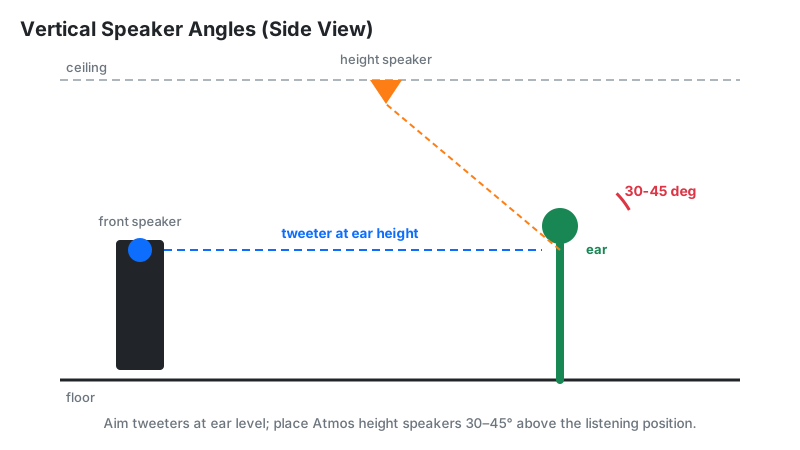
Toe-in is only half the geometry. Keep every bed-layer tweeter at seated ear height (roughly 36–40 inches / 90–100 cm) — high frequencies beam, so a tweeter firing over your head dulls the treble even with perfect toe-in. Tilt the cabinet slightly if stands are the wrong height.
For Dolby Atmos height channels, aim for 30–45° of elevation above the listening position (Dolby's home guidance centers on ~30–45° depending on layout). Upward-firing modules bounce off the ceiling instead — they need a flat, reflective ceiling 8–14 ft high to work at all.
Work in that order: angle first (free), position second (free), DSP third, treatment last. Check levels afterward with our SPL Calculator and Sound Distance Drop Calculator.
Frequently Asked Questions
Disclaimer: this calculator provides planning estimates for speaker setup only — not professional acoustic design advice. Room acoustics vary; use the results as a starting point and fine-tune by ear or consult a qualified acoustician for critical rooms.