How DJs Match BPM Manually: Beatmatching Guide
Last updated: October 18, 2026 · Written by the Pitch Detectors Editorial Team
Manual beatmatching is the DJ skill of aligning two tracks' tempos by ear instead of relying on the sync button. You find the incoming track's BPM, set the pitch fader close, then nudge the platter or jog wheel until both kick drums land together. This guide walks through the full method — from counting beats to riding the pitch — plus the fader math and how to handle drifting tracks.
Key Takeaways
- Beatmatching has two parts: match the tempos with the pitch fader, then align the beats by nudging.
- Count beats for 15 seconds and multiply by 4, or use a tap tempo tool, to get the incoming track's BPM before touching the fader.
- The fader math: % needed = (target BPM − current BPM) ÷ current BPM × 100.
- A handy rule: at ~140 BPM, 1 BPM ≈ 0.7% of pitch — the formula is 100 ÷ BPM.
- A 1 BPM mismatch drifts 1 beat per minute; a 0.5 BPM mismatch drifts 1 beat every 2 minutes.
- When kicks "gallop," listen for which one lands first — that track is faster.
What Manual Beatmatching Is
Definition: Manual beatmatching is the technique of matching two tracks' tempos by ear using the pitch fader, then aligning their beats by nudging the platter or jog wheel. The goal is phase alignment — both kick drums striking at exactly the same instant, so the blend sounds like one track instead of two fighting.
Tempo matching and phase alignment are two separate jobs. Tempo matching gets both tracks running at the same speed. Phase alignment gets their beats landing together. Beginners often fix one and ignore the other — matched tempos with misaligned beats still sound broken, and aligned beats at different tempos drift apart within seconds. New to the underlying concept? Read what BPM means in music first.
The 5-Step Manual Beatmatching Method
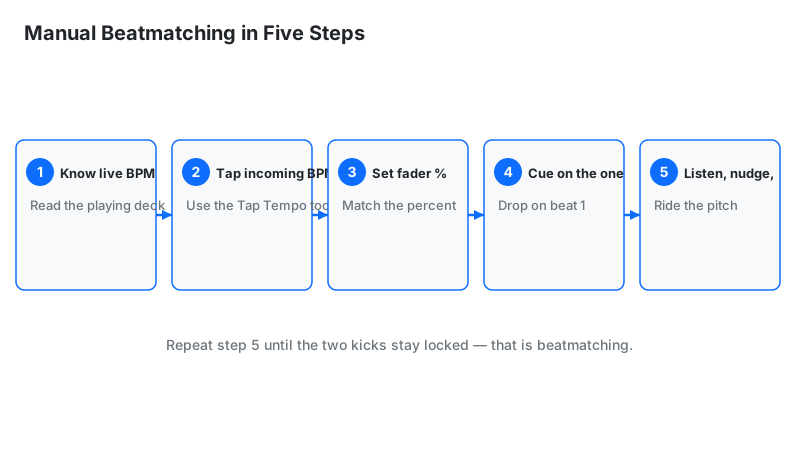
Work the steps in order every time — skipping ahead is the main reason beginners struggle. Manual beatmatching follows a fixed sequence:
- Know the live track's BPM. Read it from your prep notes, the deck display, or the track's tag. This is your target — everything adjusts toward it.
- Find the incoming track's BPM. Count beats for 15 seconds and multiply by 4, or tap along with a tap tempo tool for 15+ taps. This gets you close before the fader moves.
- Set the pitch fader. Compute the percentage: (target − current) ÷ current × 100. If the live track is 128 BPM and the incoming is 124, that is (128 − 124) ÷ 124 × 100 = +3.2%. Move the fader to roughly that position.
- Cue and release on the one. Find the first downbeat of a phrase in the incoming track, hold it on cue, and release it exactly on a downbeat of the live track. If the release timing is off, the beats start misaligned no matter how good your tempo is.
- Listen, nudge, and fine-tune. In your headphones, check whether the kicks land together. If they drift, adjust the fader in tiny moves (0.2–0.3%) and nudge the platter edge or jog wheel to snap the phase back. Repeat until the kicks stay locked for 30+ seconds.
Expect 30–60 seconds per mix while learning, shrinking to a few seconds with practice. Speed comes from repetition, not from rushing the steps.
The Pitch-Fader Math, Worked Out
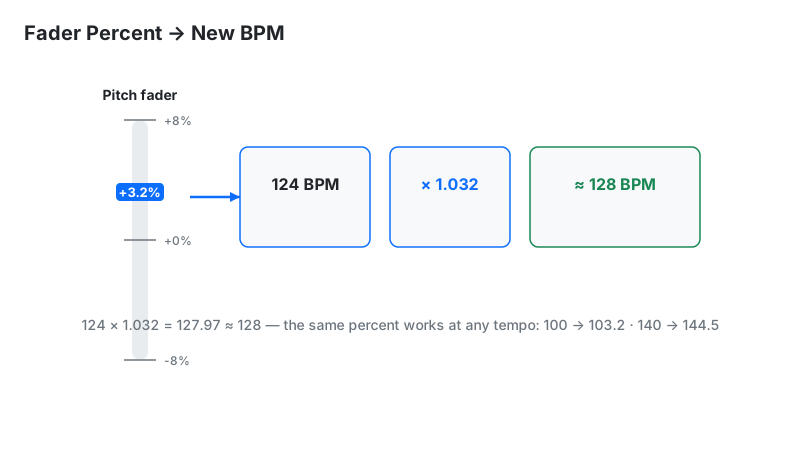
The fader shows a percentage change in playback speed, and BPM scales by exactly that percentage. The pitch-fader formula: new BPM = old BPM × (1 + % ÷ 100). Three worked examples:
- 124 → 128 BPM: (128 − 124) ÷ 124 × 100 = +3.2%. Set the fader near +3.2%.
- 130 → 126 BPM: (126 − 130) ÷ 130 × 100 = −3.1%. Pull the fader down about 3%.
- Range check: a ±8% fader at 120 BPM covers 120 × 0.92 = 110.4 to 120 × 1.08 = 129.6 — roughly ±10 BPM.
Then the DJ's rule of thumb: 1 BPM ≈ 0.7% of pitch near 140 BPM. It falls straight out of the formula — the percent for 1 BPM is 100 ÷ BPM, and 100 ÷ 140 = 0.71%. The table shows how the figure shifts with tempo:
| Track BPM | % change for 1 BPM | What it means |
|---|---|---|
| 120 | 0.83% | 1 BPM needs a bigger fader move at slow tempos |
| 128 | 0.78% | The classic house-techno working range |
| 140 | 0.71% | The "0.7% rule" home territory |
| 150 | 0.67% | 1 BPM needs a smaller move at fast tempos |
| 174 | 0.57% | Drum and bass: tiny fader moves, big BPM effect |
Two practical consequences. First, compute the percent from the incoming track's BPM — the fader scales the track it controls. Second, at fast tempos like drum and bass, a 1% fader move shifts nearly 2 BPM (100 ÷ 174 = 0.57% per BPM, so 1% ≈ 1.75 BPM), so your adjustments need to be extra gentle. Our BPM to speed converter runs these conversions instantly.
Drift has its own math. A tempo mismatch of ΔBPM drifts 1 beat in 1 ÷ ΔBPM minutes. A 1 BPM mismatch drifts 1 beat per minute. A 0.5 BPM mismatch — the kind your ears barely notice — drifts 1 beat every 2 minutes, enough to wreck a long blend. A 2 BPM mismatch drifts 1 beat every 30 seconds, audible within a phrase. This is why close is not locked: even a fraction of a BPM keeps the gallop coming back.
Every worked example on this page was verified by hand calculation.
Reading the Drift: Finding the Faster Track
When the tempos are close but not equal, the kick drums produce a flamming, galloping sound — two nearly identical kicks landing milliseconds apart. That flam is your most useful diagnostic tool: its direction tells you which track is faster.
If the incoming track's kick consistently lands just before the live track's kick, the incoming track is faster — pull its fader down a touch. If it lands just after, the incoming track is slower — push the fader up. Make small moves (0.2–0.3%), then listen again. The gallop slows as you converge and vanishes when the kicks land as one.
Split cue makes this easier. Put the live track in one ear and the incoming track in the other — or pull one headphone cup off so one ear hears the room. Separating the two signals makes the flam direction obvious. Once the kicks lock, bring the incoming track into the main mix gradually and keep an ear on it — drift can return, especially on vinyl.
Vinyl vs. CDJ vs. Controller: What Changes
The beatmatching method is the same everywhere; the controls differ. The table below covers the gear you will actually encounter:
| Gear | Pitch fader range | How you nudge | Notes |
|---|---|---|---|
| Technics SL-1200 (vinyl) | ±8% (MK7 adds ±16%) | Touch the platter edge or the record label | Strobe dots under red light show exact speed visually; speed and pitch stay linked |
| Pioneer CDJ | ±6 / ±10 / ±16 / ±100% (model-dependent) | Push the jog wheel edge | Master Tempo (key lock) holds pitch while tempo changes; ±10% is the common default |
| DJ controller / software | Configurable, often ±8% default | Jog wheel or dedicated nudge buttons | Sync button available; fine pitch-bend buttons allow 0.1% moves |
Fader ranges come from manufacturer specs (Technics SL-1200: ±8%; Pioneer CDJ-1000MK3: ±6/±10/±16/±100%). The key practical point: on vinyl, nudging means physically touching the record — a light touch on the label slows it, a gentle push on the platter edge speeds it up. On CDJs and controllers, the jog wheel does the same job without touching the music surface.
Dealing With Drift and Bad Grids
Some tracks never sit still. Old funk, disco, and live-band recordings drift because no click track held the drummer steady. Vinyl pressings can wobble slightly. And DJ software regularly generates wrong BPM grids — especially in half-time genres like dubstep and trap, where detection locks onto 70 instead of 140.
The fix is riding the pitch: treating the fader as a live control, not a set-and-forget dial. Make small corrections every 16–32 bars, keep blends shorter on drifty tracks, and mix during breakdowns or sparse intros where small corrections are inaudible. When the software grid is wrong, ignore the display entirely and trust your ears — manual beatmatching overrides bad detection, which is exactly why the skill still matters.
One more drift source beginners miss: their own release timing. If you drop the incoming track slightly off the downbeat, no amount of fader work fixes the mix — the phases started misaligned. When a mix will not lock, re-cue and release again before blaming the tempo.
The nudge-vs-fader rule: nudge when the beats are misaligned but the drift is slow; touch the fader when the misalignment keeps growing in the same direction. If you are nudging more than once every 4–8 bars, the tempo is wrong — fix the fader, not the phase.
Common Beginner Mistakes
Most manual-beatmatching mistakes are ear-training shortcuts gone wrong. Six errors dominate:
- Chasing the display instead of your ears. If the numbers match but the kicks gallop, the numbers are wrong. Ears win.
- Moving the fader too far. Overshooting is the classic error — a 2% shove when you needed 0.3%. Make small moves and re-listen.
- Nudging the wrong direction. If the gallop gets worse after your nudge, you pushed the wrong way. Reverse it.
- Cueing off the beat. Releasing between beats guarantees a misaligned mix. Drop on the one.
- Big pitch moves without key lock. Beyond ~±4%, vocals start sounding chipmunked or slurred. Engage key lock (master tempo) for large adjustments.
- Expecting instant results. The first clean manual blends take weeks of practice. Every professional DJ went through the galloping phase.
Sync vs. Manual Beatmatching
The sync button is not the enemy — it is a tool with a defined job. Here is where each approach wins:
| Situation | Use sync | Beatmatch manually |
|---|---|---|
| Two quantized electronic tracks, correct grids | ✓ Fast and exact | Works, but slower |
| BPM detected wrong (half-time genres) | ✗ Locks to the wrong tempo | ✓ Ears ignore bad detection |
| Vinyl or drifting live recordings | ✗ No grid to sync to | ✓ The only option |
| Learning DJ fundamentals | ✗ Skips the ear training | ✓ Builds timing and phrasing sense |
| Fast multi-deck festival set | ✓ Frees hands for effects and performance | Possible, but demanding |
The professional standard is both: sync for speed where it is reliable, manual skill as the fallback that never fails. Learn manual first — it makes you better at judging when sync is lying to you.